


Live Camera Streaming over RTSP#
NVIDIA Isaac Sim can publish a live video feed of a camera in the scene over the
Real Time Streaming Protocol (RTSP). Frames captured from a render product are
encoded with NVIDIA’s hardware video encoder (NVENC) and pushed to an in-process
RTSP server, which any standard client (VLC, ffplay, GStreamer, OpenCV) can
connect to. This is the recommended path for piping simulated camera output
into perception stacks, recording rigs, broadcast pipelines, or downstream
analytics services that already speak RTSP.
The streaming pipeline ships in the isaacsim.streaming.rtsp extension. Enable
the extension when you need RTSP streaming. It exposes two entry points: an
OmniGraph node for declarative scene-graph authoring, and a Replicator
writer for fully programmatic setups.
Prerequisites#
Ensure you have the following:
An NVIDIA GPU with NVENC support (required for H.264 encoding).
Enable the
isaacsim.streaming.rtspextension in the Extension Manager window by navigating to Window > Extensions, or launch NVIDIA Isaac Sim with--enable isaacsim.streaming.rtsp.
Streaming a Camera#
The isaacsim.streaming.rtsp.RTSPCameraHelper OmniGraph node
publishes a camera’s render product over RTSP. A complete pipeline consists
of this node and two supporting nodes wired in a single execution chain:
OnPlaybackTick— runs the graph once per timeline frame while playback is running.IsaacCreateRenderProduct— creates (or reuses) a render product for the target camera at the requested resolution and emits its USD path onrenderProductPath.RTSPCameraHelper— attaches the streaming writer to that render product and brings up the RTSP server on the configured port and mount path.
Building the Graph in the Editor#
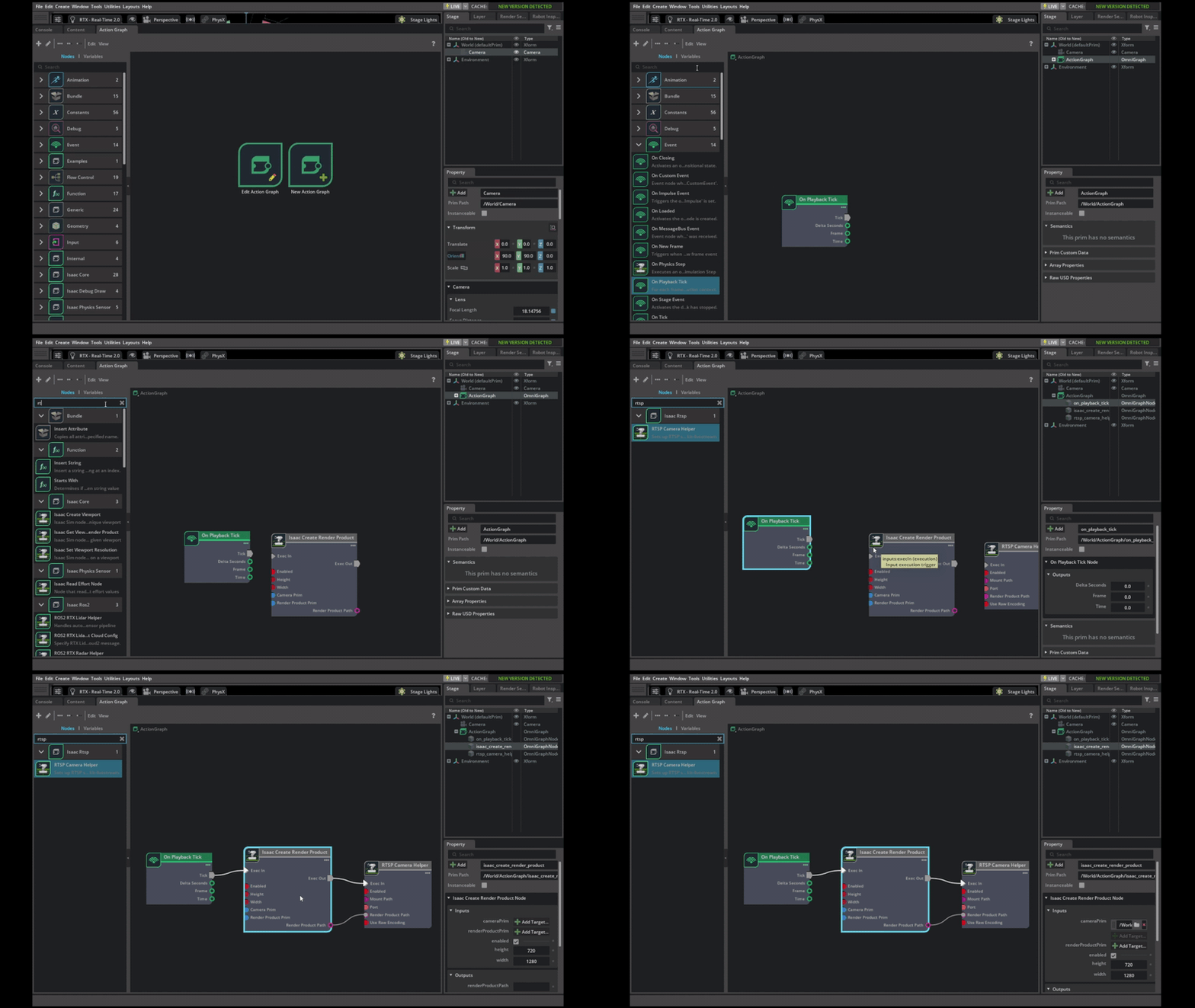
The recommended way to author the pipeline is the OmniGraph editor. To build the graph:
Open Window > Graph Editors > Action Graph and click New Action Graph.
Add the three nodes listed above. To find them, search for
RTSP,Isaac Create Render Product, andOn Playback Tick.Connect
OnPlaybackTick.ticktoIsaacCreateRenderProduct.execIn, thenIsaacCreateRenderProduct.execOuttoRTSPCameraHelper.execIn.Connect
IsaacCreateRenderProduct.renderProductPathtoRTSPCameraHelper.renderProductPathso the helper attaches to the render product the previous node created.On the
IsaacCreateRenderProductnode, set cameraPrim to the camera you want to stream.On the
RTSPCameraHelpernode, set port (default8554) and mountPath (default/stream).Press Play in the timeline. The RTSP server starts lazily on the first rendered frame and the stream becomes available at
rtsp://localhost:8554/<mountPath>. The server shuts down cleanly when you press Stop.
Refer to Stream Parameters for the full set of node inputs. The screencast below shows the full sequence end-to-end:
Building the Graph from a Script#
The same pipeline can be authored programmatically using
omni.graph.core.Controller. This is useful for headless setups,
batch jobs, and tests. The snippet below builds the equivalent graph against
a camera at /Camera and configures the stream at
rtsp://localhost:8554/stream. Press Play or start Replicator capture
to produce frames and start the RTSP server.
import omni.graph.core as og
import omni.kit.app
import omni.usd
from pxr import UsdGeom

ext_mgr = omni.kit.app.get_app().get_extension_manager()
ext_mgr.set_extension_enabled_immediate("isaacsim.core.nodes", True)
ext_mgr.set_extension_enabled_immediate("isaacsim.streaming.rtsp", True)

stage = omni.usd.get_context().get_stage()
UsdGeom.Camera.Define(stage, "/Camera")

og.Controller.edit(
    {"graph_path": "/RTSPGraph", "evaluator_name": "execution"},
    {
        og.Controller.Keys.CREATE_NODES: [
            ("OnPlaybackTick", "omni.graph.action.OnPlaybackTick"),
            ("CreateRenderProduct", "isaacsim.core.nodes.IsaacCreateRenderProduct"),
            ("RTSPHelper", "isaacsim.streaming.rtsp.RTSPCameraHelper"),
        ],
        og.Controller.Keys.SET_VALUES: [
            ("CreateRenderProduct.inputs:cameraPrim", "/Camera"),
            ("CreateRenderProduct.inputs:width", 1280),
            ("CreateRenderProduct.inputs:height", 720),
            ("RTSPHelper.inputs:port", 8554),
            ("RTSPHelper.inputs:mountPath", "/stream"),
            ("RTSPHelper.inputs:useRawEncoding", False),
        ],
        og.Controller.Keys.CONNECT: [
            ("OnPlaybackTick.outputs:tick", "CreateRenderProduct.inputs:execIn"),
            ("CreateRenderProduct.outputs:execOut", "RTSPHelper.inputs:execIn"),
            ("CreateRenderProduct.outputs:renderProductPath", "RTSPHelper.inputs:renderProductPath"),
        ],
    },
)
Connecting a Client#
Any standard RTSP client (such as VLC, ffplay, or GStreamer) can
subscribe to the stream at rtsp://<host>:<port><mountPath>.
When connecting from another machine, replace localhost with the
simulator host’s IP and make sure the port is reachable through any
firewalls.
Stream Parameters#
The RTSPCameraHelper node exposes the following inputs:
Input |
Default |
Description |
|---|---|---|
|
— |
Path of the render product whose |
|
|
TCP port the RTSP server listens on. Must be in |
|
|
Path appended to the server URL (for example |
|
|
When |
|
|
Toggle the stream at runtime. Setting it to |
Encoding Modes#
The writer supports two encoding paths, controlled by useRawEncoding:
H.264 (Default, Recommended)#
The render pipeline produces H.264-encoded bytes directly using NVENC and hands them to the RTSP server already compressed. This mode:
Minimizes copies (no CPU readback, no double-encode).
Supports per-frame SEI metadata. Refer to Frame Metadata.
Sends the simulation timestamp with each streamed frame so downstream consumers can align frames to the sim time.
Use this mode unless you have a specific reason to bypass NVENC.
Raw#
The writer streams uncompressed RGBA CUDA buffers and lets the RTSP server encode them internally.
The render product’s resolution is read from the CUDA buffer shape on the first frame. SEI metadata injection is not supported in raw mode.
Streaming Multiple Cameras#
To publish several cameras simultaneously, instantiate one RTSPCameraHelper
per camera and give each helper a unique port. The mountPath can be
shared across streams, but using a descriptive mount path per camera (such as
/front and /rear) makes the URLs self-documenting:
import omni.graph.core as og
import omni.kit.app
import omni.usd
from pxr import UsdGeom

ext_mgr = omni.kit.app.get_app().get_extension_manager()
ext_mgr.set_extension_enabled_immediate("isaacsim.core.nodes", True)
ext_mgr.set_extension_enabled_immediate("isaacsim.streaming.rtsp", True)

stage = omni.usd.get_context().get_stage()
UsdGeom.Camera.Define(stage, "/CameraFront")
UsdGeom.Camera.Define(stage, "/CameraRear")

og.Controller.edit(
    {"graph_path": "/MultiStreamGraph", "evaluator_name": "execution"},
    {
        og.Controller.Keys.CREATE_NODES: [
            ("OnPlaybackTick", "omni.graph.action.OnPlaybackTick"),
            ("FrontRP", "isaacsim.core.nodes.IsaacCreateRenderProduct"),
            ("RearRP", "isaacsim.core.nodes.IsaacCreateRenderProduct"),
            ("FrontRTSP", "isaacsim.streaming.rtsp.RTSPCameraHelper"),
            ("RearRTSP", "isaacsim.streaming.rtsp.RTSPCameraHelper"),
        ],
        og.Controller.Keys.SET_VALUES: [
            ("FrontRP.inputs:cameraPrim", "/CameraFront"),
            ("FrontRP.inputs:width", 1280),
            ("FrontRP.inputs:height", 720),
            ("RearRP.inputs:cameraPrim", "/CameraRear"),
            ("RearRP.inputs:width", 1280),
            ("RearRP.inputs:height", 720),
            ("FrontRTSP.inputs:port", 8554),
            ("FrontRTSP.inputs:mountPath", "/front"),
            ("RearRTSP.inputs:port", 8555),
            ("RearRTSP.inputs:mountPath", "/rear"),
        ],
        og.Controller.Keys.CONNECT: [
            ("OnPlaybackTick.outputs:tick", "FrontRP.inputs:execIn"),
            ("OnPlaybackTick.outputs:tick", "RearRP.inputs:execIn"),
            ("FrontRP.outputs:execOut", "FrontRTSP.inputs:execIn"),
            ("RearRP.outputs:execOut", "RearRTSP.inputs:execIn"),
            ("FrontRP.outputs:renderProductPath", "FrontRTSP.inputs:renderProductPath"),
            ("RearRP.outputs:renderProductPath", "RearRTSP.inputs:renderProductPath"),
        ],
    },
)
The two streams above are addressable as rtsp://localhost:8554/front and
rtsp://localhost:8555/rear. Each helper owns its own RTSP server, so a
client connecting to one stream does not affect the other.
Frame Metadata#
In H.264 mode, each frame carries a Supplemental Enhancement Information
(SEI) Network Abstraction Layer (NAL) unit with a JSON payload. The payload uses the fixed UUID
aa71e48f-0711-5d80-a247-cd31ca6fa49c, derived from
isaacsim.streaming.rtsp.sei_metadata, so consumers can identify and filter
the metadata stream. The schema is:
{
    "publish_sim_time_ns": 1500000000,
    "timestamp_iso8601": "2026-01-01T12:00:01.500Z",
    "timestamp": 1767268801500000000,
    "frame_num": 42
}
publish_sim_time_ns— simulation time at frame capture, in nanoseconds. Reset to zero when the timeline stops and restarts.timestamp_iso8601— wall-clock timestamp anchored to the moment the RTSP server started, advanced bypublish_sim_time_ns. Useful for correlating with logs and other wall-clock-stamped streams.timestamp— the same instant astimestamp_iso8601, expressed as nanoseconds since the Unix epoch.frame_num— monotonically increasing frame counter, starting at1and reset on detach.
Downstream tools that parse SEI NAL units (for example a custom
rtspsrc callback in GStreamer, or NVIDIA DeepStream’s metadata API) can
recover the payload by matching the UUID and decoding the JSON bytes.
Attaching the Writer Directly#
For workflows that already drive Replicator from Python and don’t need the
OmniGraph layer (custom SDG scripts, batch jobs, headless services),
isaacsim.streaming.rtsp.RTSPStreamWriter can be attached to a
render product directly. The writer is registered with Replicator’s
WriterRegistry on extension startup and accepts port, mountPath,
encoding, width, and height parameters. Author the SRTX
LdrColor RenderVar on the render product first via
isaacsim.streaming.rtsp.impl.render_var_utils.ensure_render_var_on_product,
then attach the writer:
import omni.kit.app
import omni.replicator.core as rep
import omni.usd
from pxr import UsdGeom

ext_mgr = omni.kit.app.get_app().get_extension_manager()
ext_mgr.set_extension_enabled_immediate("isaacsim.core.nodes", True)
ext_mgr.set_extension_enabled_immediate("isaacsim.streaming.rtsp", True)

from isaacsim.streaming.rtsp import RTSPStreamWriter
from isaacsim.streaming.rtsp.impl.render_var_utils import ensure_render_var_on_product

stage = omni.usd.get_context().get_stage()
UsdGeom.Camera.Define(stage, "/Camera")

render_product = rep.create.render_product("/Camera", (1280, 720))

success, _rv_path = ensure_render_var_on_product(stage, render_product.path, "LdrColor", "h264")
if not success:
    raise RuntimeError(f"Failed to create LdrColor render var on {render_product.path}")

writer = RTSPStreamWriter(
    port=8554,
    mountPath="/stream",
    encoding="h264",
    width=1280,
    height=720,
)
writer.attach([render_product])
After attaching the writer, start Replicator capture or play the timeline to produce frames. The RTSP server starts when the writer receives the first frame.
Server Lifecycle#
The RTSP server starts the first time the writer receives a frame and stops
when the writer detaches. RTSPCameraHelper ties this lifecycle to the
timeline:
Play — the action graph runs, the writer attaches to the render product, and the server starts on the first frame.
Stop — the writer detaches, the server is torn down, and the port is released.
Setting
enabledtofalse— same effect as Stop for that helper.
If the RTSP server encounters an unrecoverable error during streaming (for example a connection failure or NVENC error), the writer logs the error, shuts down its server, and silently skips subsequent frames until the timeline restarts. This prevents a broken stream from spamming the log or blocking the simulation loop.
Troubleshooting#
- The stream URL refuses connections
The RTSP server starts only after the first rendered frame. Press Play and confirm the timeline is advancing. If the writer logged a setup error (for example “render product has no resolution attribute”), the server never started. Check the carb log for details.
- Port already in use
Another process (or another
RTSPCameraHelperin the same scene) is already bound to the port. Pick a unique port per helper and verify that nothing else is listening withss -ltnp | grep 8554.- Stream stops mid-run and never recovers
The writer enters a “failed” state on the first encoder or transport error, drops further frames silently, and waits for the timeline to restart. Stop and restart the timeline (or toggle
enabled) to retry it.- SEI metadata is missing
SEI metadata is only injected in H.264 mode. Set
useRawEncodingtofalse(the default).