

Configuration Editor API#
The Configuration Editor API is provided by the isaacsim.replicator.agent.ui extension. It lets you load, modify, and save IRA (Isaac Sim Replicator Agent) configurations, as well as set up simulations and start data generation from the UI or Python scripts. The in-memory config uses the same schema as the YAML configuration described in the Configuration File Guide.
Use this API when you want to:
Load or switch configuration files at runtime.
Update specific fields (such as environment path, character counts, or writer settings) without editing YAML by hand.
Add or remove items in lists (such as
prop_asset_paths) or in dictionaries (such as character/robot groups).Perform simulation setup and data generation from code and react to completion using core carb events.
Overview#
The UI extension keeps an in-memory copy of the IRA config. The API operates on that copy and can optionally persist it to a file. Successful config changes and loads dispatch a UI refresh so that any open Configuration Editor panels stay in sync.
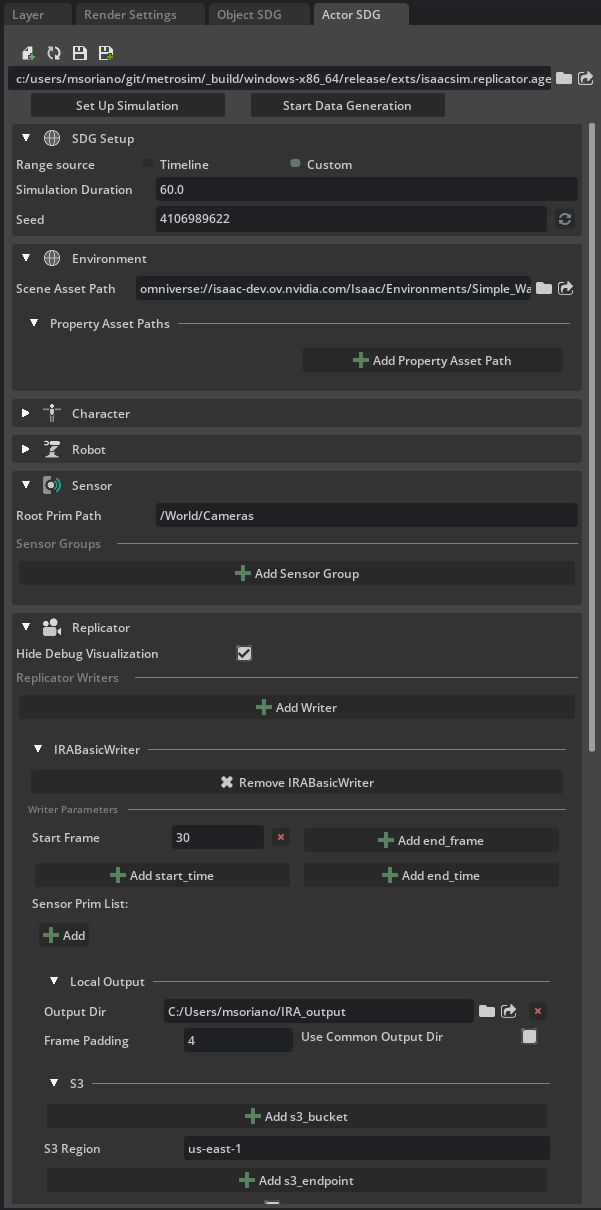
Functions are grouped as follows in isaacsim.replicator.agent.ui:
Config file and path:
get_config_file_path,load_config_file,save_config_fileRead/write config:
get_config,set_config,update_config,add_config_item,delete_config_itemSimulation:
setup_simulation,start_data_generation
For get_config, update_config, add_config_item, and delete_config_item, use dot-separated paths and numeric indices for lists (see Path Syntax).
Config File and Path#
get_config_file_path() — Returns the path of the config file currently associated with the in-memory config, or
Noneif none is set.load_config_file(file_path, set_config=True) — Loads a YAML config from disk. Returns
Trueon success. Ifset_configisTrue, the loaded config becomes the current in-memory config. You can subscribe toisaacsim.replicator.agent.core.events.IRAEvents.CONFIG_FILE_LOADED_EVENTto be notified when loading has finished.save_config_file(file_path, exclude_unset=False, exclude_defaults=False) — Writes the current in-memory config to a YAML file. Returns
Trueon success. Useexclude_unsetorexclude_defaultsto trim output.
Example:
import os
import tempfile

from isaacsim.replicator.agent.ui import get_config_file_path, load_config_file, save_config_file

config_path = get_config_file_path()
if config_path:
    from pathlib import Path

    target_config_path = Path(config_path).parent / "warehouse.yaml"
else:
    target_config_path = None

if target_config_path and load_config_file(target_config_path, set_config=True):
    print("Config loaded; current file:", get_config_file_path())

# ... do some config modifications using update_config and add_config_item

fd, temp_save_path = tempfile.mkstemp(suffix=".yaml")
os.close(fd)
save_config_file(temp_save_path)
Read and Update Config#
get_config(path=None) — Returns the value at a dot-separated path, or the full config object if
pathisNone. ReturnsNoneif the path is invalid or config is not loaded.set_config(config, file_path=None) — Replaces the in-memory config with the given object (for example, from
get_config()or the core loader). Optionally setfile_pathas the current file for the UI.update_config(path, new_value) — Sets one field at the given path. Validates after the change; on failure the update is rolled back and returns
False.add_config_item(path, value, key=None) — Appends to a list at
path, or adds a key-value pair to a dict (keyrequired for dicts).delete_config_item(path, key) — Removes a list element by index (or last item if
keyisNone) or a dict entry by key.
Example:
from isaacsim.replicator.agent.ui import add_config_item, delete_config_item, get_config, update_config

# Example queries
full_config = get_config()
stage_path = get_config("environment.base_stage_asset_path")

# Example updates
update_config("environment.base_stage_asset_path", "Isaac/Environments/Simple_Warehouse/full_warehouse.usd")
update_config("simulation_duration", 120.0)
add_config_item("environment.prop_asset_paths", "Isaac/Props/Conveyors/ConveyorBelt_A08.usd")
delete_config_item("environment.prop_asset_paths", key=0)
Simulation Control#
setup_simulation() — Validates the current config and passes it to the IRA core to set up the simulation (environment, agents, sensors). Returns
Trueif setup was started. Subscribe toisaacsim.replicator.agent.core.events.IRAEvents.SET_UP_SIMULATION_DONE_EVENTwhen setup has finished.start_data_generation() — Starts the data generation pipeline with the current config. Returns
Trueif started. Subscribe toisaacsim.replicator.agent.core.events.IRAEvents.DATA_GENERATION_DONE_EVENTwhen generation has completed.
Example workflow: load config, optionally update fields, run setup, then start data generation. Use the carb event dispatcher to observe SET_UP_SIMULATION_DONE_EVENT and call start_data_generation() when setup is ready.
import tempfile
from pathlib import Path

import carb
from isaacsim.replicator.agent.core.events import IRAEvents
from isaacsim.replicator.agent.ui import (
    get_config_file_path,
    load_config_file,
    setup_simulation,
    start_data_generation,
    update_config,
)

# Skipping actual simulation setup and data generation by default for brevity
RUN_SETUP = False


def on_setup_done(event):
    """Callback for when simulation setup is done."""
    carb.log_info("Simulation setup done")
    start_data_generation()
    handle_setup.reset()


def on_data_done(event):
    """Callback for when data generation is done."""
    carb.log_info("Data generation done")
    handle_data.reset()


# Set up callbacks for setup simulation and data generation
dispatcher = carb.eventdispatcher.get_eventdispatcher()
handle_setup = dispatcher.observe_event(
    event_name=IRAEvents.SET_UP_SIMULATION_DONE_EVENT,
    on_event=on_setup_done,
    observer_name="setup_done_observer",
)
handle_data = dispatcher.observe_event(
    event_name=IRAEvents.DATA_GENERATION_DONE_EVENT,
    on_event=on_data_done,
    observer_name="data_done_observer",
)

config_path = get_config_file_path()
if config_path:
    target_config_path = Path(config_path).parent / "warehouse.yaml"
else:
    print("No config file path found")
    target_config_path = None

if target_config_path and load_config_file(target_config_path):
    temp_path = Path(tempfile.mkdtemp(prefix="IRA_Output_"))
    update_config("simulation_duration", 2.0)
    update_config("replicator.writers.IRABasicWriter.output_dir", str(temp_path))

    if RUN_SETUP:
        setup_simulation()
        print(f"Generating data to: {temp_path}")
        # When setup is done, SET_UP_SIMULATION_DONE_EVENT will fire
        # calling our local on_setup_done(), which in turn calls start_data_generation()

# If setup_simulation() was not run, the event callbacks never fire; unsubscribe here.
# When RUN_SETUP is True, on_setup_done/on_data_done reset the handles when events fire.
if not RUN_SETUP:
    handle_setup.reset()
    handle_data.reset()
Path Syntax#
Config paths use dot-separated segments that correspond to the YAML structure in the Configuration File Guide:
Top-level keys:
version,environment,seed,simulation_duration,character,robot,sensor,replicator.Nested keys: for example,
environment.base_stage_asset_path,environment.prop_asset_paths,character.groups,replicator.writers.List index: Use a numeric segment for the element index (for example,
environment.prop_asset_paths.0for the first prop).Dictionary key: Use the group or writer name as the segment (for example,
character.groups.warehouse_workers,replicator.writers.IRABasicWriter).
Paths are case-sensitive and must match the schema. When a path targets a list, the last segment can be an integer index; when it targets a dict, the last segment is the key name.