
[isaacsim.sensors.experimental.camera] Isaac Sim Camera Simulation#
Version: 0.1.1
Provides APIs for camera prims, eg. setting lens distortion and enabling tiled rendering.
Enable Extension#
The extension can be enabled (if not already) in one of the following ways:
Define the next entry as an application argument from a terminal.
APP_SCRIPT.(sh|bat) --enable isaacsim.sensors.experimental.camera
Define the next entry under [dependencies] in an experience (.kit) file or an extension configuration (extension.toml) file.
[dependencies]
"isaacsim.sensors.experimental.camera" = {}
Open the Window > Extensions menu in a running application instance and search for isaacsim.sensors.experimental.camera.
Then, toggle the enable control button if it is not already active.
Annotators#
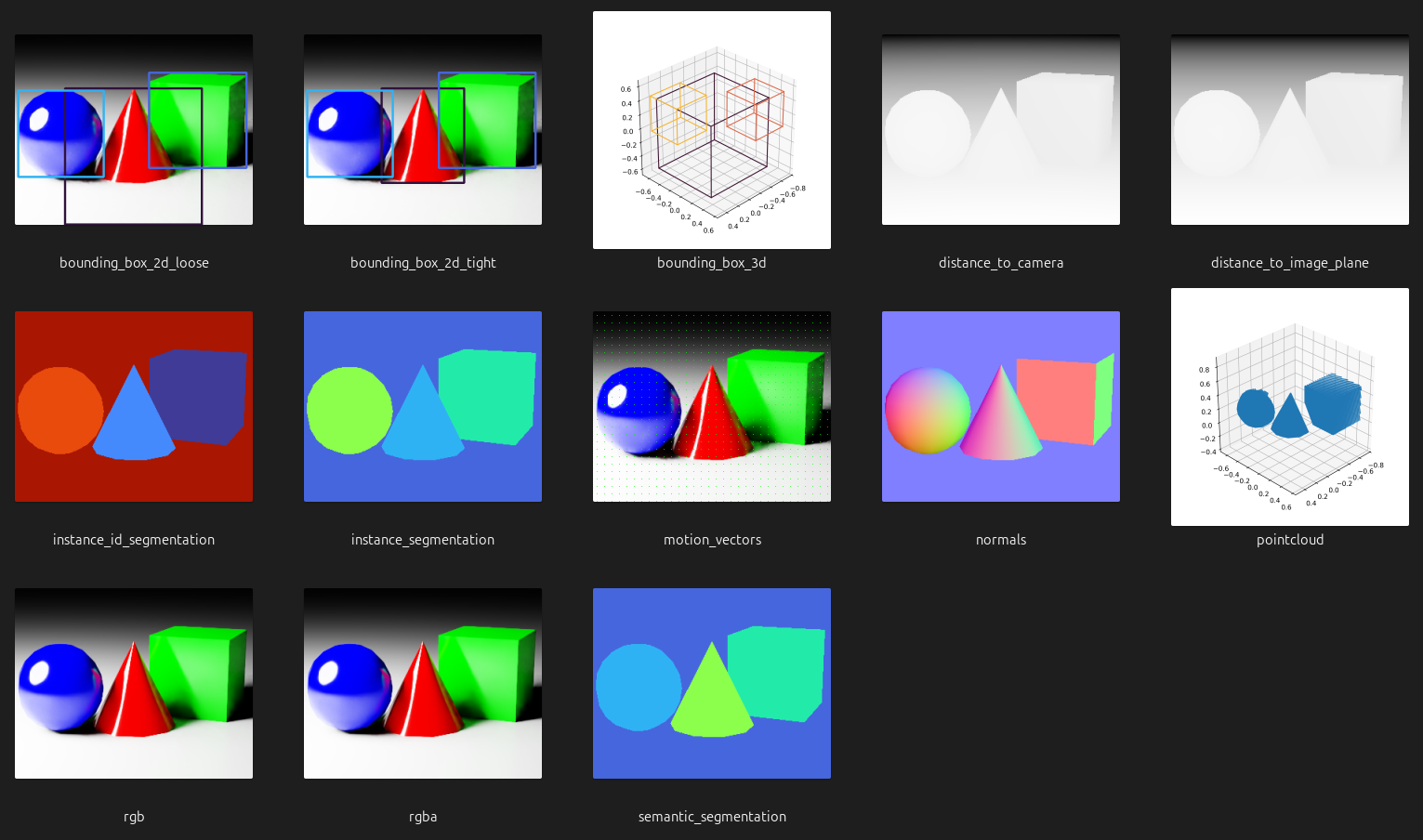
The sensor classes included in this extension support, depending on the implementation, a subset of the following annotators (outputs/data products generated by the camera sensors):
Standard Annotators#
These annotators can be used in any rendering mode. Annotator’s description and outputs are listed in the table below.
Annotator |
Description |
Shape |
Type / Dtype |
|---|---|---|---|
|
Loose 2D bounding boxes (regardless of occlusions) and their semantic IDs. |
N/A |
|
|
Tight 2D bounding boxes (only the visible pixels of entities, completely occluded entities are ommited) and their semantic IDs. |
N/A |
|
|
3D bounding boxes (regardless of occlusions) and their semantic IDs. |
N/A |
|
|
Depth map from objects to the position of the camera. |
|
|
|
Depth map from objects to the image plane of the camera. |
|
|
|
Instance segmentation that returns the renderer instance IDs. |
|
|
|
Instance segmentation of each entity in the camera’s field of view. Only semantically labelled entities are returned. |
|
|
|
Relative motion (dx, dy) of a pixel in the camera’s field of view between frames, also known as optical flow. |
|
|
|
Normals (x, y, z) of the surface at each pixel in the camera’s field of view. |
|
|
|
Points sampled on the surface of the prims in the camera’s field of view. |
|
|
|
Low dynamic range (LDR) RGB image. |
|
|
|
Low dynamic range (LDR) RGBA image. |
|
|
|
Semantic segmentation of each entity in the camera’s field of view. |
|
|
Single View Depth Annotators#
These annotators can be used in single view depth rendering mode. Annotator’s description and outputs are listed in the table below.
Annotator |
Description |
Shape |
Type / Dtype |
|---|---|---|---|
|
Depth map from objects to the position of the camera. |
|
|
|
Low dynamic range (LDR) luminance. |
|
|
|
RGBA color for each point cloud point. |
|
|
|
Points sampled relative to the left imager camera. |
|
|
API#
Warning
The API featured in this extension is experimental and subject to change without deprecation cycles. Although we will try to maintain backward compatibility in the event of a change, it may not always be possible.
Python API#
The following table summarizes the available materials.
sensors
High level class for creating/wrapping and operating single camera sensor. |
|
High level class for creating/wrapping and operating single view depth camera sensor. |
|
High level class for creating/wrapping and operating tiled (batched) camera sensors. |
utils
Draw annotator data (and info) to an image suitable for OpenCV visualization, testing and debugging, for example. |
Sensors#
- class CameraSensor(
- path: str | Camera,
- *,
- resolution: tuple[int, int],
- annotators: Literal['bounding_box_2d_loose', 'bounding_box_2d_tight', 'bounding_box_3d', 'distance_to_camera', 'distance_to_image_plane', 'instance_id_segmentation', 'instance_segmentation', 'motion_vectors', 'normals', 'pointcloud', 'rgb', 'rgba', 'semantic_segmentation'] | list[Literal['bounding_box_2d_loose', 'bounding_box_2d_tight', 'bounding_box_3d', 'distance_to_camera', 'distance_to_image_plane', 'instance_id_segmentation', 'instance_segmentation', 'motion_vectors', 'normals', 'pointcloud', 'rgb', 'rgba', 'semantic_segmentation']],
Bases:
objectHigh level class for creating/wrapping and operating single camera sensor.
- Parameters:
path –
Cameraobject or single path to existing or non-existing (one of both) USD Camera prim. Can include regular expression for matching a prim.resolution – Resolution of the sensor (following OpenCV/NumPy convention:
(height, width)).annotators – Annotator/sensor types to configure.
- Raises:
ValueError – If no prim is found matching the specified path.
ValueError – If the input argument refers to more than one camera prim.
ValueError – If an unsupported annotator type is specified.
Example:
>>> import isaacsim.core.experimental.utils.app as app_utils
>>> from isaacsim.sensors.experimental.camera import CameraSensor
>>>
>>> # given a USD stage with the Camera prim: /World/prim_0
>>> resolution = (240, 320)  # following OpenCV/NumPy convention `(height, width)`
>>> camera_sensor = CameraSensor(
...     "/World/prim_0",
...     resolution=resolution,
...     annotators=["rgb", "distance_to_image_plane"],
... )
>>>
>>> # play the simulation so the sensor can fetch data
>>> app_utils.play(commit=True)
- attach_annotators(annotators: str | list[str]) None#
Attach annotators to the sensor.
- Parameters:
annotators – Annotator/sensor types to attach.
- Raises:
ValueError – If the specified annotator is not supported.
Example:
>>> camera_sensor.annotators
['distance_to_image_plane', 'rgb']
>>> camera_sensor.attach_annotators("pointcloud")
>>> camera_sensor.annotators
['distance_to_image_plane', 'pointcloud', 'rgb']
- detach_annotators(annotators: str | list[str]) None#
Detach annotators from the sensor.
- Parameters:
annotators – Annotator/sensor types to detach. If the annotator is not attached, or it has already been detached, a warning is logged and the method does nothing.
- Raises:
ValueError – If the specified annotator is not supported.
Example:
>>> camera_sensor.annotators
['distance_to_image_plane', 'pointcloud', 'rgb']
>>> camera_sensor.detach_annotators(["distance_to_image_plane", "pointcloud"])
>>> camera_sensor.annotators
['rgb']
- get_data(
- annotator: str,
- *,
- out: wp.array | None = None,
Fetch the specified annotator/sensor data for the camera.
- Parameters:
annotator – Annotator/sensor type from which fetch the data.
out – Pre-allocated array to fill with the fetched data.
- Returns:
Two-elements tuple. 1) Array containing the fetched data. If
outis defined, such instance is returned filled with the data. If no data is available at the moment of calling the method,Noneis returned. 2) Dictionary containing additional information according to the requested annotator/sensor.- Raises:
ValueError – If the specified annotator is not supported.
ValueError – If the specified annotator is not configured.
Example:
>>> data, info = camera_sensor.get_data("rgb")
>>> data.shape
(240, 320, 3)
>>> info
{}
- property annotators: list[str]#
Annotators.
- Returns:
Sorted list of registered annotators.
Example:
>>> camera_sensor.annotators
['distance_to_image_plane', 'rgb']
- property camera: Camera#
Camera object encapsulated by the sensor.
- Returns:
Camera object encapsulated by the sensor.
Example:
>>> camera_sensor.camera
<isaacsim.core.experimental.objects.impl.camera.Camera object at 0x...>
- property render_product: pxr.UsdRender.Product#
Render product.
- Returns:
Render product of the camera sensor.
Example:
>>> camera_sensor.render_product
UsdRender.Product(Usd.Prim(</Render/OmniverseKit/HydraTextures/camera_sensor_...>))
- property resolution: tuple[int, int]#
Resolution of the sensor.
- Returns:
(height, width)).- Return type:
Resolution of sensor frames (following OpenCV/NumPy convention
Example:
>>> camera_sensor.resolution
(240, 320)
- class SingleViewDepthCameraSensor(
- path: str | Camera,
- *,
- resolution: tuple[int, int],
- annotators: Literal['bounding_box_2d_loose', 'bounding_box_2d_tight', 'bounding_box_3d', 'distance_to_camera', 'distance_to_image_plane', 'instance_id_segmentation', 'instance_segmentation', 'motion_vectors', 'normals', 'pointcloud', 'semantic_segmentation', 'depth_sensor_distance', 'depth_sensor_imager', 'depth_sensor_point_cloud_color', 'depth_sensor_point_cloud_position'] | list[Literal['bounding_box_2d_loose', 'bounding_box_2d_tight', 'bounding_box_3d', 'distance_to_camera', 'distance_to_image_plane', 'instance_id_segmentation', 'instance_segmentation', 'motion_vectors', 'normals', 'pointcloud', 'semantic_segmentation', 'depth_sensor_distance', 'depth_sensor_imager', 'depth_sensor_point_cloud_color', 'depth_sensor_point_cloud_position']],
Bases:
CameraSensorHigh level class for creating/wrapping and operating single view depth camera sensor.
The sensor is modeled using a single camera view to simulate a stereo camera pair and compute disparity and depth. The sensor is implemented as a post-process operation in the renderer, where the OmniSensorDepthSensorSingleViewAPI schema is applied to the USD render product prim rather than to the camera prim.
- Parameters:
path –
Cameraobject or single path to existing or non-existing (one of both) USD Camera prim. Can include regular expression for matching a prim.resolution – Resolution of the sensor (following OpenCV/NumPy convention:
(height, width)).annotators – Annotator/sensor types to configure.
- Raises:
ValueError – If no prim is found matching the specified path.
ValueError – If the input argument refers to more than one camera prim.
ValueError – If an unsupported annotator type is specified.
Example:
>>> import isaacsim.core.experimental.utils.app as app_utils
>>> from isaacsim.sensors.experimental.camera import SingleViewDepthCameraSensor
>>>
>>> # given a USD stage with the Camera prim: /World/prim_0
>>> resolution = (240, 320)  # following OpenCV/NumPy convention `(height, width)`
>>> camera_sensor = SingleViewDepthCameraSensor(
...     "/World/prim_0",
...     resolution=resolution,
...     annotators="depth_sensor_distance",
... )
>>>
>>> # play the simulation so the sensor can fetch data
>>> app_utils.play(commit=True)
- attach_annotators(
- annotators: str | list[str],
Attach annotators to the sensor.
- Parameters:
annotators – Annotator/sensor types to attach.
- Raises:
ValueError – If the specified annotator is not supported.
Example:
>>> camera_sensor.annotators
['distance_to_image_plane', 'rgb']
>>> camera_sensor.attach_annotators("pointcloud")
>>> camera_sensor.annotators
['distance_to_image_plane', 'pointcloud', 'rgb']
- detach_annotators(
- annotators: str | list[str],
Detach annotators from the sensor.
- Parameters:
annotators – Annotator/sensor types to detach. If the annotator is not attached, or it has already been detached, a warning is logged and the method does nothing.
- Raises:
ValueError – If the specified annotator is not supported.
Example:
>>> camera_sensor.annotators
['distance_to_image_plane', 'pointcloud', 'rgb']
>>> camera_sensor.detach_annotators(["distance_to_image_plane", "pointcloud"])
>>> camera_sensor.annotators
['rgb']
- get_data(
- annotator: str,
- *,
- out: wp.array | None = None,
Fetch the specified annotator/sensor data for the camera.
- Parameters:
annotator – Annotator/sensor type from which fetch the data.
out – Pre-allocated array to fill with the fetched data.
- Returns:
Two-elements tuple. 1) Array containing the fetched data. If
outis defined, such instance is returned filled with the data. If no data is available at the moment of calling the method,Noneis returned. 2) Dictionary containing additional information according to the requested annotator/sensor.- Raises:
ValueError – If the specified annotator is not supported.
ValueError – If the specified annotator is not configured.
Example:
>>> data, info = camera_sensor.get_data("rgb")
>>> data.shape
(240, 320, 3)
>>> info
{}
- get_enabled_outlier_removal() bool#
Get the enabled state of the outlier removal filter of the depth sensor.
Filter out single pixel samples caused by antialiasing jitter and reprojection resolution.
- Returns:
Boolean flag indicating if the outlier removal filter is enabled.
Example:
>>> camera_sensor.get_enabled_outlier_removal()
True
- get_enabled_post_processing() bool#
Get the enabled state of the post-process operation for depth sensing in the renderer of the prims.
- Returns:
Boolean flag indicating if the depth sensor post-process is enabled.
Example:
>>> camera_sensor.get_enabled_post_processing()
True
- get_sensor_baseline() float#
Get the distance between the simulated depth camera sensor, in millimeters.
Larger positive/negative values will increase the unknown black/hole regions around objects where the depth camera sensor cannot see.
- Returns:
The distance between the simulated depth camera sensor, in millimeters.
Example:
>>> camera_sensor.get_sensor_baseline()
55.0
- get_sensor_disparity_confidence() float#
Get the confidence threshold for the depth sensor.
Control how likely a depth sample is considered valid. Higher values make depth values vary wider across the quantization (noise mean) range.
- Returns:
The confidence threshold for the depth sensor.
Example:
>>> camera_sensor.get_sensor_disparity_confidence()
 0.6999...
- get_sensor_disparity_noise_downscale() float#
Get the coarseness of the disparity noise, in pixels, of the depth sensor.
Higher values reduce the spatial resolution of the noise.
- Returns:
The disparity noise downscale factor, in pixels.
Example:
>>> camera_sensor.get_sensor_disparity_noise_downscale()
1.0
- get_sensor_distance_cutoffs() tuple[float, float]#
Get the cutoff range (minimum and maximum distance) of the depth sensor.
- Returns:
The minimum cutoff distance. The maximum cutoff distance.
Example:
>>> camera_sensor.get_sensor_distance_cutoffs()
(0.5, 10000000.0)
- get_sensor_focal_length() float#
Get the simulated focal length of the depth sensor, in pixels.
Combined with the sensor size, this sets the field of view for the disparity calculation. Since the actual FOV is controlled on the camera prim, this only adjusts the amount of left/right disparity. Lower focal length decreases disparity.
- Returns:
The sensor focal length, in pixels.
Example:
>>> camera_sensor.get_sensor_focal_length()
897.0
- get_sensor_maximum_disparity() float#
Get the maximum number of disparity pixels for the depth sensor.
Higher values allow the sensor to resolve closer (more disparate) objects. Lower values reduce the depth sensing range.
- Returns:
The maximum number of disparity pixels for the depth sensor.
Example:
>>> camera_sensor.get_sensor_maximum_disparity()
110.0
- get_sensor_noise_parameters() tuple[float, float]#
Get the quantization factor (mean and sigma) for the disparity noise, in pixels, of the depth sensor.
- Returns:
Two-elements tuple. 1) The disparity noise mean value, in pixels. 2) The disparity noise sigma value, in pixels.
Example:
>>> camera_sensor.get_sensor_noise_parameters()
(0.25, 0.25)
- get_sensor_output_mode() int#
Get the output mode used to override the LDRColor buffer with a debug visualization of the depth sensor.
Supported modes:
0: Pass through LDRColor.1: Repeated 1 meter grayscale gradient.2: Grayscale gradient over min/max distance.3: Rainbow gradient over min/max distance.4: Input Depth values in grayscale.5: Reprojected depth with confidence culling applied.6: Confidence Map with Disparity.7: Disparity values in grayscale.
- Returns:
The output mode.
Example:
>>> camera_sensor.get_sensor_output_mode()
0
- get_sensor_size() float#
Get the size of the sensor, in pixels, of the depth sensor.
Combined with focal length, this affects the amount of disparity. Higher values decrease disparity.
- Returns:
The sensor size, in pixels.
Example:
>>> camera_sensor.get_sensor_size()
1280.0
- set_enabled_outlier_removal(
- enabled: bool,
Enable or disable the outlier removal filter of the depth sensor.
Filter out single pixel samples caused by antialiasing jitter and reprojection resolution.
- Parameters:
enabled – Boolean flag to enable/disable outlier removal.
Example:
>>> camera_sensor.set_enabled_outlier_removal(True)
- set_enabled_post_processing(
- enabled: bool,
Enable or disable the post-process operation for depth sensing in the renderer.
- Parameters:
enabled – Boolean flag to enable/disable the depth sensor post-process.
Example:
>>> camera_sensor.set_enabled_post_processing(True)
- set_sensor_baseline(
- baseline: float,
Set the distance between the simulated depth camera sensor, in millimeters.
Larger positive/negative values will increase the unknown black/hole regions around objects where the camera sensor cannot see.
- Parameters:
baseline – Sensor baseline in millimeters.
Example:
>>> camera_sensor.set_sensor_baseline(50.0)
- set_sensor_disparity_confidence(
- confidence_threshold: float,
Set the confidence threshold for the depth sensor.
Control how likely a depth sample is considered valid. Higher values make depth values vary wider across the quantization (noise mean) range.
- Parameters:
confidence_threshold – Confidence threshold.
Example:
>>> camera_sensor.set_sensor_disparity_confidence(0.75)
- set_sensor_disparity_noise_downscale(
- downscale: float,
Set the coarseness of the disparity noise, in pixels, of the depth sensor.
Higher values reduce the spatial resolution of the noise.
- Parameters:
downscale – Disparity noise downscale factor in pixels.
Example:
>>> camera_sensor.set_sensor_disparity_noise_downscale(1.5)
- set_sensor_distance_cutoffs(
- minimum_distance: float = None,
- maximum_distance: float = None,
Set the cutoff range (minimum and maximum distance) of the depth sensor.
- Parameters:
minimum_distance – Minimum cutoff distance.
maximum_distance – Maximum cutoff distance.
- Raises:
ValueError – If both
minimum_distanceandmaximum_distanceare not defined.
Example:
>>> camera_sensor.set_sensor_distance_cutoffs(minimum_distance=0.1, maximum_distance=1000000.0)
- set_sensor_focal_length(
- focal_length: float,
Set the simulated focal length of the depth sensor, in pixels.
Combined with the sensor size, this sets the field of view for the disparity calculation. Since the actual FOV is controlled on the camera prim, this only adjusts the amount of left/right disparity. Lower focal length decreases disparity.
- Parameters:
focal_length – Sensor focal length in pixels.
Example:
>>> camera_sensor.set_sensor_focal_length(800.0)
- set_sensor_maximum_disparity(
- maximum_disparity: float,
Set the maximum number of disparity pixels for the depth sensor.
Higher values allow the sensor to resolve closer (more disparate) objects. Lower values reduce the depth sensing range.
- Parameters:
maximum_disparity – Maximum disparity.
Example:
>>> camera_sensor.set_sensor_maximum_disparity(120.0)
- set_sensor_noise_parameters(
- noise_mean: float = None,
- noise_sigma: float = None,
Set the quantization factor (mean and sigma) for the disparity noise, in pixels, of the depth sensor.
Higher mean values reduce depth resolution. Higher sigma values make depth values vary wider across the quantization (noise mean) range.
- Parameters:
noise_mean – Disparity noise mean value in pixels.
noise_sigma – Disparity noise sigma value in pixels.
- Raises:
AssertionError – If neither
noise_meannornoise_sigmaare specified.
Example:
>>> camera_sensor.set_sensor_noise_parameters(noise_mean=0.5, noise_sigma=0.1)
- set_sensor_output_mode(mode: int) None#
Set the output mode to override the LDRColor buffer with a debug visualization of the depth sensor.
Supported modes:
0: Pass through LDRColor.1: Repeated 1 meter grayscale gradient.2: Grayscale gradient over min/max distance.3: Rainbow gradient over min/max distance.4: Input Depth values in grayscale.5: Reprojected depth with confidence culling applied.6: Confidence Map with Disparity.7: Disparity values in grayscale.
- Parameters:
mode – Output mode.
Example:
>>> camera_sensor.set_sensor_output_mode(0) # pass through LDRColor
- set_sensor_size(size: float) None#
Set the size of the sensor, in pixels, of the depth sensor.
Combined with focal length, this affects the amount of disparity. Higher values decrease disparity.
- Parameters:
size – Sensor size, in pixels.
Example:
>>> camera_sensor.set_sensor_size(1920.0)
- property annotators: list[str]#
Annotators.
- Returns:
Sorted list of registered annotators.
Example:
>>> camera_sensor.annotators
['distance_to_image_plane', 'rgb']
- property camera: Camera#
Camera object encapsulated by the sensor.
- Returns:
Camera object encapsulated by the sensor.
Example:
>>> camera_sensor.camera
<isaacsim.core.experimental.objects.impl.camera.Camera object at 0x...>
- property render_product: pxr.UsdRender.Product#
Render product.
- Returns:
Render product of the camera sensor.
Example:
>>> camera_sensor.render_product
UsdRender.Product(Usd.Prim(</Render/OmniverseKit/HydraTextures/camera_sensor_...>))
- property resolution: tuple[int, int]#
Resolution of the sensor.
- Returns:
(height, width)).- Return type:
Resolution of sensor frames (following OpenCV/NumPy convention
Example:
>>> camera_sensor.resolution
(240, 320)
- class TiledCameraSensor(
- paths: str | list[str] | Camera,
- *,
- resolution: tuple[int, int],
- annotators: Literal['distance_to_camera', 'distance_to_image_plane', 'instance_id_segmentation', 'instance_segmentation', 'motion_vectors', 'normals', 'rgb', 'rgba', 'semantic_segmentation'] | list[Literal['distance_to_camera', 'distance_to_image_plane', 'instance_id_segmentation', 'instance_segmentation', 'motion_vectors', 'normals', 'rgb', 'rgba', 'semantic_segmentation']],
Bases:
objectHigh level class for creating/wrapping and operating tiled (batched) camera sensors.
- Parameters:
paths –
Cameraobject, single path or list of paths to existing or non-existing (one of both) USD Camera prims. Can include regular expressions for matching multiple prims.resolution – Resolution of each individual sensor (following OpenCV/NumPy convention:
(height, width)).annotators – Annotator/sensor types to configure.
- Raises:
ValueError – If no prims are found matching the specified paths.
ValueError – If an unsupported annotator type is specified.
Example:
>>> import isaacsim.core.experimental.utils.app as app_utils
>>> from isaacsim.sensors.experimental.camera import TiledCameraSensor
>>>
>>> # given a USD stage with the Camera prims: /World/prim_0, /World/prim_1, and /World/prim_2
>>> resolution = (240, 320)  # following OpenCV/NumPy convention `(height, width)`
>>> tiled_camera_sensor = TiledCameraSensor(
...     "/World/prim_.*",
...     resolution=resolution,
...     annotators=["rgb", "distance_to_image_plane"],
... )
>>>
>>> # play the simulation so the sensor can fetch data
>>> app_utils.play(commit=True)
- attach_annotators(
- annotators: str | list[str],
Attach annotators to the sensor.
- Parameters:
annotators – Annotator/sensor types to attach.
- Raises:
ValueError – If the specified annotator is not supported.
Example:
>>> tiled_camera_sensor.annotators
['distance_to_image_plane', 'rgb']
>>> tiled_camera_sensor.attach_annotators("normals")
>>> tiled_camera_sensor.annotators
['distance_to_image_plane', 'normals', 'rgb']
- detach_annotators(
- annotators: str | list[str],
Detach annotators from the sensor.
- Parameters:
annotators – Annotator/sensor types to detach. If the annotator is not attached, or it has already been detached, a warning is logged and the method does nothing.
- Raises:
ValueError – If the specified annotator is not supported.
Example:
>>> tiled_camera_sensor.annotators
['distance_to_image_plane', 'normals', 'rgb']
>>> tiled_camera_sensor.detach_annotators(["distance_to_image_plane", "normals"])
>>> tiled_camera_sensor.annotators
['rgb']
- get_data(
- annotator: str,
- *,
- tiled: bool = False,
- out: wp.array | None = None,
Fetch the specified annotator/sensor data for all cameras as a batch of frames or as a single tiled frame.
- Parameters:
annotator – Annotator/sensor type from which fetch the data.
tiled – Whether to get annotator/sensor data as a single tiled frame.
out – Pre-allocated array to fill with the fetched data.
- Returns:
Two-elements tuple. 1) Array containing the fetched data. If
outis defined, such instance is returned filled with the data. If no data is available at the moment of calling the method,Noneis returned. 2) Dictionary containing additional information according to the requested annotator/sensor.- Raises:
ValueError – If the specified annotator is not supported.
ValueError – If the specified annotator is not configured when instantiating the object.
Example:
>>> data, info = tiled_camera_sensor.get_data("rgb")
>>> data.shape
(3, 240, 320, 3)
>>> info
{}
- property annotators: list[str]#
Annotators.
- Returns:
Sorted list of registered annotators.
Example:
>>> tiled_camera_sensor.annotators
['distance_to_image_plane', 'rgb']
- property camera: Camera#
Camera object encapsulated by the sensor.
- Returns:
Camera object encapsulated by the sensor.
Example:
>>> tiled_camera_sensor.camera
<isaacsim.core.experimental.objects.impl.camera.Camera object at 0x...>
- property render_product: pxr.UsdRender.Product#
Render product.
- Returns:
Render product of the tiled camera sensor.
Example:
>>> tiled_camera_sensor.render_product
UsdRender.Product(Usd.Prim(</Render/OmniverseKit/HydraTextures/tiled_camera_sensor_...>))
- property resolution: tuple[int, int]#
Resolution of individual batched frames.
- Returns:
(height, width)).- Return type:
Resolution of individual batched frames (following OpenCV/NumPy convention
Example:
>>> tiled_camera_sensor.resolution
(240, 320)
- property tiled_resolution: tuple[int, int]#
Resolution of tiled frames.
- Returns:
(height, width)).- Return type:
Resolution of tiled frames (following OpenCV/NumPy convention
Example:
>>> tiled_camera_sensor.tiled_resolution
(480, 640)
Utils#
- draw_annotator_data_to_image(
- *,
- annotator: str,
- data: wp.array | np.ndarray,
- info: dict,
- frame: wp.array | np.ndarray = None,
Draw annotator data (and info) to an image suitable for OpenCV visualization, testing and debugging, for example.
- Parameters:
annotator – Annotator type.
data – Data to draw.
info – Additional information according to the annotator.
frame – Frame used as a background for drawing. If not provided, a black frame is used.
- Returns:
Drawn image as a BGR NumPy array suitable for OpenCV operations.
- Raises:
ValueError – If the annotator is not supported.
Example:
>>> import cv2
>>> import isaacsim.core.experimental.utils.app as app_utils
>>> from isaacsim.sensors.experimental.camera import CameraSensor, draw_annotator_data_to_image
>>>
>>> camera_sensor = CameraSensor(
...     "/World/camera",
...     resolution=(512, 512),
...     annotators=["rgb", "motion_vectors"],
... )
>>>
>>> # play the simulation so the sensor can fetch data
>>> app_utils.play(commit=True)
>>>
>>> # draw motion vectors on top of a RGB image captured from the camera
>>> frame, _ = camera_sensor.get_data("rgb")  # capture the current camera view as background
>>> data, info = camera_sensor.get_data("motion_vectors")
>>> image = draw_annotator_data_to_image(
...     annotator="motion_vectors",
...     data=data,
...     info=info,
...     frame=frame,
... )
...
... # save the image to a file
>>> cv2.imwrite("motion_vectors.png", image)