


Structured Light Cameras#
Isaac Sim models structured light cameras through the isaacsim.sensors.experimental.rtx.StructuredLightCamera class. Structured light imaging works by projecting a known pattern onto a scene
and capturing the deformation of that pattern from a camera offset from the projector. Cycling through a sequence of patterns and reconstructing the deformation between projector and camera frames allows
fine-grained depth recovery. Real structured light rigs commonly use phase-shifting sinusoids, gray-code stripes, or De Bruijn patterns; the per-pattern exposure is typically on the order of microseconds to
milliseconds, which keeps the captured scene effectively static across the pattern sequence.
Overview#
StructuredLightCamera is a subclass of isaacsim.sensors.experimental.rtx.RtxCamera. In addition to the underlying USD Camera prim, it creates a parent Xform (default {path}/projectors) populated with one
UsdLux.RectLight per projector pattern. Each RectLight has the ShapingAPI schema applied, the projector pattern as its inputs:texture:file, the projector direction texture as its
projector:directionTexture:file, isProjector=True, and visibleInPrimaryRay=False. At any given simulation time exactly one RectLight is visible.
Pattern selection is simulation-time-driven:
The constructor accepts a
projector_timestampslist of rational tuples(numerator, denominator), one per pattern. Each tuple is the simulation time (in seconds) at which that pattern becomes active. The first entry must represent \(t = 0\) (typically(0, 1); any(0, k)is accepted), and the list must be strictly increasing. Rational tuples avoid the floating-point precision issues that arise when timestamps span sub-millisecond resolution. Ifprojector_timestampsis omitted, the schedule defaults to[(i, 30) for i in range(N)](a 30 Hz uniform cadence).On every Kit app-update tick, an observer reads the current timeline value, computes
current_time mod cycle_period, and selects the pattern whose timestamp is the largest one less than or equal to the resulting phase. The cycle period defaults totimestamps[-1] + (timestamps[1] - timestamps[0])for \(N \geq 2\) patterns, orFraction(1, 30)for \(N = 1\). It can be overridden viaprojector_cycle_period.
Because pattern intervals are typically much smaller than a single physics step, the class emits a one-time warning at the first observed simulation dt larger than the minimum interval between consecutive
patterns (including the wrap-around from the last pattern back to the first), and a per-tick warning whenever a single tick advances the active pattern by more than one index.
Data acquisition#
StructuredLightCamera is an authoring class — it creates and manages USD prims but does not retrieve image data on its own. To capture frames, wrap an instance in
isaacsim.sensors.experimental.rtx.CameraSensor:
from pathlib import Path

import omni.kit.app
from isaacsim.sensors.experimental.rtx import CameraSensor, StructuredLightCamera

# Resolve the bundled structured-light test patterns shipped with the extension.
ext_root = (
    omni.kit.app.get_app().get_extension_manager().get_extension_path_by_module("isaacsim.sensors.experimental.rtx")
)
data_dir = Path(ext_root) / "isaacsim/sensors/experimental/rtx/tests/data/structured_light_camera"
patterns = [data_dir / "patterns" / f"image_{i:02d}.png" for i in range(10)]
direction_texture = data_dir / "projector_opencv_pinhole_4000x2880_2025_10_08_10_51_18.exr"

# 10 patterns spaced over 0 - 2 ms with variable intervals. Rational tuples
# avoid floating-point error at sub-millisecond resolution.
projector_timestamps = [
    (0, 1),
    (19, 100_000),
    (41, 100_000),
    (62, 100_000),
    (4, 5_000),
    (101, 100_000),
    (61, 50_000),
    (141, 100_000),
    (179, 100_000),
    (1, 500),
]

# Create the camera at a root-level path. The projector RectLight prims are
# created at ``/structured_light_camera/projectors`` and cycle automatically
# based on the current simulation time.
cam = StructuredLightCamera(
    "/structured_light_camera",
    projector_light_patterns=patterns,
    projector_direction_texture=direction_texture,
    projector_timestamps=projector_timestamps,
    projector_intensity=150_000.0,
)

# Wrap the camera in a CameraSensor with the rgb annotator to retrieve frames.
sensor = CameraSensor(cam, resolution=(720, 1280), annotators=["rgb"])
The CameraSensor owns a Replicator render product against the same Camera prim, and there are two complementary ways to get image data out of it:
Manual annotator pull — construct the sensor with the desired annotators (
annotators=["rgb"]above) and callsensor.get_data("rgb")from your own loop. The snippet above uses this pattern.Replicator writer — leave
annotators=[]and callsensor.attach_writer("BasicWriter", output_dir=..., rgb=True)(or any other Replicator writer). Eachrep.orchestrator.stepthen automatically dispatches a write to disk without any custom plumbing in your loop. See the Standalone Python section for an end-to-end example of this pattern.
Standalone Python#
The standalone example at standalone_examples/api/isaacsim.sensors.experimental.rtx/camera_structured_light.py demonstrates capturing a 10-pattern sequence using the Replicator Orchestrator and a
BasicWriter. The example:
Loads the bundled structured-light patterns and projector direction texture from the extension’s
tests/data/structured_light_camera/directory.Builds a 1000-unit white PBR cube as an enclosure, with the camera and coincident projector at the origin.
Drives
rep.orchestrator.step(rt_subframes=32, delta_time=<interval>)once per pattern, where<interval>is the difference between consecutive timestamps. Becausetimestamps[0]is always zero, the first step’sdelta_timeis also zero, so the orchestrator captures pattern 0 at \(t = 0\) before advancing.Attaches a
BasicWriterto the sensor so each step writes onergb_NNNN.pngto the example’s output directory.
Note
This example demonstrates the API plumbing — pattern cycling, RectLight cluster authoring, calibrated camera intrinsics, and Orchestrator capture. The camera and projector share an origin and so it
does not model a real depth-recovery rig (which would have a non-zero baseline between camera and projector). For a depth-recovery workflow, position the projector with projector_position /
projector_orientation offset from the camera and adjust the captured-pattern triangulation accordingly.
Run the example:
./python.sh standalone_examples/api/isaacsim.sensors.experimental.rtx/camera_structured_light.py
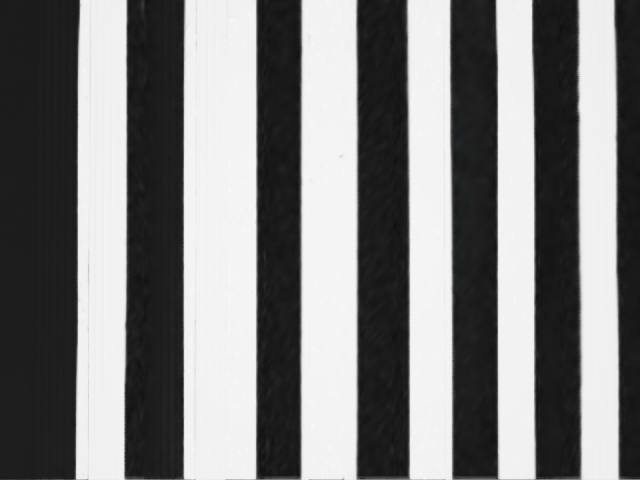
After the script completes, the output directory _example_output_isaacsim.sensors.experimental.rtx/camera_structured_light/ contains 10 RGB frames named rgb_0000.png through rgb_0009.png, plus a
metadata.txt file recording the writer name, version, and Replicator global seed.









Note
Your output images may differ from those shown above due to variance in the renderer across different hardware and driver configurations.