


Scene Based Synthetic Dataset Generation#
This tutorial illustrates the process of generating synthetic datasets using the omni.replicator extension. The resulting data is stored offline (on disk), making it readily available for training deep neural networks. The examples can be executed within the Isaac Sim Python standalone environment. The example uses Isaac Sim and Replicator to create synthetic datasets offline (on disk) for the training of machine learning models.
In this tutorial you:
Utilize and set up external customizable config files (YAML/JSON) to adjust simulation and scenario parameters
Load custom environments
Spawn assets using the Isaac Sim API
Run randomized physics simulations
Register various Replicator randomization graphs
Create cameras and render products with the Replicator API
Use Replicator writers to save data to disk
Prerequisites#
Familiarity with the omni.replicator extension, including its annotators and writers.
Basic understanding of Isaac Sim’s Stage and World concepts, further explained in the Hello World tutorial.
Running simulations as Standalone Applications or via the Script Editor.
Familiarity with Replicator randomizers and OmniGraph for a better understanding of the randomization pipeline.
Scenario#
By default, the scenario is executed in a warehouse environment. Within this setting, a forklift is randomly placed in a designated area. Based on the forklift’s position, a pallet is placed in front of it at a randomized distance. Using Replicator’s scatter_2d randomization function with the collision check argument check_for_collisions set to True, the pallet is scattered with boxes, ensuring the boxes do not self-collide. The scatter graph node randomly scatters the boxes in each capture frame. Additionally, a traffic cone is randomly positioned at one of the bottom corners of the forklift’s oriented bounding box (OBB). Before the synthetic data generation (SDG) pipeline starts, a short physics simulation is executed, during which several boxes are dropped onto a pallet situated behind the forklift.
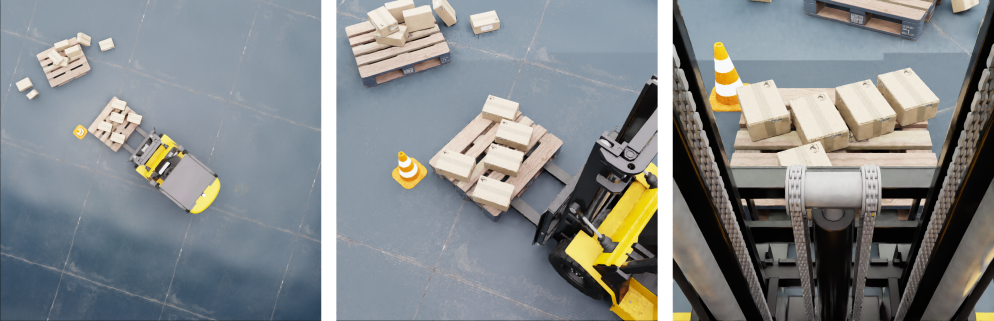
Three camera views are used for the synthetic data generation (SDG). The first (top_view_cam) offers a top-down view of the scenario (left), the second (pallet_cam) captures a randomized view of the boxes scattered on the pallet (center), and the third is overlooking the pallet from the driver’s place in the forklift using various heights (right).
The data is collected using Replicator writers with configurable backends. The default setup uses BasicWriter with a DiskBackend. The writer’s config parameters are loaded from the writer_config entry and used to initialize the writer with annotators including rgb, semantic_segmentation, and bounding_box_3d. The output directory is specified in backend_params, which by default is <working_dir>/_out_scene_based_sdg.
Getting Started#
The main script of the tutorial is located at <install_path>/standalone_examples/replicator/scene_based_sdg/scene_based_sdg.py and it is set to run as a standalone application. The default configurations are stored in the script itself in the form of a Python dictionary, there is no need to provide a config file.
To overwrite the default configuration parameters, you can provided custom config files as a command-line argument for the script by using --config <path/to/file.json/yaml>. Example config files are stored in scene_based_sdg/config/*. In the provided examples, the configuration files serve as templates to illustrate and showcase the configurability of the script.
Helper functions are located in the scene_based_sdg_utils.py file.
To generate a synthetic dataset, run the following command for the Standalone Application (on Windows use python.bat instead of python.sh):
./python.sh standalone_examples/replicator/scene_based_sdg/scene_based_sdg.py
Implementation#
The following section provides an implementation overview of the script. It includes details regarding the configuration parameters, scene generation helper functions, randomizations (Isaac Sim and Replicator), and data capture loop. As standalone example the script is split into two files: the main script and a utilities module.
Utils module and main script
import asyncio
import math
import os

import carb.settings
import numpy as np
import omni.kit.app
import omni.replicator.core as rep
import omni.usd
from isaacsim.core.experimental.prims import GeomPrim, RigidPrim, XformPrim
from isaacsim.core.experimental.utils.bounds import (
    compute_combined_aabb,
    compute_obb,
    create_bbox_cache,
    get_obb_corners,
)
from isaacsim.core.experimental.utils.semantics import add_labels, remove_all_labels
from isaacsim.core.experimental.utils.stage import add_reference_to_stage, define_prim
from isaacsim.core.experimental.utils.transform import euler_angles_to_quaternion, quaternion_to_euler_angles
from isaacsim.core.simulation_manager import SimulationManager
from isaacsim.storage.native import get_assets_root_path_async
from pxr import Gf, Usd, UsdGeom


def setup_writer(config: dict) -> rep.Writer | None:
    """Setup and initialize writer with optional backend support."""

    def normalize_output_dir(params):
        if "output_dir" in params and not os.path.isabs(params["output_dir"]):
            params["output_dir"] = os.path.join(os.getcwd(), params["output_dir"])

    writer_type = config.get("writer", "BasicWriter")
    if writer_type not in rep.WriterRegistry.get_writers():
        print(f"[SDG] Writer type '{writer_type}' not found in registry.")
        return None

    writer = rep.WriterRegistry.get(writer_type)
    writer_kwargs = dict(config.get("writer_config", {}))
    normalize_output_dir(writer_kwargs)

    backend_type = config.get("backend_type")
    backend = None
    if backend_type:
        try:
            backend = rep.backends.get(backend_type)
        except Exception as e:
            print(f"[SDG] Backend '{backend_type}' not found: {e}")
            return None

        backend_params = dict(config.get("backend_params", {}))
        normalize_output_dir(backend_params)

        try:
            print(f"[SDG] Backend: {backend_type} | Params: {backend_params}")
            backend.initialize(**backend_params)
        except TypeError as e:
            print(f"[SDG] Invalid backend params: {e}")
            return None

    if "output_dir" in writer_kwargs:
        print(f"[SDG] Output: {writer_kwargs['output_dir']}")

    backend_info = f" + {backend_type}" if backend else ""
    print(f"[SDG] Writer: {writer_type}{backend_info} | Config: {writer_kwargs}")

    try:
        if backend:
            writer.initialize(backend=backend, **writer_kwargs)
        else:
            writer.initialize(**writer_kwargs)
    except TypeError as e:
        print(f"[SDG] Invalid writer params: {e}")
        return None

    return writer


async def simulate_falling_objects_async(
    forklift_prim: Usd.Prim,
    assets_root_path: str,
    config: dict,
    max_sim_steps: int = 250,
    num_boxes: int = 8,
    rng: np.random.Generator | None = None,
) -> None:
    """Run physics simulation to drop boxes on pallet near forklift."""
    if rng is None:
        rng = np.random.default_rng()

    forklift_transform = omni.usd.get_world_transform_matrix(forklift_prim)
    sim_pallet_offset = Gf.Matrix4d().SetTranslate(Gf.Vec3d(rng.uniform(-1, 1), rng.uniform(-4, -3.6), 0))
    sim_pallet_position = (sim_pallet_offset * forklift_transform).ExtractTranslation()
    sim_pallet_rotation = euler_angles_to_quaternion([0, 0, rng.uniform(0, math.pi)]).numpy()

    sim_pallet_path = "/World/SimulatedPallet"
    sim_pallet = define_prim(sim_pallet_path)
    add_reference_to_stage(assets_root_path + config["pallet"]["url"], sim_pallet_path)
    add_labels(sim_pallet, labels=[config["pallet"]["class"]], taxonomy="class")
    XformPrim(
        sim_pallet_path,
        positions=tuple(sim_pallet_position),
        orientations=sim_pallet_rotation,
        reset_xform_op_properties=True,
    )
    sim_pallet_geom = GeomPrim(f"{str(sim_pallet.GetPrimPath())}/.*", apply_collision_apis=True)
    sim_pallet_geom.set_collision_approximations("boundingCube")

    bbox_cache = create_bbox_cache()
    current_height = bbox_cache.ComputeLocalBound(sim_pallet).GetRange().GetSize()[2] * 1.1

    sim_box_rigid_prims = []
    for box_index in range(num_boxes):
        box_xy_offset = Gf.Vec3d(rng.uniform(-0.2, 0.2), rng.uniform(-0.2, 0.2), current_height)
        sim_box_path = f"/World/SimulatedCardbox_{box_index}"
        sim_box = define_prim(sim_box_path)
        add_reference_to_stage(assets_root_path + config["cardbox"]["url"], sim_box_path)
        add_labels(sim_box, labels=[config["cardbox"]["class"]], taxonomy="class")
        XformPrim(
            sim_box_path,
            positions=tuple(sim_pallet_position + box_xy_offset),
            orientations=sim_pallet_rotation,
            reset_xform_op_properties=True,
        )
        current_height += bbox_cache.ComputeLocalBound(sim_box).GetRange().GetSize()[2] * 1.1

        sim_box_geom = GeomPrim(f"{str(sim_box.GetPrimPath())}/.*", apply_collision_apis=True)
        sim_box_geom.set_collision_approximations("convexHull")
        sim_box_rigid_prims.append(RigidPrim(str(sim_box.GetPrimPath())))

    SimulationManager.set_physics_dt(1.0 / 90.0)
    SimulationManager.initialize_physics()

    velocity_threshold = 0.01
    for step in range(max_sim_steps):
        SimulationManager.step()
        if sim_box_rigid_prims:
            top_box_velocity = sim_box_rigid_prims[-1].get_velocities(indices=[0])[0].numpy()
            if np.linalg.norm(top_box_velocity) < velocity_threshold:
                print(f"[SDG] Simulation settled at step {step}")
                break
        await omni.kit.app.get_app().next_update_async()


def setup_camera_bounds(
    pallet_prim: Usd.Prim, forklift_prim: Usd.Prim, pallet_tf: Gf.Matrix4d, forklift_tf: Gf.Matrix4d
) -> dict[str, dict[str, tuple[float, float, float]]]:
    """Calculate camera randomization bounds for pallet, top view, and driver cameras."""
    pallet_pos = pallet_tf.ExtractTranslation()
    pallet_cam_bounds = {
        "min": (pallet_pos[0] - 2, pallet_pos[1] - 2, 2),
        "max": (pallet_pos[0] + 2, pallet_pos[1] + 2, 4),
    }

    forklift_pos = forklift_tf.ExtractTranslation()
    top_cam_bounds = {
        "min": (forklift_pos[0], forklift_pos[1], 9),
        "max": (forklift_pos[0], forklift_pos[1], 11),
    }

    driver_cam_pos = forklift_pos + Gf.Vec3d(0.0, 0.0, 1.9)
    driver_cam_bounds = {
        "min": (driver_cam_pos[0], driver_cam_pos[1], driver_cam_pos[2] - 0.25),
        "max": (driver_cam_pos[0], driver_cam_pos[1], driver_cam_pos[2] + 0.25),
    }

    return {
        "pallet_cam": pallet_cam_bounds,
        "top_cam": top_cam_bounds,
        "driver_cam": driver_cam_bounds,
    }


def create_scatter_plane_for_prim(
    prim: Usd.Prim, prim_tf: Gf.Matrix4d, parent_path: str, scale_factor: float = 0.8, visible: bool = False
) -> Usd.Prim:
    """Create scatter plane sized and aligned to prim surface."""
    bb_cache = create_bbox_cache()
    prim_bbox = bb_cache.ComputeLocalBound(prim)
    prim_bbox.Transform(prim_tf)
    prim_size = prim_bbox.GetRange().GetSize()

    prim_quat = prim_tf.ExtractRotation().GetQuaternion()
    prim_quat_xyzw = (prim_quat.GetReal(), *prim_quat.GetImaginary())
    prim_rotation_deg = quaternion_to_euler_angles(np.array(prim_quat_xyzw), degrees=True).numpy()

    prim_pos = prim_tf.ExtractTranslation()
    scatter_plane_scale = (prim_size[0] * scale_factor, prim_size[1] * scale_factor, 1)
    scatter_plane_pos = prim_pos + Gf.Vec3d(0, 0, prim_size[2])

    scatter_plane = rep.functional.create.plane(
        scale=scatter_plane_scale,
        position=tuple(scatter_plane_pos),
        rotation=tuple(prim_rotation_deg),
        visible=visible,
        parent=parent_path,
    )

    return scatter_plane


def setup_cone_placement_corners(
    forklift_prim: Usd.Prim, bb_cache=None, scale_factor: float = 1.3
) -> tuple[list[list[float]], tuple[float, float, float]]:
    """Calculate forklift OBB corners for cone placement."""
    if bb_cache is None:
        bb_cache = create_bbox_cache()

    forklift_obb_center, forklift_obb_axes, forklift_obb_extent = compute_obb(forklift_prim, bbox_cache=bb_cache)
    enlarged_extent = (
        forklift_obb_extent[0] * scale_factor,
        forklift_obb_extent[1] * scale_factor,
        forklift_obb_extent[2],
    )
    forklift_obb_corners = get_obb_corners(forklift_obb_center, forklift_obb_axes, enlarged_extent)

    cone_placement_corners = [
        forklift_obb_corners[0].tolist(),
        forklift_obb_corners[2].tolist(),
        forklift_obb_corners[4].tolist(),
        forklift_obb_corners[6].tolist(),
    ]

    forklift_obb_quat = Gf.Matrix3d(forklift_obb_axes).ExtractRotation().GetQuaternion()
    forklift_obb_quat_xyzw = (forklift_obb_quat.GetReal(), *forklift_obb_quat.GetImaginary())
    forklift_rotation_deg = quaternion_to_euler_angles(np.array(forklift_obb_quat_xyzw), degrees=True).numpy()

    return cone_placement_corners, forklift_rotation_deg


def register_lights_graph_randomizer(forklift_prim: Usd.Prim, pallet_prim: Usd.Prim, event_name: str) -> None:
    """Register graph randomizer for sphere lights."""
    bb_cache = create_bbox_cache()
    combined_bounds = compute_combined_aabb([forklift_prim, pallet_prim], bbox_cache=bb_cache)
    light_pos_min = (combined_bounds[0], combined_bounds[1], 6)
    light_pos_max = (combined_bounds[3], combined_bounds[4], 7)

    with rep.trigger.on_custom_event(event_name):
        rep.create.light(
            light_type="Sphere",
            color=rep.distribution.uniform((0.2, 0.1, 0.1), (0.9, 0.8, 0.8)),
            intensity=rep.distribution.uniform(2000, 4000),
            position=rep.distribution.uniform(light_pos_min, light_pos_max),
            scale=rep.distribution.uniform(1, 4),
            count=3,
        )


def register_cardboxes_materials_graph_randomizer(
    cardboxes: list[Usd.Prim], cardbox_material_urls: list[str], event_name: str
) -> None:
    """Register graph randomizer for cardbox materials."""
    cardbox_mesh_paths = []
    for cardbox in cardboxes:
        meshes = [child for child in cardbox.GetChildren() if child.IsA(UsdGeom.Mesh)]
        cardbox_mesh_paths.extend([mesh.GetPrimPath() for mesh in meshes])

    with rep.trigger.on_custom_event(event_name):
        cardbox_mesh_group_node = rep.create.group(cardbox_mesh_paths)
        with cardbox_mesh_group_node:
            rep.randomizer.materials(cardbox_material_urls)


async def run_example_async(config):
    assets_root_path = await get_assets_root_path_async()
    if assets_root_path is None:
        print("[SDG] Could not get nucleus server path")
        return

    # Load environment stage
    env_url = config.get("env_url", "/Isaac/Environments/Grid/default_environment.usd")
    env_path = env_url if env_url.startswith("omniverse://") else assets_root_path + env_url
    print(f"[SDG] Loading Stage {env_url}")
    omni.usd.get_context().open_stage(env_path)
    stage = omni.usd.get_context().get_stage()

    await omni.kit.app.get_app().next_update_async()

    # Initialize randomization
    rep.set_global_seed(42)
    rng = np.random.default_rng(42)

    # Configure replicator for manual triggering
    rep.orchestrator.set_capture_on_play(False)

    # Set DLSS to Quality mode for best SDG results
    carb.settings.get_settings().set("rtx/post/dlss/execMode", 2)

    # Clear previous semantic labels
    if config.get("clear_previous_semantics", True):
        for prim in stage.Traverse():
            remove_all_labels(prim, include_descendants=True)

    # Create SDG scope for organizing all generated objects
    define_prim("/SDG", "Scope")

    # Spawn forklift at random pose
    forklift_path = "/SDG/Forklift"
    forklift_prim = define_prim(forklift_path)
    add_reference_to_stage(assets_root_path + config["forklift"]["url"], forklift_path)
    add_labels(forklift_prim, labels=[config["forklift"]["class"]], taxonomy="class")
    XformPrim(
        forklift_path,
        positions=(rng.uniform(-20, -2), rng.uniform(-1, 3), 0),
        orientations=euler_angles_to_quaternion([0, 0, rng.uniform(0, math.pi)]).numpy(),
        reset_xform_op_properties=True,
    )

    # Spawn pallet in front of forklift with random offset
    forklift_tf = omni.usd.get_world_transform_matrix(forklift_prim)
    pallet_offset_tf = Gf.Matrix4d().SetTranslate(Gf.Vec3d(0, rng.uniform(-1.8, -1.2), 0))
    pallet_pos = tuple((pallet_offset_tf * forklift_tf).ExtractTranslation())
    forklift_quat = forklift_tf.ExtractRotationQuat()
    forklift_quat_xyzw = (forklift_quat.GetReal(), *forklift_quat.GetImaginary())

    pallet_path = "/SDG/Pallet"
    pallet_prim = define_prim(pallet_path)
    add_reference_to_stage(assets_root_path + config["pallet"]["url"], pallet_path)
    add_labels(pallet_prim, labels=[config["pallet"]["class"]], taxonomy="class")
    XformPrim(
        pallet_path,
        positions=pallet_pos,
        orientations=forklift_quat_xyzw,
        reset_xform_op_properties=True,
    )

    # Create cardboxes for pallet scattering
    cardboxes = []
    for i in range(5):
        cardbox_path = f"/SDG/CardBox_{i}"
        cardbox = define_prim(cardbox_path)
        add_reference_to_stage(assets_root_path + config["cardbox"]["url"], cardbox_path)
        add_labels(cardbox, labels=[config["cardbox"]["class"]], taxonomy="class")
        cardboxes.append(cardbox)

    # Create traffic cone for corner placement
    cone_path = "/SDG/Cone"
    cone = define_prim(cone_path)
    add_reference_to_stage(assets_root_path + config["cone"]["url"], cone_path)
    add_labels(cone, labels=[config["cone"]["class"]], taxonomy="class")

    # Create cameras
    rep.functional.create.scope(name="Cameras", parent="/SDG")
    driver_cam = rep.functional.create.camera(
        focus_distance=400.0,
        focal_length=24.0,
        clipping_range=(0.1, 10000000.0),
        name="DriverCam",
        parent="/SDG/Cameras",
    )
    pallet_cam = rep.functional.create.camera(name="PalletCam", parent="/SDG/Cameras")
    top_view_cam = rep.functional.create.camera(clipping_range=(6.0, 1000000.0), name="TopCam", parent="/SDG/Cameras")

    await omni.kit.app.get_app().next_update_async()

    # Setup render products
    resolution = config.get("resolution", (512, 512))
    forklift_rp = rep.create.render_product(top_view_cam, resolution, name="TopView")
    driver_rp = rep.create.render_product(driver_cam, resolution, name="DriverView")
    pallet_rp = rep.create.render_product(pallet_cam, resolution, name="PalletView")

    render_products = [forklift_rp, driver_rp, pallet_rp]
    for render_product in render_products:
        render_product.hydra_texture.set_updates_enabled(False)

    # Initialize writer and attach to render products
    writer = setup_writer(config)
    if not writer:
        print("[SDG] Failed to setup writer")
        return

    writer.attach(render_products)

    for render_product in render_products:
        render_product.hydra_texture.set_updates_enabled(True)

    rt_subframes = config.get("rt_subframes", -1)

    # Calculate camera randomization bounds
    pallet_tf = omni.usd.get_world_transform_matrix(pallet_prim)
    camera_bounds = setup_camera_bounds(pallet_prim, forklift_prim, pallet_tf, forklift_tf)
    pallet_cam_bounds_min = camera_bounds["pallet_cam"]["min"]
    pallet_cam_bounds_max = camera_bounds["pallet_cam"]["max"]
    top_cam_bounds_min = camera_bounds["top_cam"]["min"]
    top_cam_bounds_max = camera_bounds["top_cam"]["max"]
    driver_cam_bounds_min = camera_bounds["driver_cam"]["min"]
    driver_cam_bounds_max = camera_bounds["driver_cam"]["max"]

    # Setup scatter plane and cone placement
    scatter_plane = create_scatter_plane_for_prim(pallet_prim, pallet_tf, parent_path="/SDG", scale_factor=0.8)
    cone_placement_corners, forklift_rotation_deg = setup_cone_placement_corners(forklift_prim)

    # Register graph-based randomizers for lights and materials
    register_lights_graph_randomizer(forklift_prim, pallet_prim, event_name="randomize_lights")

    cardbox_material_urls = [
        f"{assets_root_path}/Isaac/Environments/Simple_Warehouse/Materials/MI_PaperNotes_01.mdl",
        f"{assets_root_path}/Isaac/Environments/Simple_Warehouse/Materials/MI_CardBoxB_05.mdl",
    ]
    register_cardboxes_materials_graph_randomizer(
        cardboxes, cardbox_material_urls, event_name="randomize_cardboxes_materials"
    )

    # Run physics simulation to settle boxes on pallet
    await simulate_falling_objects_async(forklift_prim, assets_root_path, config, rng=rng)

    # SDG loop - generate frames with randomizations
    num_frames = config.get("num_frames", 10)
    print(f"[SDG] Running SDG for {num_frames} frames")
    for i in range(num_frames):
        print(f"[SDG] Frame {i}/{num_frames}")

        print(f"[SDG]  Randomizing boxes on pallet.")
        rep.functional.randomizer.scatter_2d(
            prims=cardboxes, surface_prims=scatter_plane, check_for_collisions=True, rng=rng
        )

        print(f"[SDG]  Randomizing boxes materials.")
        rep.utils.send_og_event(event_name="randomize_cardboxes_materials")
        print(f"[SDG]  Randomizing lights.")
        rep.utils.send_og_event(event_name="randomize_lights")

        print(f"[SDG]  Randomizing pallet camera.")
        rep.functional.modify.pose(
            pallet_cam,
            position_value=rng.uniform(pallet_cam_bounds_min, pallet_cam_bounds_max),
            look_at_value=pallet_prim,
            look_at_up_axis=(0, 0, 1),
        )

        print(f"[SDG]  Randomizing driver camera.")
        rep.functional.modify.pose(
            driver_cam,
            position_value=rng.uniform(driver_cam_bounds_min, driver_cam_bounds_max),
            look_at_value=pallet_prim,
            look_at_up_axis=(0, 0, 1),
        )

        if i % 2 == 0:
            print(f"[SDG]  Randomizing cone position.")
            selected_corner = cone_placement_corners[rng.integers(0, len(cone_placement_corners))]
            rep.functional.modify.pose(
                cone,
                position_value=selected_corner,
            )

        if i % 4 == 0:
            print(f"[SDG]  Randomizing top view camera.")
            roll_angle = rng.uniform(0, 2 * np.pi)
            rep.functional.modify.pose(
                top_view_cam,
                position_value=rng.uniform(top_cam_bounds_min, top_cam_bounds_max),
                look_at_value=forklift_prim,
                look_at_up_axis=(np.cos(roll_angle), np.sin(roll_angle), 0.0),
            )

        print(f"[SDG]  Capturing frame with rt_subframes={rt_subframes}")
        await rep.orchestrator.step_async(delta_time=0.0, rt_subframes=rt_subframes)

    # Cleanup
    await rep.orchestrator.wait_until_complete_async()
    writer.detach()
    for render_product in render_products:
        render_product.destroy()

    print("[SDG] Complete")


config = {
    "resolution": [512, 512],
    "rt_subframes": 32,
    "num_frames": 10,
    "env_url": "/Isaac/Environments/Simple_Warehouse/full_warehouse.usd",
    "writer": "BasicWriter",
    "backend_type": "DiskBackend",
    "backend_params": {
        "output_dir": "_out_scene_based_sdg",
    },
    "writer_config": {
        "rgb": True,
        "bounding_box_2d_tight": True,
        "semantic_segmentation": True,
        "distance_to_image_plane": True,
        "bounding_box_3d": True,
        "occlusion": True,
    },
    "clear_previous_semantics": True,
    "forklift": {
        "url": "/Isaac/Props/Forklift/forklift.usd",
        "class": "forklift",
    },
    "cone": {
        "url": "/Isaac/Environments/Simple_Warehouse/Props/S_TrafficCone.usd",
        "class": "traffic_cone",
    },
    "pallet": {
        "url": "/Isaac/Environments/Simple_Warehouse/Props/SM_PaletteA_01.usd",
        "class": "pallet",
    },
    "cardbox": {
        "url": "/Isaac/Environments/Simple_Warehouse/Props/SM_CardBoxD_04.usd",
        "class": "cardbox",
    },
}

asyncio.ensure_future(run_example_async(config))
Main script
"""Generate offline synthetic dataset."""

import argparse
import json
import math
import os

import numpy as np
import yaml
from isaacsim import SimulationApp

# Default configuration
config = {
    "launch_config": {
        "renderer": "RealTimePathTracing",
        "headless": False,
    },
    "resolution": [512, 512],
    "rt_subframes": 32,
    "num_frames": 10,
    "env_url": "/Isaac/Environments/Simple_Warehouse/full_warehouse.usd",
    "writer": "BasicWriter",
    "backend_type": "DiskBackend",
    "backend_params": {
        "output_dir": "_out_scene_based_sdg",
    },
    "writer_config": {
        "rgb": True,
        "bounding_box_2d_tight": True,
        "semantic_segmentation": True,
        "distance_to_image_plane": True,
        "bounding_box_3d": True,
        "occlusion": True,
    },
    "clear_previous_semantics": True,
    "forklift": {
        "url": "/Isaac/Props/Forklift/forklift.usd",
        "class": "forklift",
    },
    "cone": {
        "url": "/Isaac/Environments/Simple_Warehouse/Props/S_TrafficCone.usd",
        "class": "traffic_cone",
    },
    "pallet": {
        "url": "/Isaac/Environments/Simple_Warehouse/Props/SM_PaletteA_01.usd",
        "class": "pallet",
    },
    "cardbox": {
        "url": "/Isaac/Environments/Simple_Warehouse/Props/SM_CardBoxD_04.usd",
        "class": "cardbox",
    },
    "close_app_after_run": True,
}

import carb

# Parse command line arguments for optional config file
parser = argparse.ArgumentParser()
parser.add_argument("--config", required=False, help="Include specific config parameters (json or yaml))")
args, unknown = parser.parse_known_args()

# Load config file if provided
args_config = {}
if args.config and os.path.isfile(args.config):
    print("File exist")
    with open(args.config) as f:
        if args.config.endswith(".json"):
            args_config = json.load(f)
        elif args.config.endswith(".yaml"):
            args_config = yaml.safe_load(f)
        else:
            carb.log_warn(f"File {args.config} is not json or yaml, will use default config")
else:
    carb.log_warn(f"File {args.config} does not exist, will use default config")

# Clear default writer_config if overridden in args
if "writer_config" in args_config:
    config["writer_config"].clear()

# Merge args config into default config
config.update(args_config)

# Initialize simulation app
simulation_app = SimulationApp(launch_config=config["launch_config"])

import carb.settings

# Runtime modules (must import after SimulationApp creation)
import omni.replicator.core as rep
import omni.usd
import scene_based_sdg_utils
from isaacsim.core.experimental.prims import XformPrim
from isaacsim.core.experimental.utils.semantics import add_labels, remove_all_labels
from isaacsim.core.experimental.utils.stage import add_reference_to_stage, define_prim, get_current_stage, open_stage
from isaacsim.core.experimental.utils.transform import euler_angles_to_quaternion
from isaacsim.storage.native import get_assets_root_path
from pxr import Gf

# Get assets root path from nucleus server
assets_root_path = get_assets_root_path()
if assets_root_path is None:
    carb.log_error("Could not get nucleus server path, closing application..")
    simulation_app.close()

# Load environment stage
print(f"[SDG] Loading Stage {config['env_url']}")
stage_opened, _ = open_stage(assets_root_path + config["env_url"])
if not stage_opened:
    carb.log_error(f"Could not open stage{config['env_url']}, closing application..")
    simulation_app.close()

# Initialize randomization
rep.set_global_seed(42)
rng = np.random.default_rng(42)

# Configure replicator for manual triggering
rep.orchestrator.set_capture_on_play(False)

# Set DLSS to Quality mode for best SDG results
carb.settings.get_settings().set("rtx/post/dlss/execMode", 2)

# Clear previous semantic labels
if config["clear_previous_semantics"]:
    for prim in get_current_stage().Traverse():
        remove_all_labels(prim, include_descendants=True)

# Create SDG scope for organizing all generated objects
define_prim("/SDG", "Scope")

# Spawn forklift at random pose
forklift_path = "/SDG/Forklift"
forklift_prim = define_prim(forklift_path)
add_reference_to_stage(assets_root_path + config["forklift"]["url"], forklift_path)
add_labels(forklift_prim, labels=[config["forklift"]["class"]], taxonomy="class")
XformPrim(
    forklift_path,
    positions=(rng.uniform(-20, -2), rng.uniform(-1, 3), 0),
    orientations=euler_angles_to_quaternion([0, 0, rng.uniform(0, math.pi)]).numpy(),
    reset_xform_op_properties=True,
)

# Spawn pallet in front of forklift with random offset
forklift_tf = omni.usd.get_world_transform_matrix(forklift_prim)
pallet_offset_tf = Gf.Matrix4d().SetTranslate(Gf.Vec3d(0, rng.uniform(-1.8, -1.2), 0))
pallet_pos = tuple((pallet_offset_tf * forklift_tf).ExtractTranslation())
forklift_quat = forklift_tf.ExtractRotationQuat()
forklift_quat_xyzw = (forklift_quat.GetReal(), *forklift_quat.GetImaginary())

pallet_path = "/SDG/Pallet"
pallet_prim = define_prim(pallet_path)
add_reference_to_stage(assets_root_path + config["pallet"]["url"], pallet_path)
add_labels(pallet_prim, labels=[config["pallet"]["class"]], taxonomy="class")
XformPrim(
    pallet_path,
    positions=pallet_pos,
    orientations=forklift_quat_xyzw,
    reset_xform_op_properties=True,
)

# Create cardboxes for pallet scattering
cardboxes = []
for i in range(5):
    cardbox_path = f"/SDG/CardBox_{i}"
    cardbox = define_prim(cardbox_path)
    add_reference_to_stage(assets_root_path + config["cardbox"]["url"], cardbox_path)
    add_labels(cardbox, labels=[config["cardbox"]["class"]], taxonomy="class")
    cardboxes.append(cardbox)

# Create traffic cone for corner placement
cone_path = "/SDG/Cone"
cone = define_prim(cone_path)
add_reference_to_stage(assets_root_path + config["cone"]["url"], cone_path)
add_labels(cone, labels=[config["cone"]["class"]], taxonomy="class")

# Create cameras
rep.functional.create.scope(name="Cameras", parent="/SDG")
driver_cam = rep.functional.create.camera(
    focus_distance=400.0, focal_length=24.0, clipping_range=(0.1, 10000000.0), name="DriverCam", parent="/SDG/Cameras"
)
pallet_cam = rep.functional.create.camera(name="PalletCam", parent="/SDG/Cameras")
top_view_cam = rep.functional.create.camera(clipping_range=(6.0, 1000000.0), name="TopCam", parent="/SDG/Cameras")

# Setup render products
resolution = config.get("resolution", (512, 512))
forklift_rp = rep.create.render_product(top_view_cam, resolution, name="TopView")
driver_rp = rep.create.render_product(driver_cam, resolution, name="DriverView")
pallet_rp = rep.create.render_product(pallet_cam, resolution, name="PalletView")

render_products = [forklift_rp, driver_rp, pallet_rp]
for render_product in render_products:
    render_product.hydra_texture.set_updates_enabled(False)

# Initialize writer and attach to render products
writer = scene_based_sdg_utils.setup_writer(config)
if not writer:
    carb.log_error("[SDG] Failed to setup writer, closing application.")
    simulation_app.close()

writer.attach(render_products)

for render_product in render_products:
    render_product.hydra_texture.set_updates_enabled(True)

# Configure raytracing subframes for material loading and motion artifacts
rt_subframes = config.get("rt_subframes", -1)


# Calculate camera randomization bounds
pallet_tf = omni.usd.get_world_transform_matrix(pallet_prim)
camera_bounds = scene_based_sdg_utils.setup_camera_bounds(pallet_prim, forklift_prim, pallet_tf, forklift_tf)
pallet_cam_bounds_min = camera_bounds["pallet_cam"]["min"]
pallet_cam_bounds_max = camera_bounds["pallet_cam"]["max"]
top_cam_bounds_min = camera_bounds["top_cam"]["min"]
top_cam_bounds_max = camera_bounds["top_cam"]["max"]
driver_cam_bounds_min = camera_bounds["driver_cam"]["min"]
driver_cam_bounds_max = camera_bounds["driver_cam"]["max"]

# Setup scatter plane and cone placement
scatter_plane = scene_based_sdg_utils.create_scatter_plane_for_prim(
    pallet_prim, pallet_tf, parent_path="/SDG", scale_factor=0.8
)
cone_placement_corners, forklift_rotation_deg = scene_based_sdg_utils.setup_cone_placement_corners(forklift_prim)

# Register graph-based randomizers for lights and materials
scene_based_sdg_utils.register_lights_graph_randomizer(forklift_prim, pallet_prim, event_name="randomize_lights")

cardbox_material_urls = [
    f"{assets_root_path}/Isaac/Environments/Simple_Warehouse/Materials/MI_PaperNotes_01.mdl",
    f"{assets_root_path}/Isaac/Environments/Simple_Warehouse/Materials/MI_CardBoxB_05.mdl",
]
scene_based_sdg_utils.register_cardboxes_materials_graph_randomizer(
    cardboxes, cardbox_material_urls, event_name="randomize_cardboxes_materials"
)

# Run physics simulation to settle boxes on pallet
scene_based_sdg_utils.simulate_falling_objects(forklift_prim, assets_root_path, config, rng=rng)

# SDG loop - generate frames with randomizations
num_frames = config.get("num_frames", 0)
print(f"[SDG] Running SDG for {num_frames} frames")
for i in range(num_frames):
    print(f"[SDG] Frame {i}/{num_frames}")

    print(f"[SDG]  Randomizing boxes on pallet.")
    rep.functional.randomizer.scatter_2d(
        prims=cardboxes, surface_prims=scatter_plane, check_for_collisions=True, rng=rng
    )

    print(f"[SDG]  Randomizing boxes materials.")
    rep.utils.send_og_event(event_name="randomize_cardboxes_materials")
    print(f"[SDG]  Randomizing lights.")
    rep.utils.send_og_event(event_name="randomize_lights")

    print(f"[SDG]  Randomizing pallet camera.")
    rep.functional.modify.pose(
        pallet_cam,
        position_value=rng.uniform(pallet_cam_bounds_min, pallet_cam_bounds_max),
        look_at_value=pallet_prim,
        look_at_up_axis=(0, 0, 1),
    )

    print(f"[SDG]  Randomizing driver camera.")
    rep.functional.modify.pose(
        driver_cam,
        position_value=rng.uniform(driver_cam_bounds_min, driver_cam_bounds_max),
        look_at_value=pallet_prim,
        look_at_up_axis=(0, 0, 1),
    )

    if i % 2 == 0:
        print(f"[SDG]  Randomizing cone position.")
        selected_corner = cone_placement_corners[rng.integers(0, len(cone_placement_corners))]
        rep.functional.modify.pose(
            cone,
            position_value=selected_corner,
        )

    if i % 4 == 0:
        print(f"[SDG]  Randomizing top view camera.")
        roll_angle = rng.uniform(0, 2 * np.pi)
        rep.functional.modify.pose(
            top_view_cam,
            position_value=rng.uniform(top_cam_bounds_min, top_cam_bounds_max),
            look_at_value=forklift_prim,
            look_at_up_axis=(np.cos(roll_angle), np.sin(roll_angle), 0.0),
        )

    print(f"[SDG]  Capturing frame with rt_subframes={rt_subframes}")
    rep.orchestrator.step(delta_time=0.0, rt_subframes=rt_subframes)

# Cleanup
rep.orchestrator.wait_until_complete()
writer.detach()
for render_product in render_products:
    render_product.destroy()

# Check if the application should keep running after data generation
close_app_after_run = config.get("close_app_after_run", True)
if config["launch_config"]["headless"]:
    if not close_app_after_run:
        print("[SDG] 'close_app_after_run' is ignored when running headless. The application will be closed.")
elif not close_app_after_run:
    print("[SDG] The application will not be closed after the run. Make sure to close it manually.")
    while simulation_app.is_running():
        simulation_app.update()
simulation_app.close()
Utils module
"""Provide utility functions for scene-based synthetic data generation."""

import math
import os

import carb
import numpy as np
import omni.replicator.core as rep
import omni.usd
from isaacsim.core.experimental.prims import GeomPrim, RigidPrim, XformPrim
from isaacsim.core.experimental.utils.bounds import (
    compute_combined_aabb,
    compute_obb,
    create_bbox_cache,
    get_obb_corners,
)
from isaacsim.core.experimental.utils.semantics import add_labels
from isaacsim.core.experimental.utils.stage import add_reference_to_stage, define_prim
from isaacsim.core.experimental.utils.transform import euler_angles_to_quaternion, quaternion_to_euler_angles
from isaacsim.core.simulation_manager import SimulationManager
from pxr import Gf, Usd, UsdGeom


def setup_writer(config: dict) -> rep.Writer | None:
    """Setup and initialize writer with optional backend support and error handling."""

    def normalize_output_dir(params):
        """Convert relative output_dir to absolute path."""
        if "output_dir" in params and not os.path.isabs(params["output_dir"]):
            params["output_dir"] = os.path.join(os.getcwd(), params["output_dir"])

    # Get writer from registry
    writer_type = config.get("writer", "BasicWriter")
    if writer_type not in rep.WriterRegistry.get_writers():
        carb.log_error(f"[SDG] Writer type '{writer_type}' not found in registry.")
        return None

    writer = rep.WriterRegistry.get(writer_type)
    writer_kwargs = dict(config.get("writer_config", {}))
    normalize_output_dir(writer_kwargs)

    # Initialize backend if specified
    backend_type = config.get("backend_type")
    backend = None
    if backend_type:
        try:
            backend = rep.backends.get(backend_type)
        except Exception as e:
            carb.log_error(f"[SDG] Backend '{backend_type}' not found: {e}")
            return None

        backend_params = dict(config.get("backend_params", {}))
        normalize_output_dir(backend_params)

        try:
            print(f"[SDG] Backend: {backend_type} | Params: {backend_params}")
            backend.initialize(**backend_params)
        except TypeError as e:
            carb.log_error(f"[SDG] Invalid backend params: {e}")
            return None

    # Initialize writer
    if "output_dir" in writer_kwargs:
        print(f"[SDG] Output: {writer_kwargs['output_dir']}")

    backend_info = f" + {backend_type}" if backend else ""
    print(f"[SDG] Writer: {writer_type}{backend_info} | Config: {writer_kwargs}")

    try:
        if backend:
            writer.initialize(backend=backend, **writer_kwargs)
        else:
            writer.initialize(**writer_kwargs)
    except TypeError as e:
        carb.log_error(f"[SDG] Invalid writer params: {e}")
        return None

    return writer


def simulate_falling_objects(
    forklift_prim: Usd.Prim,
    assets_root_path: str,
    config: dict,
    max_sim_steps: int = 250,
    num_boxes: int = 8,
    rng: np.random.Generator | None = None,
) -> None:
    """Run physics simulation to drop boxes on pallet near forklift."""
    if rng is None:
        rng = np.random.default_rng()

    forklift_transform = omni.usd.get_world_transform_matrix(forklift_prim)
    sim_pallet_offset = Gf.Matrix4d().SetTranslate(Gf.Vec3d(rng.uniform(-1, 1), rng.uniform(-4, -3.6), 0))
    sim_pallet_position = (sim_pallet_offset * forklift_transform).ExtractTranslation()
    sim_pallet_rotation = euler_angles_to_quaternion([0, 0, rng.uniform(0, math.pi)]).numpy()

    sim_pallet_path = "/World/SimulatedPallet"
    sim_pallet = define_prim(sim_pallet_path)
    add_reference_to_stage(assets_root_path + config["pallet"]["url"], sim_pallet_path)
    add_labels(sim_pallet, labels=[config["pallet"]["class"]], taxonomy="class")
    XformPrim(
        sim_pallet_path,
        positions=tuple(sim_pallet_position),
        orientations=sim_pallet_rotation,
        reset_xform_op_properties=True,
    )
    sim_pallet_geom = GeomPrim(f"{str(sim_pallet.GetPrimPath())}/.*", apply_collision_apis=True)
    sim_pallet_geom.set_collision_approximations("boundingCube")

    bbox_cache = create_bbox_cache()
    current_height = bbox_cache.ComputeLocalBound(sim_pallet).GetRange().GetSize()[2] * 1.1

    sim_box_rigid_prims = []
    for box_index in range(num_boxes):
        box_xy_offset = Gf.Vec3d(rng.uniform(-0.2, 0.2), rng.uniform(-0.2, 0.2), current_height)
        sim_box_path = f"/World/SimulatedCardbox_{box_index}"
        sim_box = define_prim(sim_box_path)
        add_reference_to_stage(assets_root_path + config["cardbox"]["url"], sim_box_path)
        add_labels(sim_box, labels=[config["cardbox"]["class"]], taxonomy="class")
        XformPrim(
            sim_box_path,
            positions=tuple(sim_pallet_position + box_xy_offset),
            orientations=sim_pallet_rotation,
            reset_xform_op_properties=True,
        )
        current_height += bbox_cache.ComputeLocalBound(sim_box).GetRange().GetSize()[2] * 1.1

        sim_box_geom = GeomPrim(f"{str(sim_box.GetPrimPath())}/.*", apply_collision_apis=True)
        sim_box_geom.set_collision_approximations("convexHull")
        sim_box_rigid_prims.append(RigidPrim(str(sim_box.GetPrimPath())))

    SimulationManager.set_physics_dt(1.0 / 90.0)
    SimulationManager.initialize_physics()

    velocity_threshold = 0.01
    for step in range(max_sim_steps):
        SimulationManager.step()
        if sim_box_rigid_prims:
            top_box_velocity = sim_box_rigid_prims[-1].get_velocities(indices=[0])[0].numpy()
            if np.linalg.norm(top_box_velocity) < velocity_threshold:
                print(f"[SDG] Simulation settled at step {step}")
                break


def setup_camera_bounds(
    pallet_prim: Usd.Prim, forklift_prim: Usd.Prim, pallet_tf: Gf.Matrix4d, forklift_tf: Gf.Matrix4d
) -> dict[str, dict[str, tuple[float, float, float]]]:
    """Calculate camera randomization bounds for pallet, top view, and driver cameras."""
    pallet_pos = pallet_tf.ExtractTranslation()
    pallet_cam_bounds = {
        "min": (pallet_pos[0] - 2, pallet_pos[1] - 2, 2),
        "max": (pallet_pos[0] + 2, pallet_pos[1] + 2, 4),
    }

    forklift_pos = forklift_tf.ExtractTranslation()
    top_cam_bounds = {
        "min": (forklift_pos[0], forklift_pos[1], 9),
        "max": (forklift_pos[0], forklift_pos[1], 11),
    }

    driver_cam_pos = forklift_pos + Gf.Vec3d(0.0, 0.0, 1.9)
    driver_cam_bounds = {
        "min": (driver_cam_pos[0], driver_cam_pos[1], driver_cam_pos[2] - 0.25),
        "max": (driver_cam_pos[0], driver_cam_pos[1], driver_cam_pos[2] + 0.25),
    }

    return {
        "pallet_cam": pallet_cam_bounds,
        "top_cam": top_cam_bounds,
        "driver_cam": driver_cam_bounds,
    }


def create_scatter_plane_for_prim(
    prim: Usd.Prim, prim_tf: Gf.Matrix4d, parent_path: str, scale_factor: float = 0.8, visible: bool = False
) -> Usd.Prim:
    """Create scatter plane sized and aligned to prim surface."""
    bb_cache = create_bbox_cache()
    prim_bbox = bb_cache.ComputeLocalBound(prim)
    prim_bbox.Transform(prim_tf)
    prim_size = prim_bbox.GetRange().GetSize()

    prim_quat = prim_tf.ExtractRotation().GetQuaternion()
    prim_quat_xyzw = (prim_quat.GetReal(), *prim_quat.GetImaginary())
    prim_rotation_deg = quaternion_to_euler_angles(np.array(prim_quat_xyzw), degrees=True).numpy()

    prim_pos = prim_tf.ExtractTranslation()
    scatter_plane_scale = (prim_size[0] * scale_factor, prim_size[1] * scale_factor, 1)
    scatter_plane_pos = prim_pos + Gf.Vec3d(0, 0, prim_size[2])

    scatter_plane = rep.functional.create.plane(
        scale=scatter_plane_scale,
        position=tuple(scatter_plane_pos),
        rotation=tuple(prim_rotation_deg),
        visible=visible,
        parent=parent_path,
    )

    return scatter_plane


def setup_cone_placement_corners(
    forklift_prim: Usd.Prim, bb_cache=None, scale_factor: float = 1.3
) -> tuple[list[list[float]], tuple[float, float, float]]:
    """Calculate forklift OBB corners for cone placement."""
    if bb_cache is None:
        bb_cache = create_bbox_cache()

    forklift_obb_center, forklift_obb_axes, forklift_obb_extent = compute_obb(forklift_prim, bbox_cache=bb_cache)
    enlarged_extent = (
        forklift_obb_extent[0] * scale_factor,
        forklift_obb_extent[1] * scale_factor,
        forklift_obb_extent[2],
    )
    forklift_obb_corners = get_obb_corners(forklift_obb_center, forklift_obb_axes, enlarged_extent)

    cone_placement_corners = [
        forklift_obb_corners[0].tolist(),
        forklift_obb_corners[2].tolist(),
        forklift_obb_corners[4].tolist(),
        forklift_obb_corners[6].tolist(),
    ]

    forklift_obb_quat = Gf.Matrix3d(forklift_obb_axes).ExtractRotation().GetQuaternion()
    forklift_obb_quat_xyzw = (forklift_obb_quat.GetReal(), *forklift_obb_quat.GetImaginary())
    forklift_rotation_deg = quaternion_to_euler_angles(np.array(forklift_obb_quat_xyzw), degrees=True).numpy()

    return cone_placement_corners, forklift_rotation_deg


def register_lights_graph_randomizer(forklift_prim: Usd.Prim, pallet_prim: Usd.Prim, event_name: str) -> None:
    """Register graph randomizer for sphere lights."""
    bb_cache = create_bbox_cache()
    combined_bounds = compute_combined_aabb([forklift_prim, pallet_prim], bbox_cache=bb_cache)
    light_pos_min = (combined_bounds[0], combined_bounds[1], 6)
    light_pos_max = (combined_bounds[3], combined_bounds[4], 7)

    with rep.trigger.on_custom_event(event_name):
        rep.create.light(
            light_type="Sphere",
            color=rep.distribution.uniform((0.2, 0.1, 0.1), (0.9, 0.8, 0.8)),
            intensity=rep.distribution.uniform(2000, 4000),
            position=rep.distribution.uniform(light_pos_min, light_pos_max),
            scale=rep.distribution.uniform(1, 4),
            count=3,
        )


def register_cardboxes_materials_graph_randomizer(
    cardboxes: list[Usd.Prim], cardbox_material_urls: list[str], event_name: str
) -> None:
    """Register graph randomizer for cardbox materials."""
    cardbox_mesh_paths = []
    for cardbox in cardboxes:
        meshes = [child for child in cardbox.GetChildren() if child.IsA(UsdGeom.Mesh)]
        cardbox_mesh_paths.extend([mesh.GetPrimPath() for mesh in meshes])

    with rep.trigger.on_custom_event(event_name):
        cardbox_mesh_group_node = rep.create.group(cardbox_mesh_paths)
        with cardbox_mesh_group_node:
            rep.randomizer.materials(cardbox_material_urls)
Config Scenarios#
The following provides details about the various config scenarios:
Without an explicit config file, the script uses the default parameters stored in the script itself. The default parameters are the following:
Built-in (default) Config
config = {
    "launch_config": {
        "renderer": "RealTimePathTracing",
        "headless": False,
    },
    "resolution": [512, 512],
    "rt_subframes": 32,
    "num_frames": 10,
    "env_url": "/Isaac/Environments/Simple_Warehouse/full_warehouse.usd",
    "writer": "BasicWriter",
    "backend_type": "DiskBackend",
    "backend_params": {
        "output_dir": "_out_scene_based_sdg",
    },
    "writer_config": {
        "rgb": True,
        "bounding_box_2d_tight": True,
        "semantic_segmentation": True,
        "distance_to_image_plane": True,
        "bounding_box_3d": True,
        "occlusion": True,
    },
    "clear_previous_semantics": True,
    "forklift": {
        "url": "/Isaac/Props/Forklift/forklift.usd",
        "class": "forklift",
    },
    "cone": {
        "url": "/Isaac/Environments/Simple_Warehouse/Props/S_TrafficCone.usd",
        "class": "traffic_cone",
    },
    "pallet": {
        "url": "/Isaac/Environments/Simple_Warehouse/Props/SM_PaletteA_01.usd",
        "class": "pallet",
    },
    "cardbox": {
        "url": "/Isaac/Environments/Simple_Warehouse/Props/SM_CardBoxD_04.usd",
        "class": "cardbox",
    },
    "close_app_after_run": True,
}
The following command runs the script with the default parameters:
./python.sh standalone_examples/replicator/scene_based_sdg/scene_based_sdg.py
Using the config_basic_writer.yaml config file explictly chooses BasicWriter with the given writer_config configurations. It also changes the environment to /Isaac/Environments/Grid/default_environment.usd.
Custom YAML Config
launch_config:
  renderer: RealTimePathTracing
  headless: false
resolution: [512, 512]
env_url: "/Isaac/Environments/Grid/default_environment.usd"
rt_subframes: 32
writer: BasicWriter
backend_type: DiskBackend
backend_params:
  output_dir: _out_basicwriter
writer_config:
  rgb: true
The following command runs the script with the custom parameters:
./python.sh standalone_examples/replicator/scene_based_sdg/scene_based_sdg.py \
    --config standalone_examples/replicator/scene_based_sdg/config/config_basic_writer.yaml
The config_default_writer.json uses the default writer (which is still the BasicWriter) and changes the writer_config values to rgb and instance_segmentation annotators.
Custom JSON Config
{
    "launch_config": {
        "renderer": "RealTimePathTracing",
        "headless": false
    },
    "resolution": [512, 512],
    "backend_type": "DiskBackend",
    "backend_params": {
        "output_dir": "_out_defaultwriter"
    },
    "writer_config": {
        "rgb": true,
        "instance_segmentation": true
    }
}
The following command runs the script with the custom parameters:
./python.sh standalone_examples/replicator/scene_based_sdg/scene_based_sdg.py \
    --config standalone_examples/replicator/scene_based_sdg/config/config_default_writer.json
The config_kitti_writer.yaml config file uses KittiWriter with the given writer_config configurations.
Custom YAML Config using KittiWriter
launch_config:
  renderer: RealTimePathTracing
  headless: true
resolution: [512, 512]
num_frames: 5
clear_previous_semantics: false
writer: KittiWriter
backend_type: null
writer_config:
  output_dir: _out_kitti
  colorize_instance_segmentation: true
  mapping_dict:
    forklift: [11, 110, 223, 255]
    pallet: [211, 210, 223, 255]
The following command runs the script with the custom parameters:
./python.sh standalone_examples/replicator/scene_based_sdg/scene_based_sdg.py \
    --config standalone_examples/replicator/scene_based_sdg/config/config_kitti_writer.yaml
The config_coco_writer.yaml config file uses CocoWriter with the given writer_config configurations.
Custom YAML Config using CocoWriter
launch_config:
  renderer: RealTimePathTracing
  headless: true
resolution: [512, 512]
num_frames: 5
clear_previous_semantics: true
backend_type: null
writer: CocoWriter
writer_config:
  output_dir: _out_coco
  coco_categories:
    forklift:
      name: forklift
      id: 333
      supercategory: warehouse
      color: [211, 111, 211]
      isthing: 1
    pallet:
      name: pallet
      id: 313
      supercategory: warehouse
      color: [141, 111, 131]
      isthing: 1
The following command runs the script with the custom parameters:
./python.sh standalone_examples/replicator/scene_based_sdg/scene_based_sdg.py \
    --config standalone_examples/replicator/scene_based_sdg/config/config_coco_writer.yaml
Loading the Environment#
The environment is a USD stage. Use get_assets_root_path to get the path to the nucleus server and then load the environment with open_stage.
Load the Environment
# Get assets root path from nucleus server
assets_root_path = get_assets_root_path()
if assets_root_path is None:
    carb.log_error("Could not get nucleus server path, closing application..")
    simulation_app.close()

# Load environment stage
print(f"[SDG] Loading Stage {config['env_url']}")
stage_opened, _ = open_stage(assets_root_path + config["env_url"])
if not stage_opened:
    carb.log_error(f"Could not open stage{config['env_url']}, closing application..")
    simulation_app.close()

# Initialize randomization
rep.set_global_seed(42)
rng = np.random.default_rng(42)

# Configure replicator for manual triggering
rep.orchestrator.set_capture_on_play(False)

# Set DLSS to Quality mode for best SDG results
carb.settings.get_settings().set("rtx/post/dlss/execMode", 2)

# Clear previous semantic labels
if config["clear_previous_semantics"]:
    for prim in get_current_stage().Traverse():
        remove_all_labels(prim, include_descendants=True)
Creating the Cameras and the Writer#
The example creates cameras with rep.functional.create.camera and creates referenced assets with the Isaac Sim API. The asset prims are defined with define_prim, populated with add_reference_to_stage, labeled with add_labels, and transformed with XformPrim. The created render products are attached to the built-in BasicWriter to collect the data from the selected annotators (rgb, semantic_segmentation, bounding_box_3d) and to write it to the given output path.
The examples use rep.functional.create.camera to create camera prims for render products.
Cameras
# Create cameras
rep.functional.create.scope(name="Cameras", parent="/SDG")
driver_cam = rep.functional.create.camera(
    focus_distance=400.0, focal_length=24.0, clipping_range=(0.1, 10000000.0), name="DriverCam", parent="/SDG/Cameras"
)
pallet_cam = rep.functional.create.camera(name="PalletCam", parent="/SDG/Cameras")
top_view_cam = rep.functional.create.camera(clipping_range=(6.0, 1000000.0), name="TopCam", parent="/SDG/Cameras")
From the cameras, render products are created and disabled until the SDG pipeline starts to improve performance by avoiding unnecessary rendering. The writer setup is handled by a helper function that supports optional backend configuration for flexible output handling.
Writer and Render Products
# Setup render products
resolution = config.get("resolution", (512, 512))
forklift_rp = rep.create.render_product(top_view_cam, resolution, name="TopView")
driver_rp = rep.create.render_product(driver_cam, resolution, name="DriverView")
pallet_rp = rep.create.render_product(pallet_cam, resolution, name="PalletView")

render_products = [forklift_rp, driver_rp, pallet_rp]
for render_product in render_products:
    render_product.hydra_texture.set_updates_enabled(False)

# Initialize writer and attach to render products
writer = scene_based_sdg_utils.setup_writer(config)
if not writer:
    carb.log_error("[SDG] Failed to setup writer, closing application.")
    simulation_app.close()

writer.attach(render_products)

for render_product in render_products:
    render_product.hydra_texture.set_updates_enabled(True)
The setup_writer helper function handles writer initialization with optional backend support:
def setup_writer(config: dict) -> rep.Writer | None:
    """Setup and initialize writer with optional backend support and error handling."""

    def normalize_output_dir(params):
        """Convert relative output_dir to absolute path."""
        if "output_dir" in params and not os.path.isabs(params["output_dir"]):
            params["output_dir"] = os.path.join(os.getcwd(), params["output_dir"])

    # Get writer from registry
    writer_type = config.get("writer", "BasicWriter")
    if writer_type not in rep.WriterRegistry.get_writers():
        carb.log_error(f"[SDG] Writer type '{writer_type}' not found in registry.")
        return None

    writer = rep.WriterRegistry.get(writer_type)
    writer_kwargs = dict(config.get("writer_config", {}))
    normalize_output_dir(writer_kwargs)

    # Initialize backend if specified
    backend_type = config.get("backend_type")
    backend = None
    if backend_type:
        try:
            backend = rep.backends.get(backend_type)
        except Exception as e:
            carb.log_error(f"[SDG] Backend '{backend_type}' not found: {e}")
            return None

        backend_params = dict(config.get("backend_params", {}))
        normalize_output_dir(backend_params)

        try:
            print(f"[SDG] Backend: {backend_type} | Params: {backend_params}")
            backend.initialize(**backend_params)
        except TypeError as e:
            carb.log_error(f"[SDG] Invalid backend params: {e}")
            return None

    # Initialize writer
    if "output_dir" in writer_kwargs:
        print(f"[SDG] Output: {writer_kwargs['output_dir']}")

    backend_info = f" + {backend_type}" if backend else ""
    print(f"[SDG] Writer: {writer_type}{backend_info} | Config: {writer_kwargs}")

    try:
        if backend:
            writer.initialize(backend=backend, **writer_kwargs)
        else:
            writer.initialize(**writer_kwargs)
    except TypeError as e:
        carb.log_error(f"[SDG] Invalid writer params: {e}")
        return None

    return writer
Domain Randomization#
The following snippet provides examples of various randomization possibilities using Isaac Sim and Replicator API. The example uses a seeded random number generator (numpy.random.Generator) for reproducible randomization. It starts by spawning a forklift using the Isaac Sim API to a randomly generated pose. It then uses the forklift pose to place a pallet in front of it within the bounds of a random distance. Cardboxes and a traffic cone are also created upfront for later randomization.
Isaac Sim API Asset Spawning
# Spawn forklift at random pose
forklift_path = "/SDG/Forklift"
forklift_prim = define_prim(forklift_path)
add_reference_to_stage(assets_root_path + config["forklift"]["url"], forklift_path)
add_labels(forklift_prim, labels=[config["forklift"]["class"]], taxonomy="class")
XformPrim(
    forklift_path,
    positions=(rng.uniform(-20, -2), rng.uniform(-1, 3), 0),
    orientations=euler_angles_to_quaternion([0, 0, rng.uniform(0, math.pi)]).numpy(),
    reset_xform_op_properties=True,
)

# Spawn pallet in front of forklift with random offset
forklift_tf = omni.usd.get_world_transform_matrix(forklift_prim)
pallet_offset_tf = Gf.Matrix4d().SetTranslate(Gf.Vec3d(0, rng.uniform(-1.8, -1.2), 0))
pallet_pos = (pallet_offset_tf * forklift_tf).ExtractTranslation()
forklift_quat = forklift_tf.ExtractRotationQuat()
forklift_quat_xyzw = (forklift_quat.GetReal(), *forklift_quat.GetImaginary())

pallet_path = "/SDG/Pallet"
pallet_prim = define_prim(pallet_path)
add_reference_to_stage(assets_root_path + config["pallet"]["url"], pallet_path)
add_labels(pallet_prim, labels=[config["pallet"]["class"]], taxonomy="class")
XformPrim(
    pallet_path,
    positions=tuple(pallet_pos),
    orientations=forklift_quat_xyzw,
    reset_xform_op_properties=True,
)

# Create cardboxes for pallet scattering
cardboxes = []
for i in range(5):
    cardbox_path = f"/SDG/CardBox_{i}"
    cardbox = define_prim(cardbox_path)
    add_reference_to_stage(assets_root_path + config["cardbox"]["url"], cardbox_path)
    add_labels(cardbox, labels=[config["cardbox"]["class"]], taxonomy="class")
    cardboxes.append(cardbox)

# Create traffic cone for corner placement
cone_path = "/SDG/Cone"
cone = define_prim(cone_path)
add_reference_to_stage(assets_root_path + config["cone"]["url"], cone_path)
add_labels(cone, labels=[config["cone"]["class"]], taxonomy="class")
The Replicator API uses rep.functional for direct randomization without graph registration. A scatter plane is created using a helper function, and boxes are scattered directly using rep.functional.randomizer.scatter_2d in the SDG loop. Material randomization is handled through a separate graph-based randomizer.
Scatter Plane Setup
def create_scatter_plane_for_prim(
    prim: Usd.Prim, prim_tf: Gf.Matrix4d, parent_path: str, scale_factor: float = 0.8, visible: bool = False
) -> Usd.Prim:
    """Create scatter plane sized and aligned to prim surface."""
    bb_cache = create_bbox_cache()
    prim_bbox = bb_cache.ComputeLocalBound(prim)
    prim_bbox.Transform(prim_tf)
    prim_size = prim_bbox.GetRange().GetSize()

    prim_quat = prim_tf.ExtractRotation().GetQuaternion()
    prim_quat_xyzw = (prim_quat.GetReal(), *prim_quat.GetImaginary())
    prim_rotation_deg = quaternion_to_euler_angles(np.array(prim_quat_xyzw), degrees=True).numpy()

    prim_pos = prim_tf.ExtractTranslation()
    scatter_plane_scale = (prim_size[0] * scale_factor, prim_size[1] * scale_factor, 1)
    scatter_plane_pos = prim_pos + Gf.Vec3d(0, 0, prim_size[2])

    scatter_plane = rep.functional.create.plane(
        scale=scatter_plane_scale,
        position=tuple(scatter_plane_pos),
        rotation=tuple(prim_rotation_deg),
        visible=visible,
        parent=parent_path,
    )

    return scatter_plane
Material randomization for cardboxes is registered as a graph-based randomizer triggered by custom events:
Material Randomization Graph
def register_cardboxes_materials_graph_randomizer(
    cardboxes: list[Usd.Prim], cardbox_material_urls: list[str], event_name: str
) -> None:
    """Register graph randomizer to apply random materials to cardbox meshes."""
    cardbox_mesh_paths = []
    for cardbox in cardboxes:
        meshes = [child for child in cardbox.GetChildren() if child.IsA(UsdGeom.Mesh)]
        cardbox_mesh_paths.extend([mesh.GetPrimPath() for mesh in meshes])

    with rep.trigger.on_custom_event(event_name):
        cardbox_mesh_group_node = rep.create.group(cardbox_mesh_paths)
        with cardbox_mesh_group_node:
            rep.randomizer.materials(cardbox_material_urls)
The traffic cone is positioned at one of the forklift’s bounding box corners. A helper function calculates the corner positions:
Cone Placement Setup
def setup_cone_placement_corners(
    forklift_prim: Usd.Prim, bb_cache=None, scale_factor: float = 1.3
) -> tuple[list[list[float]], tuple[float, float, float]]:
    """Calculate forklift OBB corners for cone placement."""
    if bb_cache is None:
        bb_cache = create_bbox_cache()

    forklift_obb_center, forklift_obb_axes, forklift_obb_extent = compute_obb(forklift_prim, bbox_cache=bb_cache)
    enlarged_extent = (
        forklift_obb_extent[0] * scale_factor,
        forklift_obb_extent[1] * scale_factor,
        forklift_obb_extent[2],
    )
    forklift_obb_corners = get_obb_corners(forklift_obb_center, forklift_obb_axes, enlarged_extent)

    cone_placement_corners = [
        forklift_obb_corners[0].tolist(),
        forklift_obb_corners[2].tolist(),
        forklift_obb_corners[4].tolist(),
        forklift_obb_corners[6].tolist(),
    ]

    forklift_obb_quat = Gf.Matrix3d(forklift_obb_axes).ExtractRotation().GetQuaternion()
    forklift_obb_quat_xyzw = (forklift_obb_quat.GetReal(), *forklift_obb_quat.GetImaginary())
    forklift_rotation_deg = quaternion_to_euler_angles(np.array(forklift_obb_quat_xyzw), degrees=True).numpy()

    return cone_placement_corners, forklift_rotation_deg
Light randomization is registered as a graph-based randomizer triggered by custom events:
Light Randomization Graph
def register_lights_graph_randomizer(forklift_prim: Usd.Prim, pallet_prim: Usd.Prim, event_name: str) -> None:
    """Register graph randomizer for sphere lights."""
    bb_cache = create_bbox_cache()
    combined_bounds = compute_combined_aabb([forklift_prim, pallet_prim], bbox_cache=bb_cache)
    light_pos_min = (combined_bounds[0], combined_bounds[1], 6)
    light_pos_max = (combined_bounds[3], combined_bounds[4], 7)

    with rep.trigger.on_custom_event(event_name):
        rep.create.light(
            light_type="Sphere",
            color=rep.distribution.uniform((0.2, 0.1, 0.1), (0.9, 0.8, 0.8)),
            intensity=rep.distribution.uniform(2000, 4000),
            position=rep.distribution.uniform(light_pos_min, light_pos_max),
            scale=rep.distribution.uniform(1, 4),
            count=3,
        )
Similar to the above examples, Replicator has support for many other randomizations. For more information, see Replicator’s randomizer examples tutorials.
Camera bounds are calculated using a helper function to determine the randomization ranges:
Camera Bounds Setup
def setup_camera_bounds(
    pallet_prim: Usd.Prim, forklift_prim: Usd.Prim, pallet_tf: Gf.Matrix4d, forklift_tf: Gf.Matrix4d
) -> dict[str, dict[str, tuple[float, float, float]]]:
    """Calculate camera randomization bounds for pallet, top view, and driver cameras."""
    pallet_pos = pallet_tf.ExtractTranslation()
    pallet_cam_bounds = {
        "min": (pallet_pos[0] - 2, pallet_pos[1] - 2, 2),
        "max": (pallet_pos[0] + 2, pallet_pos[1] + 2, 4),
    }

    forklift_pos = forklift_tf.ExtractTranslation()
    top_cam_bounds = {
        "min": (forklift_pos[0], forklift_pos[1], 9),
        "max": (forklift_pos[0], forklift_pos[1], 11),
    }

    driver_cam_pos = forklift_pos + Gf.Vec3d(0.0, 0.0, 1.9)
    driver_cam_bounds = {
        "min": (driver_cam_pos[0], driver_cam_pos[1], driver_cam_pos[2] - 0.25),
        "max": (driver_cam_pos[0], driver_cam_pos[1], driver_cam_pos[2] + 0.25),
    }

    return {
        "pallet_cam": pallet_cam_bounds,
        "top_cam": top_cam_bounds,
        "driver_cam": driver_cam_bounds,
    }
After setting up the randomizers and before running the data collection, a short physics simulation is run. The example drops several stacked boxes on a pallet behind the forklift using SimulationManager and the experimental GeomPrim and RigidPrim classes. The simulation uses boundingCube collision approximations to avoid high-detail mesh cooking for these generated objects.
Isaac Sim Simulation
def simulate_falling_objects(
    forklift_prim: Usd.Prim,
    assets_root_path: str,
    config: dict,
    max_sim_steps: int = 250,
    num_boxes: int = 8,
    rng: np.random.Generator | None = None,
) -> None:
    """Run physics simulation to drop boxes on pallet near forklift."""
    if rng is None:
        rng = np.random.default_rng()

    forklift_transform = omni.usd.get_world_transform_matrix(forklift_prim)
    sim_pallet_offset = Gf.Matrix4d().SetTranslate(Gf.Vec3d(rng.uniform(-1, 1), rng.uniform(-4, -3.6), 0))
    sim_pallet_position = (sim_pallet_offset * forklift_transform).ExtractTranslation()
    sim_pallet_rotation = euler_angles_to_quaternion([0, 0, rng.uniform(0, math.pi)]).numpy()

    sim_pallet_path = "/World/SimulatedPallet"
    sim_pallet = define_prim(sim_pallet_path)
    add_reference_to_stage(assets_root_path + config["pallet"]["url"], sim_pallet_path)
    add_labels(sim_pallet, labels=[config["pallet"]["class"]], taxonomy="class")
    XformPrim(
        sim_pallet_path,
        positions=tuple(sim_pallet_position),
        orientations=sim_pallet_rotation,
        reset_xform_op_properties=True,
    )
    sim_pallet_geom = GeomPrim(f"{str(sim_pallet.GetPrimPath())}/.*", apply_collision_apis=True)
    sim_pallet_geom.set_collision_approximations("boundingCube")

    bbox_cache = create_bbox_cache()
    current_height = bbox_cache.ComputeLocalBound(sim_pallet).GetRange().GetSize()[2] * 1.1

    sim_box_rigid_prims = []
    for box_index in range(num_boxes):
        box_xy_offset = Gf.Vec3d(rng.uniform(-0.2, 0.2), rng.uniform(-0.2, 0.2), current_height)
        sim_box_path = f"/World/SimulatedCardbox_{box_index}"
        sim_box = define_prim(sim_box_path)
        add_reference_to_stage(assets_root_path + config["cardbox"]["url"], sim_box_path)
        add_labels(sim_box, labels=[config["cardbox"]["class"]], taxonomy="class")
        XformPrim(
            sim_box_path,
            positions=tuple(sim_pallet_position + box_xy_offset),
            orientations=sim_pallet_rotation,
            reset_xform_op_properties=True,
        )
        current_height += bbox_cache.ComputeLocalBound(sim_box).GetRange().GetSize()[2] * 1.1

        sim_box_geom = GeomPrim(f"{str(sim_box.GetPrimPath())}/.*", apply_collision_apis=True)
        sim_box_geom.set_collision_approximations("boundingCube")
        sim_box_rigid_prims.append(RigidPrim(str(sim_box.GetPrimPath())))

    # Run physics simulation
    SimulationManager.set_physics_dt(1.0 / 90.0)
    SimulationManager.initialize_physics()

    # Simulate until boxes settle or max steps reached
    velocity_threshold = 0.01
    for step in range(max_sim_steps):
        SimulationManager.step()
        if sim_box_rigid_prims:
            top_box_velocity = sim_box_rigid_prims[-1].get_velocities(indices=[0])[0].numpy()
            if np.linalg.norm(top_box_velocity) < velocity_threshold:
                print(f"[SDG] Simulation settled at step {step}")
                break
Running the Script#
The SDG loop runs randomizations directly using rep.functional APIs, triggers graph-based randomizers via custom events, and captures frames. The loop uses the seeded random number generator for reproducible results.
SDG Loop Execution
# SDG loop - generate frames with randomizations
num_frames = config.get("num_frames", 0)
print(f"[SDG] Running SDG for {num_frames} frames")
for i in range(num_frames):
    print(f"[SDG] Frame {i}/{num_frames}")

    print(f"[SDG]  Randomizing boxes on pallet.")
    rep.functional.randomizer.scatter_2d(
        prims=cardboxes, surface_prims=scatter_plane, check_for_collisions=True, rng=rng
    )

    print(f"[SDG]  Randomizing boxes materials.")
    rep.utils.send_og_event(event_name="randomize_cardboxes_materials")
    print(f"[SDG]  Randomizing lights.")
    rep.utils.send_og_event(event_name="randomize_lights")

    print(f"[SDG]  Randomizing pallet camera.")
    rep.functional.modify.pose(
        pallet_cam,
        position_value=rng.uniform(pallet_cam_bounds_min, pallet_cam_bounds_max),
        look_at_value=pallet_prim,
        look_at_up_axis=(0, 0, 1),
    )

    print(f"[SDG]  Randomizing driver camera.")
    rep.functional.modify.pose(
        driver_cam,
        position_value=rng.uniform(driver_cam_bounds_min, driver_cam_bounds_max),
        look_at_value=pallet_prim,
        look_at_up_axis=(0, 0, 1),
    )

    if i % 2 == 0:
        print(f"[SDG]  Randomizing cone position.")
        selected_corner = cone_placement_corners[rng.integers(0, len(cone_placement_corners))]
        rep.functional.modify.pose(
            cone,
            position_value=selected_corner,
        )

    if i % 4 == 0:
        print(f"[SDG]  Randomizing top view camera.")
        roll_angle = rng.uniform(0, 2 * np.pi)
        rep.functional.modify.pose(
            top_view_cam,
            position_value=rng.uniform(top_cam_bounds_min, top_cam_bounds_max),
            look_at_value=forklift_prim,
            look_at_up_axis=(np.cos(roll_angle), np.sin(roll_angle), 0.0),
        )

    print(f"[SDG]  Capturing frame with rt_subframes={rt_subframes}")
    rep.orchestrator.step(delta_time=0.0, rt_subframes=rt_subframes)
After the SDG loop completes, proper cleanup ensures all data is written and resources are released:
Cleanup
# Cleanup
rep.orchestrator.wait_until_complete()
writer.detach()
for render_product in render_products:
    render_product.destroy()

# Check if the application should keep running after data generation
close_app_after_run = config.get("close_app_after_run", True)
if config["launch_config"]["headless"]:
    if not close_app_after_run:
        print("[SDG] 'close_app_after_run' is ignored when running headless. The application will be closed.")
elif not close_app_after_run:
    print("[SDG] The application will not be closed after the run. Make sure to close it manually.")
    while simulation_app.is_running():
        simulation_app.update()
simulation_app.close()
Summary#
This tutorial covered the following topics:
Starting a
SimulationAppinstance of Isaac Sim to work with ReplicatorLoading a stage and custom assets at random locations using Isaac Sim API with seeded randomization
Setting up cameras using
rep.functional.create.camerawith organized stage structureConfiguring writers with optional backend support for flexible output handling
Using
rep.functionalAPIs for direct randomization (scatter, pose modification)Creating graph-based randomizers for lights and materials triggered by custom events
Running physics simulations with
SimulationManagerand experimentalGeomPrim/RigidPrimclassesProper cleanup of writers and render products
Next Steps#
One possible use for the created data is with the TAO Toolkit. After the generated synthetic data is in Kitti format, you can use the TAO Toolkit to train a model. TAO provides segmentation, classification and object detection models. This example uses object detection with the Detectnet V2 model as a use case.
To get started with TAO, follow the set-up instruction video.
TAO uses Jupyter notebooks to guide you through the training process. In the folder cv_samples_v1.3.0, you can find notebooks for multiple models. You can use any of the object detection networks for this use case, but this example uses Detectnet_V2.
In the detectnet_v2 folder, you can find the Jupyter notebook and the specs folder. The TAO Detectnet V2 documentation goes into more detail about this sample. TAO works with configuration files that can be found in the specs folder. Here, you must modify the specs to refer to the generated synthetic data as the input.
To prepare the data, you must run the following command.
tao detectnet_v2 dataset-convert [-h] -d DATASET_EXPORT_SPEC -o OUTPUT_FILENAME [-f VALIDATION_FOLD]
This is in the Jupyter notebook with a sample configuration. Modify the spec file to match the folder structure of your synthetic data. The data is in TFrecord format and is ready for training. Again, you need to change the spec file for training to represent the path to the synthetic data and the classes being detected.
tao detectnet_v2 train [-h] -k <key>
                        -r <result directory>
                        -e <spec_file>
                        [-n <name_string_for_the_model>]
                        [--gpus <num GPUs>]
                        [--gpu_index <comma separate gpu indices>]
                        [--use_amp]
                        [--log_file <log_file>]
For any questions regarding the TAO Toolkit, refer to the TAO documentation.
Further Learning#
To learn how to use NVIDIA Isaac Sim to create data sets in an interactive manner, see the Synthetic Data Recorder and then visualize them with the Synthetic Data Visualizer.