


Drive an Actuated Robot from OmniGraph#
Note
The isaacsim.core.experimental.actuators extension is experimental.
Node inputs and behavior may change in future releases.
This tutorial walks through driving an actuated robot from OmniGraph
using the Articulation Actuators node provided by
isaacsim.core.experimental.actuators.
The node is intentionally thin: on each execIn pulse it lazily
constructs an
ArticulationActuators for the
configured robotPath and (optionally) writes a feedforward effort
target. All actuator pipeline parameters — controllers, clamping, delays —
come from NewtonActuator prims authored on the asset.
Important
The Articulation Actuators node only works on robots whose actuators are
authored in USD. It does not expose the Python construction path
(ArticulationActuators.from_actuators). If your actuator
configuration is Python-built or relies on a custom
newton.actuators.Controller subclass, drive it from a Python script
or a custom OmniGraph Python node instead — see
Set Up Actuators from Python.
By the end of this tutorial you’ll know how to:
Build a minimal OmniGraph that drives a USD-authored actuated robot.
Send per-DOF feedforward effort commands through the node.
To run the example, use the following command:
# Newton Actuators OmniGraph example
./python.sh standalone_examples/api/isaacsim.core.experimental.actuators/newton_actuators_omnigraph_example.py
Prerequisites
A robot asset with
NewtonActuatorprims already authored — see Author and Parse Actuators from USD.Familiarity with OmniGraph.
The Articulation Actuators node#
The node ships under the Newton Actuators category in the graph editor’s
node search. Its full name is Articulation Actuators.
Inputs:
Name |
Type |
Description |
|---|---|---|
|
execution |
Trigger pulse. When |
|
string |
Articulation root prim path. Changing this after first compute
destroys and recreates the underlying |
|
bool |
When true (default), the underlying wrapper registers a pre-physics
callback and steps the actuators automatically every tick. When
false, the node calls |
|
double |
Physics timestep (seconds) used when |
|
float[] |
Per-DOF feedforward effort. Empty array skips the call. |
|
int[] |
Articulation instance indices the feedforward applies to. Empty array applies to all instances. |
|
int[] |
DOF indices the feedforward applies to. Empty array applies to all DOFs. |
The node has no output pins; effort is written directly to the articulation.
The example graph#
The example graph used by this tutorial looks like this:
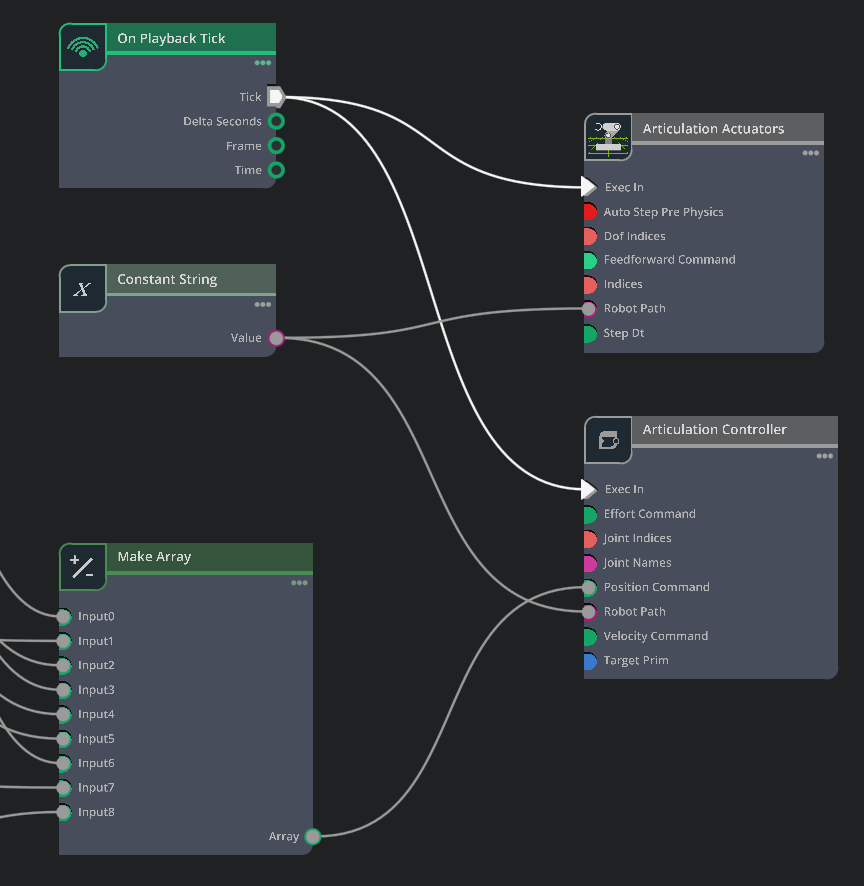
The example Action Graph opened in the editor: tick driver, robot-path constant, per-DOF pose constants feeding a target-position array, the Articulation Actuators node, and the Articulation Controller node.#
It contains:
On Playback Tick — emits an execution event every frame while the simulation is playing.
Robot Path (a Constant String node) — holds the articulation root prim path. Wiring it once and fanning it out keeps a single source of truth so the actuator and controller nodes can never drift out of sync.
Target Positions (a Construct Array node, sized to the articulation’s DOF count) — aggregates one value per DOF into the
double[]positionCommandthe controller expects. For a Franka that’s 9 entries: 7 arm joints followed by 2 finger joints.Pose0 … Pose8 (one Constant Double per DOF) — the actual home-pose numbers. Each is wired into the corresponding
inputNslot of the Construct Array. Splitting the targets across one constant per DOF makes it trivial to inspect and tweak any single joint target in the editor.Articulation Actuators — the experimental Newton actuator node. Reads
robotPathfrom the constant.Articulation Controller — the standard Isaac Sim node that writes position / velocity / effort commands onto the articulation. Reads
robotPathfrom the same constant andpositionCommandfrom the Construct Array’s output.
The wiring is:
Both the Articulation Actuators and the Articulation Controller have their
execInconnected to On Playback Tick’stick.The Robot Path constant feeds
robotPathon both actuator-side nodes.Each Pose constant feeds the corresponding
inputNslot on the Construct Array; the Construct Array’sarrayoutput feedspositionCommandon the Articulation Controller.
Note
The Articulation Actuators node only needs to fire once to bootstrap
itself: on its first execIn pulse it lazily constructs the underlying
ArticulationActuators,
which then registers its own pre-physics callback and runs the actuators
on every physics step independent of further graph ticks. We still feed
it from On Playback Tick in this example because subsequent ticks are
what re-apply the feedforwardCommand input (when wired).
The Articulation Controller, by contrast, does need to tick every frame
so its positionCommand is re-asserted onto the articulation.
Authoring the graph#
In a typical workflow you author this graph by hand in the Action Graph editor — drop in the nodes shown above, fill in the constant string with the articulation root path and the per-DOF Constant Doubles with your target joint positions, and wire them up as described. See Isaac Sim OmniGraph Tutorial for a walkthrough of the editor.
To reproduce the screenshot above without authoring the graph by hand, a
runnable companion script is provided at
standalone_examples/api/isaacsim.core.experimental.actuators/newton_actuators_omnigraph_example.py.
It opens the Franka asset, authors actuator prims onto it, builds the graph
programmatically, plays the simulation, and keeps the kit window open so
you can open the Action Graph editor and inspect or modify the graph live:
./python.sh standalone_examples/api/isaacsim.core.experimental.actuators/newton_actuators_omnigraph_example.py
Once the script is running you can edit the per-DOF Constant Double values directly in the graph editor and watch the robot follow the new targets in real time:

Editing the per-DOF target values in the Action Graph editor drives the Franka through the Articulation Controller and the authored Newton actuators.#
Adding a feedforward source#
Feedforward effort is added on top of the controller output by every actuator each tick. It is the right input for gravity-compensation torques, learned residual policies, or any open-loop torque component.
Wire a per-DOF float[] array (typically a Constant Float Array node,
or any upstream node that produces a float[]) into the
feedforwardCommand input of the Articulation Actuators node. If the
array is shorter than the full DOF count, also wire a per-DOF int[]
index array into dofIndices so the actuator knows which DOFs the
feedforward applies to.
Manual stepping (advanced)#
Setting autoStepPrePhysics to false disables the pre-physics
callback that the underlying ArticulationActuators registers, and the
node steps the actuators itself on each execIn pulse using stepDt.
This is useful when you need:
Deterministic ordering between feedforward writes and the actuator step inside the same graph evaluation tick, or
Stepping at a rate other than the physics rate (e.g. for analysis).
Be aware that the timeline still drives physics independently — manually stepping the actuators faster than physics is usually not useful. In nearly all cases the default (auto-stepping) is what you want.
Limitations#
USD discovery only. The node has no Python equivalent of
from_actuators(). If your actuator pipeline is built in Python, drive it with a Python script (see Set Up Actuators from Python) or wrap it in a custom OmniGraph Python node.