


[isaacsim.asset.importer.mjcf] MJCF Importer#
Version: 3.12.1
Overview#
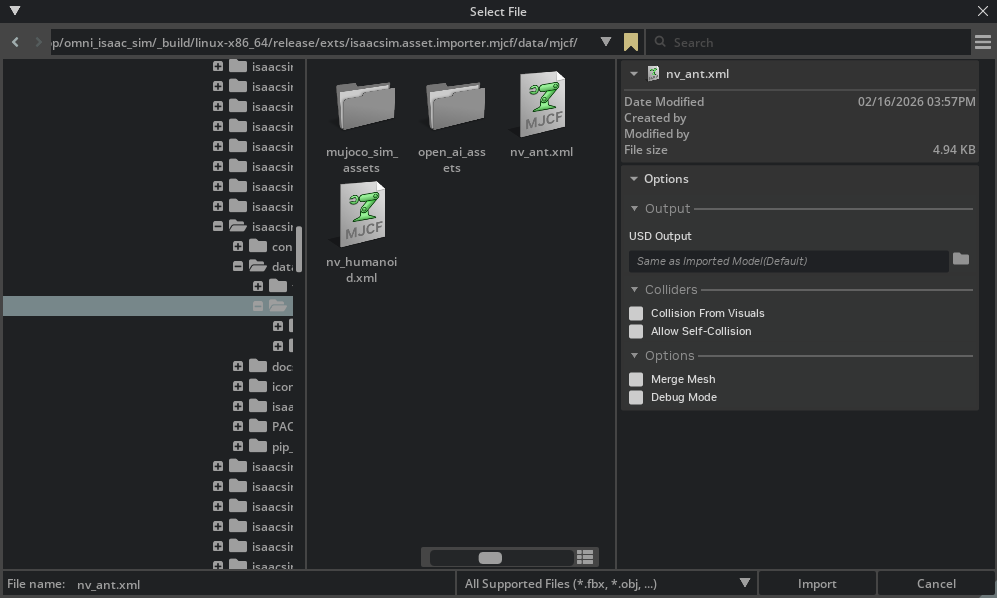
To enable this extension, go to the Extension Manager menu and enable isaacsim.asset.importer.mjcf extension.
High Level Code Overview#
Python#
The MJCF Importer extension uses MJCFImporterConfig, a dataclass that stores configuration
settings for MJCF import operations. The UI extension allows users to modify these settings
through a graphical interface. Configuration fields can be set directly on the dataclass instance.
The main entry point is the MJCFImporter class in python/impl/converter.py, which takes
an optional MJCFImporterConfig instance. The importer uses the mujoco-usd-converter library
to convert MJCF files to USD format.
Example usage:
.. code-block:: python
from isaacsim.asset.importer.mjcf import MJCFImporter, MJCFImporterConfig

# Create configuration
config = MJCFImporterConfig(
    mjcf_path="/path/to/robot.xml",
    usd_path="/path/to/output",
    merge_mesh=True,
    collision_from_visuals=True
)

# Create importer and import
importer = MJCFImporter(config)
output_path = importer.import_mjcf()
Note: The commands MJCFCreateAsset and MJCFCreateImportConfig in python/impl/command.py
are deprecated and should not be used in new code. Use MJCFImporter and MJCFImporterConfig directly instead.
Enable Extension#
The extension can be enabled (if not already) in one of the following ways:
Define the next entry as an application argument from a terminal.
APP_SCRIPT.(sh|bat) --enable isaacsim.asset.importer.mjcf
Define the next entry under [dependencies] in an experience (.kit) file or an extension configuration (extension.toml) file.
[dependencies]
"isaacsim.asset.importer.mjcf" = {}
Open the Window > Extensions menu in a running application instance and search for isaacsim.asset.importer.mjcf.
Then, toggle the enable control button if it is not already active.
Commands#
Public command API for module isaacsim.asset.importer.mjcf:
MJCFCreateAsset (deprecated)#
.. deprecated::
Use MJCFImporter() directly instead.
This command parses and imports a given mjcf file. It is deprecated and will be removed in a future version.
Arguments#
mjcf_path
import_config
prim_path
dest_path
MJCFCreateImportConfig (deprecated)#
.. deprecated::
Use MJCFImporterConfig() directly instead.
Returns an ImportConfig object that can be used while parsing and importing. It is deprecated and will be removed in a future version.
MJCF Importer Extension [isaacsim.asset.importer.mjcf]#
MJCF Import Workflow#
Use the MJCF importer configuration and converter classes to import MJCF files into USD. Below is a sample demonstrating how to import the Ant MJCF included with this extension.
 1import omni.usd
 2from isaacsim.asset.importer.mjcf import MJCFImporter, MJCFImporterConfig
 3from isaacsim.asset.importer.utils import stage_utils
 4
 5# Get path to extension data:
 6ext_manager = omni.kit.app.get_app().get_extension_manager()
 7ext_id = ext_manager.get_enabled_extension_id("isaacsim.asset.importer.mjcf")
 8extension_path = ext_manager.get_extension_path(ext_id)
 9
10# setting up import configuration:
11config = MJCFImporterConfig(mjcf_path=extension_path + "/data/mjcf/nv_ant.xml")
12
13# import MJCF
14importer = MJCFImporter(config)
15output_path = importer.import_mjcf()
16
17# open the resulting USD for inspection
18stage = stage_utils.open_stage(output_path)
- class MJCFImporter(
- config: MJCFImporterConfig | None = None,
MuJoCo MJCF to USD importer.
Uses mujoco-usd-converter to convert MJCF files to USD format.
- Parameters:
config – Optional configuration for the import operation.
Example:
>>> from isaacsim.asset.importer.mjcf import MJCFImporter
>>> MJCFImporter()
<...>
- import_mjcf(
- config: MJCFImporterConfig | None = None,
Import an MJCF file and convert it to USD.
- Parameters:
config – Optional configuration for the import operation. If not provided, the stored importer configuration will be used.
- Returns:
Path to the generated USD file.
- Raises:
ValueError – If the MJCF path is not configured or if the file does not have a
.xmlextension.FileNotFoundError – If the MJCF file does not exist at the given path.
Example:
>>> from isaacsim.asset.importer.mjcf import MJCFImporter, MJCFImporterConfig

>>> importer = MJCFImporter()
>>> config = MJCFImporterConfig(mjcf_path="/tmp/robot.xml")
>>> importer.config = config
>>> # output_path = importer.import_mjcf()
- property config: MJCFImporterConfig#
Get the importer configuration.
- Returns:
Current importer configuration.
Example:
>>> from isaacsim.asset.importer.mjcf import MJCFImporter, MJCFImporterConfig

>>> importer = MJCFImporter()
>>> importer.config
MJCFImporterConfig(...)
- class MJCFImporterConfig(
- mjcf_path: str | None = None,
- usd_path: str | None = None,
- import_scene: bool = True,
- merge_mesh: bool = False,
- debug_mode: bool = False,
- collision_from_visuals: bool = False,
- collision_type: str = 'Convex Hull',
- allow_self_collision: bool = False,
- robot_type: str = 'Default',
- fix_base: bool | None = None,
- link_density: float | None = None,
- joint_drive_type: str | dict[str, str] | None = None,
- joint_target_type: str | dict[str, str] | None = None,
- override_gain_type: str | None = None,
- override_bias_type: str | None = None,
- override_gain_prm: list[float] | None = None,
- override_bias_prm: list[float] | None = None,
- run_asset_transformer: bool = True,
- run_multi_physics_conversion: bool = True,
Configuration for MJCF import operations.
Stores settings that control how MJCF files are converted to USD.
- Parameters:
mjcf_path – Path to the MJCF (.xml) file to import.
usd_path – Directory path where the USD file will be saved. When left at its default of
None,MJCFImporter.import_mjcf()will mutate this field in-place toos.path.dirname(mjcf_path)(the directory containing the source MJCF) and write all USD output there. Pass an explicit value to keep import outputs out of the source tree.import_scene – If True, imports the MJCF simulation settings along with the model.
merge_mesh – If True, merges meshes where possible to optimize the model.
debug_mode – If True, enables debug mode with additional logging and visualization.
collision_from_visuals – If True, collision geometry is generated from visual geometries.
collision_type – Type of collision geometry to use. Options: “Convex Hull”, “Convex Decomposition”, “Bounding Sphere”, “Bounding Cube”.
allow_self_collision – If True, allows the model to collide with itself.
fix_base –
Tri-state base-type toggle. -
True: adds a fixed joint from the world to the root rigid-body link andrelocates ArticulationRootAPI to the correct ancestor prim.
False: removes any existing world-to-root fixed joint so the robot becomes floating-base.None(default): leaves the source asset’s base authoring untouched.
link_density – Default density (kg/m^3) applied to rigid body links that have no explicit mass.
Nonemeans no density override.override_gain_type – MuJoCo actuator gain type (e.g.
"fixed").Noneleaves existing value.override_bias_type – MuJoCo actuator bias type (e.g.
"affine").Noneleaves existing value.override_gain_prm – MuJoCo actuator gain parameter array (10 floats).
Noneleaves existing value. Position control example:[kp, 0, 0, 0, 0, 0, 0, 0, 0, 0].override_bias_prm – MuJoCo actuator bias parameter array (10 floats).
Noneleaves existing value. Position control example:[0, -kp, -kd, 0, 0, 0, 0, 0, 0, 0].run_asset_transformer – If True, runs the asset transformer profile after conversion to restructure the USD output.
run_multi_physics_conversion – If True, runs MuJoCo-to-PhysX physics conversion on the imported stage.
Example:
>>> from isaacsim.asset.importer.mjcf import MJCFImporterConfig

>>> config = MJCFImporterConfig(
...     mjcf_path="/tmp/robot.xml",
...     usd_path="/tmp/output",
...     merge_mesh=True
... )
>>> config.mjcf_path
'/tmp/robot.xml'
- allow_self_collision: bool = False#
- collision_from_visuals: bool = False#
- collision_type: str = 'Convex Hull'#
- debug_mode: bool = False#
- import_scene: bool = True#
- merge_mesh: bool = False#
- robot_type: str = 'Default'#
- run_asset_transformer: bool = True#
- run_multi_physics_conversion: bool = True#