


[isaacsim.robot_motion.lula_test_widget] Lula Test Widget#
Warning
Deprecation: Extension deprecated since Isaac Sim 6.0.0. See isaacsim.robot_motion.experimental.motion_generation and isaacsim.robot_motion.cumotion for newer motion-generation APIs and examples.
Version: 1.2.3
Overview#
Deprecated since version 6.0.0: This extension is deprecated in favor of isaacsim.robot_motion.experimental.motion_generation and isaacsim.robot_motion.cumotion.
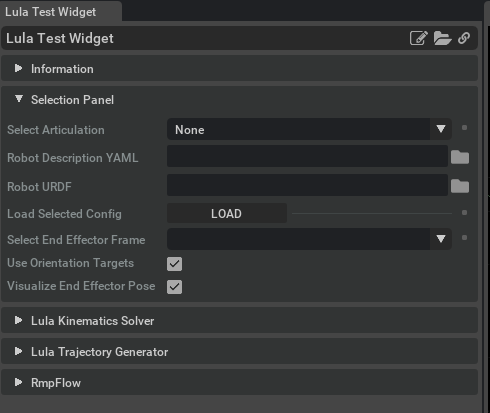
**isaacsim.robot_motion.lula_test_widget** provides a Lula-focused test widget for robot motion planning experiments. It helps users select robot articulations, load robot description and URDF files, and run simple motion tests using Lula inverse kinematics, trajectory generation, and RmpFlow motion policies.
The main workflow is scenario based. Users choose a robot and configuration files, then run tests such as target following, obstacle avoidance, custom waypoint trajectories, or sinusoidal target tracking.
Concepts#
Scenario-based testing#
The central concept is a motion test scenario managed by LulaTestScenarios. A scenario defines the active motion behavior, the visual objects used by that behavior, and the controller that produces the next robot action.
Supported scenario types include:
Inverse kinematics target following
RmpFlow target following with obstacle avoidance
RmpFlow sinusoidal target tracking
Custom trajectory execution through editable waypoints
Robot configuration files#
The widget works with two robot configuration inputs:
A YAML robot description file
A URDF robot file
The helper functions is_yaml_file, is_urdf_file, on_filter_yaml_item, and on_filter_urdf_item are used to identify and filter compatible files in file selection UI.
Visual debugging#
LulaTestScenarios can create visual aids for understanding motion behavior. These include end-effector frame visualization, target objects, obstacle objects, trajectory waypoints, and RmpFlow collision sphere visualization when debug mode is enabled.
Functionality#
Inverse kinematics testing#
LulaTestScenarios.initialize_ik_solver() initializes the Lula inverse kinematics solver from a robot description file and URDF file. After initialization, get_ik_frames() returns the available frame names that can be used as end-effector targets.
The on_ik_follow_target() scenario creates a target-following test for a selected articulation and end-effector frame. The scenario can optionally use orientation constraints through set_use_orientation().
RmpFlow testing#
The widget supports RmpFlow scenarios for motion policy testing.
on_rmpflow_follow_target_obstacles() creates a target-following scenario with obstacle avoidance. The scenario includes a target cube and wall obstacles, allowing the robot motion policy to be tested against simple obstacles.
on_rmpflow_follow_sinusoidal_target() creates a scenario where the target moves along a sinusoidal path. The target motion is updated through scenario parameters such as vertical frequency, horizontal frequency, radius, and height.
toggle_rmpflow_debug_mode() switches RmpFlow debug visualization on or off. When enabled, collision sphere visualization is activated and state updates are ignored.
Custom trajectory testing#
on_custom_trajectory() sets up a waypoint-based trajectory scenario. The initial trajectory forms a rectangular path, and users can adjust the waypoint list with:
add_waypoint()delete_waypoint()
create_trajectory_controller() creates the controller that follows the trajectory for a selected articulation and end-effector frame.
Scenario updates and actions#
update_scenario() advances scenario-specific behavior, such as moving the sinusoidal target. get_next_action() computes the next ArticulationAction for the active scenario.
If no controller is active, get_next_action() returns an empty action.
Key Components#
LulaTestScenarios#
LulaTestScenarios manages the active test scenario and the Lula-related objects used by that scenario. It owns the active IK solver, RmpFlow instance, trajectory generator, controller state, visual targets, obstacles, and waypoint data.
Important responsibilities include:
Initializing Lula IK from YAML and URDF files
Creating target-following and trajectory scenarios
Updating visual debug elements
Returning the next
ArticulationActionResetting scenario-specific data with
scenario_reset()Resetting all Lula scenario state with
full_reset()
File filter helpers#
The module exposes small helper functions for filtering robot configuration files:
is_yaml_file(path)returnsTruefor.yamlor.YAMLpaths.is_urdf_file(path)returnsTruefor.urdfor.URDFpaths.on_filter_yaml_item(item)filters file browser items for YAML selection.on_filter_urdf_item(item)filters file browser items for URDF selection.
These helpers are useful when building UI controls that should only show valid robot description or URDF files.
Usage Examples#
Initialize IK and list available frames#
from isaacsim.robot_motion.lula_test_widget import LulaTestScenarios

scenarios = LulaTestScenarios()

robot_description_path = "/path/to/robot_description.yaml"
urdf_path = "/path/to/robot.urdf"

scenarios.initialize_ik_solver(robot_description_path, urdf_path)

frames = scenarios.get_ik_frames()
print(frames)
Start an IK target-following scenario#
from isaacsim.robot_motion.lula_test_widget import LulaTestScenarios

scenarios = LulaTestScenarios()

scenarios.initialize_ik_solver(robot_description_path, urdf_path)
scenarios.set_use_orientation(True)

# articulation is the selected robot articulation object.
# ee_frame_name is one of the frame names returned by get_ik_frames().
scenarios.on_ik_follow_target(articulation, ee_frame_name)

action = scenarios.get_next_action()
Use file filter helpers#
from isaacsim.robot_motion.lula_test_widget import is_yaml_file, is_urdf_file

print(is_yaml_file("/robots/franka.yaml"))  # True
print(is_urdf_file("/robots/franka.urdf"))  # True
Relationships#
LulaTestScenarios uses Lula motion-generation concepts directly. The public API exposes get_rmpflow(), which returns the active RmpFlow instance when an RmpFlow scenario has been initialized.
The scenario controller output is an ArticulationAction, which is the action object returned by get_next_action() for applying the computed robot command.
Enable Extension#
The extension can be enabled (if not already) in one of the following ways:
Define the next entry as an application argument from a terminal.
APP_SCRIPT.(sh|bat) --enable isaacsim.robot_motion.lula_test_widget
Define the next entry under [dependencies] in an experience (.kit) file or an extension configuration (extension.toml) file.
[dependencies]
"isaacsim.robot_motion.lula_test_widget" = {}
Open the Window > Extensions menu in a running application instance and search for isaacsim.robot_motion.lula_test_widget.
Then, toggle the enable control button if it is not already active.