


[isaacsim.examples.extension] Generate Extension#
Warning
Deprecation: Extension deprecated since Isaac Sim 6.0.0. Use the repo template system instead
Version: 2.3.2
Overview#
Deprecated since version 6.0.0: This extension is deprecated. Use the repo.{sh,bat} template system instead:
./repo.sh template new
The CLI-based template system provides the same extension scaffolding capabilities with better maintainability, no runtime dependencies, and support for the latest extension conventions.
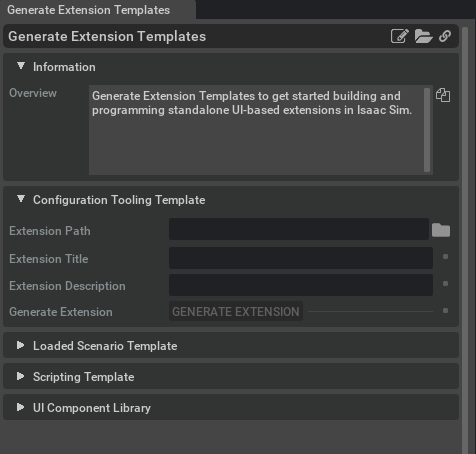
**isaacsim.examples.extension** provides a UI tool and Python helper for generating extension templates for common workflows. It creates a new extension folder from predefined template source files, replaces placeholder values with the requested title and description, and organizes the generated files into the expected extension structure.
The main public API is TemplateGenerator, which can generate templates for configuration tooling, loaded scenario workflows, scripting workflows, and UI component libraries.
Functionality#
TemplateGenerator handles the repetitive file setup needed when starting a new extension. It creates directories, copies template files, replaces template keywords, and keeps generated metadata consistent with the provided extension title and description.
The supported template types are:
Configuration tooling workflow
Loaded scenario workflow
Scripting workflow
UI component library
Each generation method takes the same core inputs:
file_path: Target directory for the generated templateextension_title: Human-readable extension titleextension_description: Description written into the generated extension metadata
If template files cannot be copied, read, or written, the generation methods may raise OSError.
Key Components#
TemplateGenerator#
TemplateGenerator is the main API for creating extension templates from Python. It provides one method per supported workflow type.
from isaacsim.examples.extension import TemplateGenerator

generator = TemplateGenerator()

generator.generate_scripting_template(
    file_path="/path/to/output",
    extension_title="My Example Extension",
    extension_description="Example extension generated from a scripting workflow template",
)
The generator also converts extension titles into valid Python package names, so the generated extension has a usable module structure.
Template Types#
Configuration Tooling#
Use generate_configuration_tooling_template() when the extension should start from a configuration tooling workflow.
generator.generate_configuration_tooling_template(
    file_path="/path/to/output",
    extension_title="My Configuration Tool",
    extension_description="Configuration tooling extension",
)
Loaded Scenario#
Use generate_loaded_scenario_template() when the extension should start from a loaded scenario workflow.
generator.generate_loaded_scenario_template(
    file_path="/path/to/output",
    extension_title="My Loaded Scenario",
    extension_description="Loaded scenario extension",
)
Scripting#
Use generate_scripting_template() when the extension should start from a scripting workflow.
generator.generate_scripting_template(
    file_path="/path/to/output",
    extension_title="My Scripting Extension",
    extension_description="Scripting workflow extension",
)
Component Library#
Use generate_component_library_template() when the extension should start from a UI component library workflow.
generator.generate_component_library_template(
    file_path="/path/to/output",
    extension_title="My Component Library",
    extension_description="UI component library extension",
)
Usage Examples#
A typical workflow is to create a TemplateGenerator, choose the template type that matches the workflow, and provide the target output path and metadata.
from isaacsim.examples.extension import TemplateGenerator

generator = TemplateGenerator()

try:
    generator.generate_component_library_template(
        file_path="/projects/extensions",
        extension_title="Robot Status Panel",
        extension_description="UI component library for displaying robot status",
    )
except OSError as error:
    print(f"Failed to generate extension template: {error}")
This creates the template under the requested output location using the provided title and description. The exact generated file set depends on the selected template type.
Enable Extension#
The extension can be enabled (if not already) in one of the following ways:
Define the next entry as an application argument from a terminal.
APP_SCRIPT.(sh|bat) --enable isaacsim.examples.extension
Define the next entry under [dependencies] in an experience (.kit) file or an extension configuration (extension.toml) file.
[dependencies]
"isaacsim.examples.extension" = {}
Open the Window > Extensions menu in a running application instance and search for isaacsim.examples.extension.
Then, toggle the enable control button if it is not already active.