


[isaacsim.sensors.physx.ui] Isaac Sim PhysX Sensor UI components#
Warning
Deprecation: Extension deprecated since Isaac Sim 6.0.0 in favor of the Experimental extension: isaacsim.sensors.physics.ui
Version: 2.5.1
Overview#
Deprecated since version 6.0.0: This extension is deprecated in favor of isaacsim.sensors.physics.ui.
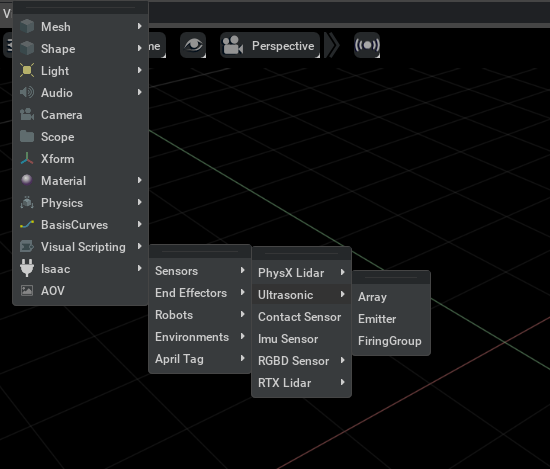
**isaacsim.sensors.physx.ui** provides UI components for Isaac Sim PhysX-raycast-based sensor simulation. It focuses on user-facing controls such as menu options for working with physics-based sensor features, including sensor types such as lidar. The extension is intended for users who need access to PhysX sensor simulation controls through the application UI rather than through scripting.
Functionality#
The extension adds UI-facing functionality around PhysX sensor simulation workflows. Its main role is to expose sensor-related actions through menus and UI components so users can access common sensor operations from the interface.
The functionality is centered on:
PhysX-raycast-based sensor simulation controls.
UI menu options for sensor-related workflows.
Support for Isaac Sim sensor workflows, including lidar-related use cases.
UI Components#
Relationships#
**isaacsim.sensors.physx.ui** is built around the PhysX sensor simulation functionality provided by **isaacsim.sensors.physx**. The UI extension contributes menu and interface components, while the underlying sensor extension provides the simulation behavior for PhysX-raycast-based sensors.
Enable Extension#
The extension can be enabled (if not already) in one of the following ways:
Define the next entry as an application argument from a terminal.
APP_SCRIPT.(sh|bat) --enable isaacsim.sensors.physx.ui
Define the next entry under [dependencies] in an experience (.kit) file or an extension configuration (extension.toml) file.
[dependencies]
"isaacsim.sensors.physx.ui" = {}
Open the Window > Extensions menu in a running application instance and search for isaacsim.sensors.physx.ui.
Then, toggle the enable control button if it is not already active.
Actions in isaacsim.sensors.physx.ui#
ID |
Display Name |
Description |
|---|---|---|
create_lightbeam_generic |
Create a generic LightBeam sensor |
|
create_lightbeam_tashan_ts_f_a |
Create a Tashan TS-F-A LightBeam sensor |
|
create_physx_lidar_generic |
Create a generic PhysX Lidar sensor |
|
create_physx_lidar_rotating |
Create a rotating PhysX Lidar sensor |