


[isaacsim.util.merge_mesh] Isaac Sim Merge Mesh#
Warning
Deprecation: Extension deprecated since ISaac Sim 6.0.0. Replaced with the Scene Optimizer
Version: 2.0.21
Overview#
Deprecated since version 6.0.0: This extension has been deprecated and replaced by the Scene Optimizer.
**isaacsim.util.merge_mesh** provides tools for combining multiple USD mesh prims into a single output mesh prim. It is useful when you want to reduce a selection of meshes into one mesh while preserving mesh data such as geometry, material assignments, geometry subsets, and texture coordinates.
The module supports both direct utility usage through MeshMerger and command-based usage through MergeMeshesCommand. The command form is the recommended entry point when you want the merge operation to participate in the Kit undo system.
Concepts#
Mesh Selection#
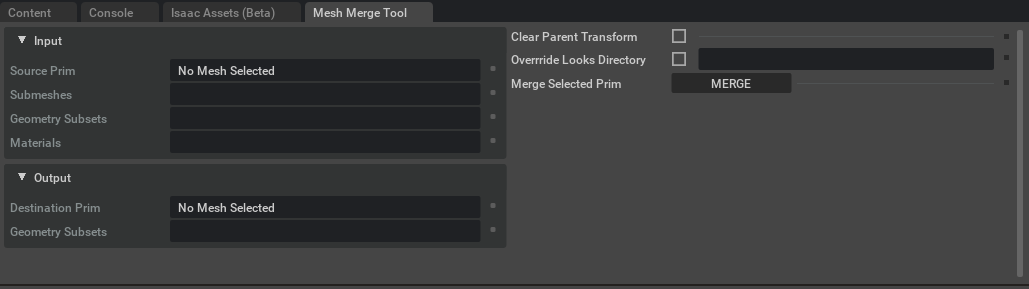
The merge operation starts from a list of selected prim paths. MeshMerger.update_selection() traverses the selected prims and their children, finds visible meshes, and computes merge statistics such as:
Total meshes to merge
Total geometry subsets
Total unique materials
This allows callers or UI code to inspect what will be merged before running the operation.
Output Mesh#
The merged mesh is written to a single output prim path. When setting MeshMerger.output_mesh, the path is adjusted to avoid conflicts with existing prims.
The merge operation combines mesh geometry into this output mesh, including points, normals, texture coordinates, material assignments, and geometry subsets.
Transform Handling#
The merge can control where the merged mesh origin is placed.
If
clear_parent_xformorclear_transformisTrue, the merged mesh origin is placed at the world origin.If it is
False, the merged mesh keeps an origin based on the source hierarchy behavior described by the command.
This is useful when deciding whether the merged result should preserve scene placement context or be normalized around the world origin.
Source Prim Handling#
The merge can optionally deactivate the original source prims after creating the merged mesh. This keeps the original data in the stage while hiding it from active scene evaluation.
MergeMeshesCommand.undo() can reactivate those sources when the command is undone.
Material Combining#
The merge can optionally combine materials into a single destination path, such as /World/Looks. When enabled, materials are redirected into that destination, and geometry subsets that share matching material names can use the same material.
Copied material connections can be fixed with MeshMerger.fix_material_sources() so shader output connections point to the new copied shader paths.
Functionality#
**isaacsim.util.merge_mesh** focuses on creating a single USD mesh from multiple input meshes while preserving the information needed for rendering and material assignment.
Key behavior includes:
Traversing selected prims and child prims to find visible meshes
Merging mesh geometry into one output mesh
Preserving geometry subsets
Preserving or combining material assignments
Copying materials to a shared destination when requested
Optionally deactivating source prims after merge
Supporting undo through
MergeMeshesCommand
Key Components#
MeshMerger#
MeshMerger is the lower-level utility class that performs selection analysis and mesh merging.
Create it with a USD stage:
from isaacsim.util.merge_mesh import MeshMerger

mesh_merger = MeshMerger(stage)
Typical usage is to configure merge options, update the selection, then run the merge:
from isaacsim.util.merge_mesh import MeshMerger

mesh_merger = MeshMerger(stage)

mesh_merger.clear_parent_xform = False
mesh_merger.deactivate_source = True
mesh_merger.combine_materials = True
mesh_merger.materials_destination = "/World/Looks"
mesh_merger.output_mesh = "/World/MergedMesh"

mesh_merger.update_selection([
    "/World/Cube",
    "/World/Cone",
    "/World/ManyToruses",
])

print(mesh_merger.total_meshes)
print(mesh_merger.total_subsets)
print(mesh_merger.total_materials)

mesh_merger.merge_meshes()
MeshMerger also provides helper methods used for undo-style cleanup:
reactivate_sources()reactivates source prims that were deactivated during merge.remove_created_materials()removes materials created during the merge operation.
MergeMeshesCommand#
MergeMeshesCommand wraps the merge operation as a Kit command. Use this when you want the merge to be undoable through the command system.
import omni.kit.commands

result, merged_prim_path = omni.kit.commands.execute(
    "MergeMeshesCommand",
    source=[
        "/World/Cube",
        "/World/Cone",
        "/World/ManyToruses",
    ],
    clear_transform=False,
    deactivate_source=True,
    combine_materials=True,
    materials_destination="/World/Looks",
)

print(merged_prim_path)
The command supports the same main merge controls:
source: list of prim paths to mergeclear_transform: place the merged mesh origin at the world origindeactivate_source: deactivate source prims after mergingcombine_materials: redirect materials into a shared destinationmaterials_destination: destination prim path for combined materials
Undoing the command reactivates source prims if needed, removes the merged mesh, and removes materials created during the merge.
Relationships#
MergeMeshesCommand inherits from **omni.kit.commands.Command**, so it can be executed with **omni.kit.commands.execute**() and participate in the Kit undo flow. Use MeshMerger when you need direct programmatic control, and use MergeMeshesCommand when the merge should behave like an undoable application operation.
Enable Extension#
The extension can be enabled (if not already) in one of the following ways:
Define the next entry as an application argument from a terminal.
APP_SCRIPT.(sh|bat) --enable isaacsim.util.merge_mesh
Define the next entry under [dependencies] in an experience (.kit) file or an extension configuration (extension.toml) file.
[dependencies]
"isaacsim.util.merge_mesh" = {}
Open the Window > Extensions menu in a running application instance and search for isaacsim.util.merge_mesh.
Then, toggle the enable control button if it is not already active.
Commands#
Public command API for module isaacsim.util.merge_mesh:
MergeMeshesCommand#
Command to merge selected meshes and all children of given prims into a single mesh.
This command provides options to control the merge behavior:
Clear Parent Transform: Sets the mesh origin at world origin, otherwise origin is the same as the first element.
Deactivate source assets: Sets source prims to Inactive after performing the merge operation.
Combine Materials: Redirects all assets materials to a given folder, and every geomsubset that shares a same material name uses the same material, each geom subset uses the original material from the source assets.
Arguments#
source: List of prim paths to merge.
clear_transform: If True, sets the merged mesh origin at world origin.
deactivate_source: If True, deactivates source prims after merging.
combine_materials: If True, redirects all materials to a single folder
materials_destination: The prim path where combined materials will be stored.
Usage#
import omni.kit.commands

# Existing mesh prims, or parent prims that contain mesh children, to merge.
source_prims = ["/World/Cube", "/World/Cone", "/World/ManyToruses"]

# Merge the meshes into a single mesh.
# The merged mesh will be created under "/Merged/" using the first source prim's name.
success, merged_mesh_path = omni.kit.commands.execute(
    "MergeMeshesCommand",
    source=source_prims,
    clear_transform=False,        # Keep the merged mesh origin based on the first source prim
    deactivate_source=True,       # Deactivate the original source prims after merging
    combine_materials=True,       # Reuse materials with the same names in one destination folder
    materials_destination="/World/Looks",
)

print(f"Merged mesh created at: {merged_mesh_path}")