


[isaacsim.robot_setup.sysid] System Identification Backend (Beta)#
Version: 3.2.0
Overview#
System Identification#
Beta: This extension is in beta. Its run contracts, exported run specifications, and APIs are not guaranteed to stay future compatible.
The isaacsim.robot_setup.sysid extension identifies robot simulation parameters from recorded motion. It provides the data contracts, telemetry ingestion, parameter models, optimizers, and simulator bridges used to reduce the difference between measured and simulated trajectories.
The extension is the headless backend for the interactive isaacsim.robot_setup.sysid.ui extension. Use the UI for guided identification in Isaac Sim, or use the Python API and command-line tools for repeatable and automated runs.
Headless integrations import run_sysid from isaacsim.robot_setup.sysid.execution and call
await run_sysid(spec, ...). The package root contains no dynamic exports; import APIs from their owning
modules. The backend requires the Isaac Sim Python environment and logs through Carbonite. Isaac Sim stage,
PhysX, and Fabric execution requires a bootstrapped Kit runtime; Newton execution opens the USD directly
instead of using the Kit stage.
For a complete Kit-hosted lifecycle,
run_headless_sysid_job loads the stage and
telemetry, runs preflight and preparation, starts the timeline, and executes the solve without creating or
closing SimulationApp.
SysIdJobService serializes these jobs for automation clients that
reuse one headless Kit process through isaacsim.code_editor.python_server.
Local LeRobot-format telemetry#
PyArrow is not bundled while its third-party approval is pending. To use this optional loader, provide PyArrow 24.0.0 in the active environment. CSV, MCAP, and ROS bag ingestion do not require PyArrow.
The local dataset must contain meta/info.json and Parquet files under data/. Joint positions must use a
recognized signal such as observation.state or observation.qpos; SysID does not guess joint state from
unrelated numeric columns. The dataset’s own license and usage terms remain the user’s responsibility.
load_trajectoryloads CSV, ROS 2 bag, MCAP, or LeRobot telemetry into the common trajectory model.build_sysid_check_reportchecks telemetry quality and parameter identifiability before optimization.build_parameter_confidence_reportestimates how strongly the final data constrains each identified parameter.
Trajectory ingestion and quality checks#
Use TrajectoryLoadConfig with load_trajectory to select CSV, MCAP, ROS 2 bag, or local LeRobot
ingestion. CSV sources can use an explicit column map or the compact built-in layout. MCAP and ROS 2
bag sources require a JSON or YAML topic map. Topic-based loaders align optional channels to position
timestamps using bounded nearest-neighbor matching and record alignment diagnostics in trajectory
provenance.
When a topic map explicitly names a command channel, that channel must decode and align successfully. The loader reports an error instead of substituting measured positions. Position-only sources may omit command mapping and intentionally use positions as the command fallback.
Nearby phase-event and collection-manifest files can supply train and validation chunks when their timestamps overlap the loaded trajectory. Unrelated or stale event logs are ignored rather than rebased onto a recording. Preflight and telemetry-quality reports validate channel shapes, finiteness, strictly increasing timestamps, chunk coverage, excitation, and command alignment.
Analytical presolve and checks#
For fixed-base robots, the optional analytical presolve builds a compact USD-derived recursive Newton-Euler model and uses torque-domain least squares to seed supported parameters. Joint context must be ordered from base to tip, USD joint bodies must resolve unambiguously, the active regressor must be full rank and well conditioned, and unconstrained solutions must remain inside the configured parameter bounds. If any gate fails, the original seed is retained and the check report explains why.
Torque telemetry must declare torque_semantics explicitly as link_side or external.
Only link-side transmitted joint torque is used for inertial and friction seeding. External or
unspecified torque channels are excluded rather than guessed.
The pre-solve check report combines telemetry quality with per-parameter identifiability and
uses unknown when a stage or compatible analytical equation is unavailable. Unknown verdicts
do not produce an ok result. The run report records configuration, optimizer status, paired
untuned/tuned validation metrics and artifacts, delay quantization, tuning assessment, and parameter sensitivity. The
reported sens. span is the parameter offset associated with a 10% modeled cost rise; it is not
a statistical confidence interval.
Both reports have versioned JSON schemas under resources/schemas/.
Recipes and validation artifacts#
Bundled recipes configure parameter families, solver settings, chunking, and compatible residual channels for common robot classes. Changing parameter-space flags clears an existing selection so stale parameter rows cannot survive a recipe change. Optional validation artifacts include position, velocity, effort, and angle-delta plots, grouped untuned/tuned RMSE summaries, and a trajectory animation or storyboard. After optimization, validation replays both the authored launch values and the accepted values on the identical chunk sequence. Generated artifact paths are contained beneath the configured artifact directory.
Importing the package root does not bootstrap Kit. Kit-dependent services are imported only when their adapters are called.
Getting started with a new robot#
Optimization and simulation#
ParameterSpacemaps bounded optimizer variables to physical robot parameters.create_optimizerprovides Levenberg-Marquardt, CMA-ES, Bayesian, and Adam gradient-descent backends.IsaacSimSysIdBridgeevaluates candidates in an Isaac Sim-hosted rollout.NewtonSysIdBridgeandNewtonDifferentiableSysIdBridgeprovide Newton rollout paths that do not use the Kit stage.
Importing contracts and portable helpers does not bootstrap Kit, USD, or a simulator. Isaac Sim rollouts still require a bootstrapped Kit runtime.
Interactive workflow#
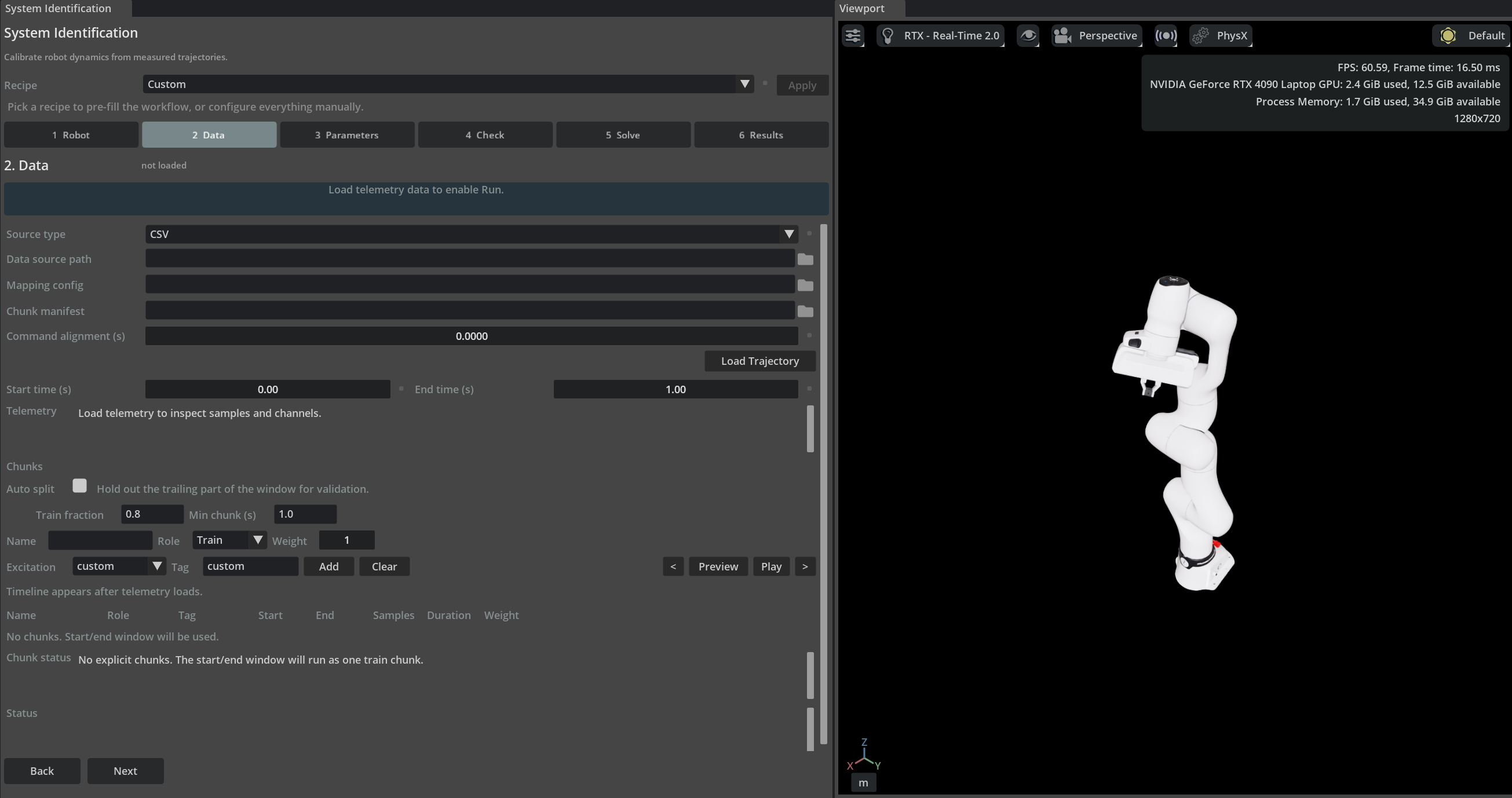
Enable isaacsim.robot_setup.sysid.ui, then open Tools > Robotics > Asset Editors > System Identification. The UI guides you through six stages:
Robot selects the articulation, physics engine, and actuator runtime.
Data loads telemetry and defines training and validation chunks.
Parameters selects the values and bounds to optimize.
Check evaluates data quality and identifiability before spending rollout time.
Solve configures and runs the optimizer.
Results compares parameter values, residuals, confidence ranges, and untuned-versus-tuned validation metrics.
Start with a built-in recipe when possible. Recipes pre-fill the workflow for common robot classes while leaving every setting editable.
Headless quick start#
Synthesize a complete run specification from a robot, telemetry source, and recipe. The tools ship
with the extension under its tools/ directory and run through the Isaac Sim Python launcher
(python.sh on Linux, python.bat on Windows):
./python.sh tools/headless_sysid_solve.py --robot /World/Robot --telemetry data.csv --recipe drive_calibration_inair --stage robot.usd
The command synthesizes a complete run spec (saved next to the results for later editing), prints the
pre-solve check, and runs the solve. The UI follows a gated pipeline — Robot → Data →
Parameters → Check → Solve → Results: the Check stage validates telemetry quality and
per-parameter identifiability before any rollouts are spent, and the Run button requires a
fresh check. After a solve, the Results panel reports each identified value with a sensitivity
range and a verdict (well/weakly constrained) so you can tell which parameters to trust.
Quick-start parallel cloning is disabled unless --source-env identifies a cloneable environment
prim such as /World/envs/env_0.
Filesystem paths stored in a RunSpec are portable: relative stage, telemetry, mapping, manifest, and output paths resolve from the directory containing the RunSpec JSON file, independent of the shell’s working directory. Absolute paths and asset URLs are preserved by both the command-line tools and persistent job service.
Persistent headless jobs#
Launch one headless Kit process with isaacsim.code_editor.python_server and this backend enabled. Remote
clients submit a JSON-safe
SysIdServiceJobRequest through
submit_sysid_job, then use
get_sysid_job_status or
cancel_sysid_job. The singleton service runs one trial at
a time because the USD context, timeline, and active physics engine are process-wide. By default it stops
simulation and creates a clean empty stage after each terminal job.
The Python server is a trusted-code interface, not an authentication or sandbox boundary. Its process-wide
job service rejects all filesystem-backed requests until the host calls
get_sysid_job_service(allowed_roots=["C:/trusted/sysid"]) before the first submission. Every request,
run-spec, telemetry, stage, mapping, provenance, animation, and result path that addresses the local filesystem
must resolve beneath one of those roots; paths escaping through .., symlinks, or file:// URLs are rejected.
Keep the server bound to trusted clients and grant the Kit process only the filesystem permissions it needs.
The standalone tools/headless_sysid_solve.py command uses the same public headless job API while continuing
to own SimulationApp only at its outer process boundary.
Fast offline PhysX stepping#
Isaac Sim rollouts default to simulation.offline_stepping = true. In this mode the bridge advances PhysX
directly with SimulationManager.step() and does not render or pump a complete Kit frame for every physics
step. If the timeline is stopped, the bridge starts it long enough to initialize physics automatically. The
bridge then pauses timeline-driven updates before calling SimulationManager.step() so physics has exactly
one step owner. Set offline_stepping to false to use the timeline-driven path for interactive playback
and debugging.
Physics backend and actuator compatibility#
The rollout host, physics backend, and actuator implementation are independent run-spec axes.
simulation.engine selects isaac_sim or standalone newton; simulation.physics_backend
selects auto, physx, or newton; and simulation.actuator_runtime selects auto,
implicit_drive, newton_explicit, or mixed. Isaac Sim + Newton requires the optional
isaacsim.physics.newton extension and switches through SimulationManager, while standalone
Newton uses the Newton 1.6 dependency set delivered by isaacsim.pip.newton in the Isaac Sim Python environment.
For standalone Newton, mixed is the recommended actuator mode. Existing USD Newton actuator prims own only their
target joints; the remaining joints continue to use implicit USD drives. Stateful parameters
such as PID integral gain and actuator_command_delay_seconds can promote only the selected joints into temporary
session-layer actuator prims by setting explicit_actuator_policy to promote_selected.
Promotion is non-destructive during a run. Accepted results are copied to the root layer only
when actuator writeback is requested and both validation passes succeed; cancellation, validation failure,
writeback failure, or cleanup discards/restores the session edits.
The interactive Robot page exposes these axes independently under Advanced simulation settings.
auto resolves to implicit drives for in-app Isaac Sim, mixed ownership for standalone Newton MuJoCo,
and explicit ownership for differentiable Featherstone. The pre-solve Check rejects unsupported combinations
instead of silently changing the selected runtime.
Backend capability boundaries#
Isaac Sim + PhysX supports every parameter family and position, velocity, torque, end-effector pose, and contact-force residuals. Integral gain and command delay still require an explicit or mixed actuator runtime.
Isaac-hosted Newton supports the same parameter families except joint friction. Its current hosted tensor interface provides position, velocity, and end-effector pose for residuals, but does not provide projected joint force or incoming link force. Commanded actuator effort is not substituted for those missing measurements, so torque and contact-force residuals are rejected.
Standalone Newton MuJoCo supports joint friction, drive gains, integral gain, armature, command delay, mass, center of mass, and inertia. Joint-limit scales, end-effector pose residuals, and contact-force residuals are not supported by this bridge.
Differentiable Newton Featherstone supports joint friction/stiffness/damping, link mass, center-of-mass offsets, and log-Cholesky inertia. It produces position, velocity, and applied-torque residuals. It is contact-free and rejects armature, integral gain, command delay, joint-limit scales, end-effector pose, and contact-force residuals.
These boundaries are one shared contract used by quick-start recipe synthesis, preflight, and the runtime bridges. An unsupported selection therefore fails before rollout instead of reaching a late bridge error.
Paired untuned and tuned validation#
When validation chunks exist, the session evaluates them twice: first with the values authored in the RunSpec, before analytical presolve or optimization, and then with the accepted optimizer output. Both passes use the same resampled chunks, horizons, signal weights, and rollout reset path. Analytical presolve may change the optimizer seed, but it never changes the reported untuned baseline.
Per-chunk and overall comparisons report untuned RMSE, tuned RMSE, absolute delta, percentage improvement,
and an improved/unchanged/regressed verdict for every available signal. Overall RMSE uses pooled sample-count
weighting. outputs.validation_relative_change_threshold (default 1%) and
outputs.validation_absolute_change_threshold (default 1e-12) define the numerical-noise band. Percentage
improvement is intentionally unavailable when the untuned RMSE is zero. If no independent
validation chunk is configured, the same comparison replays every prepared training chunk, but reports and the UI
label it training-data replay (not a holdout).
In report schema version 4, untuned_validation_metrics describes the authored launch values before analytical
presolve, while tuned_validation_metrics describes the selected accepted optimizer output. The legacy
validation_metrics and validation_summary fields remain aliases of their tuned counterparts. A true
parameters_written value means authoring to the requested USD edit targets succeeded; it does not prove that the
layers were saved or reopened. extra.writeback.live_parameters_applied separately records verified mutation of the
current live articulation. Save and reopen the USD in a fresh process when durable composition is required evidence.
Telemetry timing correction is a separate operation. telemetry.command_alignment_seconds
shifts the imported command series once to remove common recording/transport offset. The actuator
parameter is per-DOF plant behavior, is applied once inside the explicit actuator during rollout,
and is persisted as integer newton:delaySteps.
Supported mutable explicit actuator schemas include PD, PID, physics-step delay, maximum-effort and DC-motor clamping. Standalone Newton can execute already-authored neural controllers, but they are not mutable SysID parameter targets; the Isaac Sim compatibility adapter rejects them. Position clamping is also rejected because this extension does not yet expose a compatible optimization contract. A joint has exactly one control owner: explicit joints have their native drive gains disabled for the rollout, while all other joints retain their authored drive behavior.
Example run-spec fragment:
{
  "simulation": {
    "engine": "isaac_sim",
    "physics_backend": "newton",
    "actuator_runtime": "mixed",
    "explicit_actuator_policy": "promote_selected"
  },
  "parameters": {
    "space": {
      "include_basic": true,
      "include_command_delay": true
    }
  }
}
Newton MuJoCo CUDA graph capture#
Standalone Newton MuJoCo rollouts enable simulation.newton.cuda_graph_capture by default on CUDA devices.
The first rollout for a fixed trajectory and population shape runs uncaptured to compile kernels and allocate
solver storage. The bridge then captures that shape and reuses the graph for later optimizer evaluations.
Capture failures are reported and fall back to the uncaptured path; CPU execution is unchanged.
Each captured and uncaptured rollout starts by resetting MuJoCo’s rollout-local acceleration warm-start, actuator-activation, applied-force, and control buffers before restoring the requested initial joint state. This prevents solver history from a preceding candidate batch from changing the next rollout. Captured and uncaptured CUDA results should be compared with numerical tolerances rather than bitwise equality because GPU kernel execution can still introduce small floating-point differences.
Graph replay is intended for repeated, fixed-shape population evaluations. In a reference Franka run with
16 candidates and 800 steps, replay reduced median evaluation time from 13.59 seconds uncaptured to 0.515
seconds captured, a 26.4x speedup after warmup. Treat this result as workload- and hardware-specific rather
than a guaranteed ratio. Set simulation.newton.cuda_graph_capture to false when diagnosing an individual
rollout or when capture setup cannot be amortized.
Newton MuJoCo stability#
MuJoCo integrates drive damping implicitly but drive stiffness explicitly. A drive of stiffness k on an
effective inertia I is stable only when h * sqrt(k / I) stays well below 2, where h is the physics
step. By default the bridge takes one MuJoCo step per telemetry sample. Set simulation.newton.mujoco_substeps
(MuJoCo substeps on the Robot page) to split each sample into equal physics steps. Commands and explicit
actuators still update once per sample, so substeps do not stabilize a DOF owned by an explicit actuator.
After every physics step, each candidate world is checked for non-finite joint state or joint rates above
1e4 rad/s or m/s. A diverged world is reset to its initial state so MuJoCo never runs collision detection on
runaway poses, which previously surfaced as CUDA error 700. The world is then scored as an invalid
candidate, and a warning reports the stiffest drive and the recommended substep count. When every world in a
rollout diverges, the rollout fails with that estimate instead of returning a sentinel cost. Check the
asset’s drive gains first: USD angular drive stiffness is per degree, so a gain meant per radian is 57.3x too
stiff.
Gravity and inverse-dynamics feedforward require a fixed-base articulation of revolute, prismatic, and fixed
joints. A fully locked generic (D6) joint with no free coordinates is treated as fixed. Any other joint type
is reported by name and model joint index.
Differentiable Newton bridge (contact-free)#
Setting simulation.newton.solver = "featherstone_diff" in the run spec selects a
differentiable Newton bridge that rolls trajectories with SolverFeatherstone recorded on a
Warp tape. Rollout costs then backpropagate to the parameters, and the gradient_descent
(Adam) optimizer backend — chosen automatically in auto mode — obtains the exact gradient of
all selected parameters from a single backward pass per iteration. This makes high-dimensional
identification (per-link mass via parameters.space.include_per_link_mass, per-link CoM
offsets, and log-Cholesky inertia) tractable where finite differences are not.
The bridge is contact-free by construction (no contact solve is executed): record trajectories
with the robot fixed-based or in the air, following the PACE identification protocol
(arXiv:2509.06342). Supported parameters are joint friction/stiffness/damping, link mass, CoM
offsets, and log-Cholesky inertia; joint_armature, actuator_command_delay_seconds, integral gains,
and joint-limit scales are rejected with a pointer to the MuJoCo Newton
bridge or the derivative-free backends. Each taped substep owns its Featherstone
factorization workspace, so the mass matrix is rebuilt at the current configuration without
overwriting values required by the reverse pass. Mapped-joint PD, feedforward, friction, and
maximum-effort limiting are evaluated together, and the reported torque is the torque applied
to the simulated plant.
Joint friction is modelled as -friction * tanh(qd * eps). Although that torque saturates, its
linearization near zero velocity is an effective damping of friction * eps, which the symplectic
integrator must still carry on every substep, and which the reverse pass propagates even when the
forward rollout stays bounded. The bridge therefore measures the mapped joints’ inverse mass matrix
once per robot and caps eps inside the torque kernel so that the combined slope of Newton’s passive
joint damping, the drive damping, and friction stays inside the integrator’s stability limit for
whichever friction the optimizer proposes.
Three properties of that bound are worth knowing when reading the logs. It is sized against the
coupled modes rather than each joint independently, because a chain of three or more identified
joints can breach the limit collectively while every joint is inside its own budget. It is sized
against the lowest inertials a candidate can reach rather than the authored ones, so identifying
link mass, center of mass (each axis at both ends of its default range), or inertia alongside
friction tightens it further. And when that inertia is so low that the authored and passive damping
would leave friction less than half the budget, the bridge raises featherstone_substeps on its own,
up to 16, and logs the count it uses. LINK_INERTIA_LOG_CHOLESKY admits near-singular inertia
tensors that no affordable substep count can integrate, so past that cap the budget is sized at the
inertia that still leaves friction half of it. A candidate that really reaches a lower inertia can
then diverge, and is rejected when its rollout or gradient turns non-finite.
A capped eps makes friction behave viscously below the resulting knee velocity, which biases
identified friction low; the bridge logs that knee together with the substep count that would carry
the full scale. Raise simulation.newton.featherstone_substeps or author physxJoint:armature to
recover the sharper Coulomb transition. If a candidate’s drive damping grows until it would leave
friction no influence at all, the run fails rather than reporting a friction value the result never
depended on.
Enable Extension#
The extension can be enabled (if not already) in one of the following ways:
Define the next entry as an application argument from a terminal.
APP_SCRIPT.(sh|bat) --enable isaacsim.robot_setup.sysid
Define the next entry under [dependencies] in an experience (.kit) file or an extension configuration (extension.toml) file.
[dependencies]
"isaacsim.robot_setup.sysid" = {}
Open the Window > Extensions menu in a running application instance and search for isaacsim.robot_setup.sysid.
Then, toggle the enable control button if it is not already active.