


NuRec Rendering Utilities#
isaacsim.replicator.nurec_utils is an experimental module for rendering and checking NuRec (neural reconstruction) USD assets in Isaac Sim. It is intended for validation, regression tests, and debugging workflows where a NuRec asset must be rendered at known camera views and compared against reference imagery.
Note
The module is experimental. APIs, command-line behavior, supported NuRec formats, and output files are not guaranteed to stay future compatible.
What It Provides#
The module provides setup, detection, rendering, and evaluation-oriented helpers for NuRec USDs:
Stage detection and setup helpers identify NuRec particle fields, NuRec volumes, and SPG/PPISP render paths, then apply the render settings required before the first Hydra sync. (SPG: Sensor Processing Graph, NVIDIA’s CUDA-based ISP framework; PPISP: Physics-based Perceptual Image Signal Processing, a learned photometric pipeline built on SPG.)
Render helpers capture frames at authored sensor-rig keyframes or explicit TUM-format camera poses (TUM: a plain-text trajectory format from the TU Munich RGB-D benchmark where each line is
timestamp tx ty tz qx qy qz qwwith the quaternion inxyzworder). They write images plus amanifest.jsonthat records the stage, cameras, timestamps, rendered image paths, and camera positions.Camera/render-product helpers handle the two major NuRec capture paths: authored SPG render products and plain camera render products.
USD, pose, timestamp, image, and sampling helpers support validation tasks such as mapping GT timestamps to USD time codes or reading TUM trajectories.
Metrics and plotting helpers compute PSNR, SSIM, mean absolute difference, image diffs, comparison panels, metric plots, and pose heatmaps.
Timing instrumentation is available in the render-vs-GT workflow to break down stage loading, GT mirroring, setup, rendering, and evaluation time.
At a Glance#
Goal |
Main Inputs |
Main Outputs |
|---|---|---|
Render recorded sensor-rig views |
NuRec USD, camera names, nanosecond timestamp files |
RGB frames and |
Render external viewpoints |
NuRec USD, camera names, TUM pose files |
RGB frames and |
Compare renders with GT |
NuRec USD, GT image tree, optional thresholds |
PSNR, SSIM, mean absolute difference, panels, plots, and pose heatmaps |
Supported NuRec Assets#
The utilities support local paths and omniverse:// URLs for these NuRec USD types:
SPG/PPISP NuRec assets with authored render products.
Plain particle-field / gaussian-splat NuRec assets without PPISP.
Plain NuRec volume assets.
SPG/PPISP assets require single-GPU rendering and the omni.rtx.spg extension. Plain particle-field and volume assets do not require omni.rtx.spg, but they still need the NuRec setup step before the first render update so gaussian tonemapping and related settings are applied consistently.
Asset-Specific Rendering Behavior#
Asset Type |
Detection Signal |
Render Path |
Required Treatment |
|---|---|---|---|
SPG/PPISP particle or volume |
A prim authors |
Uses the asset’s authored SPG render products. PPISP owns the photometric path, so captures use pass-through exposure. |
Launch single-GPU, enable |
Plain particle-field / gaussian-splat |
A prim type name starts with |
Creates render products from camera prims and renders through the standard tonemap path with authored exposure. |
Launch single-GPU and keep gaussian tonemapping enabled before the first Hydra sync. |
Plain NuRec volume |
A prim is |
Creates render products from camera prims and renders through the standard NuRec path. |
Launch single-GPU and call the NuRec setup step before the first render update. |
Keyframe rendering requires a sensor rig with authored rig keyframes and stage time metadata. Pose rendering uses explicit TUM camera poses and does not require matching timestamps to the rig.
Launch And Render Settings#
Some settings are launch-time prerequisites, while others are applied by setup_for_rendering(stage) after the stage opens and before the first Hydra sync. The provided scripts handle both stages for you.
Setting |
Applies To |
Where It Is Set |
Purpose |
|---|---|---|---|
|
SPG/PPISP assets |
Launch argument, or enabled before rendering from a custom script. |
Loads Kit’s RTX Sensor Processing Graph framework so USD shaders with |
|
All NuRec assets |
Launch argument. |
Forces single-GPU rendering. NuRec setup reports multi-GPU rendering as an unmet launch prerequisite. |
|
SPG/PPISP assets |
Direct launch argument, or |
Enables SPG execution for the asset’s authored render products. |
|
SPG/PPISP assets |
Direct launch argument, or |
Prevents the engine NuRec post-processing path from running on top of PPISP, since PPISP is already the photometric authority. |
|
SPG/PPISP gaussian-splat assets |
Direct launch argument, or |
Keeps gaussian tonemapping in the SPG graph (not bypassed) so splat RGB follows the viewport/sRGB path. Plain (non-PPISP) gaussians leave this at the engine default. |
Render NuRec Exports#
The nurec standalone example renders a NuRec export and writes per-camera frames plus a manifest.json describing them. The script lives in source/standalone_examples/nurec/nurec_render.py and runs with the bundled ./python.sh interpreter.
It auto-detects whether the export was trained with PPISP: a PPISP export renders through its authored RenderProduct with pass-through exposure, while a plain NuRec export creates a RenderProduct on the asset’s camera and renders through the standard tonemap pipeline with the authored exposure.
You can render a NuRec export two ways:
Pose - place the camera at explicit world poses supplied in TUM trajectory format. This works on any export and does not require a sensor rig. The timestamp is symbolic and only names the output frame.
Keyframe - replay the export’s sensor-rig keyframes at requested timestamps. This is the captured training pose, so it requires the export to carry a sensor rig; without one, the script reports an error and exits.
Prerequisites#
A built Isaac Sim and a CUDA-capable GPU.
A NuRec export, such as a
ParticleFieldor volume stage.
Render Explicit Poses#
Supply one TUM trajectory file per camera. Each line is timestamp tx ty tz qx qy qz qw, with the quaternion in xyzw order.
./python.sh source/standalone_examples/nurec/nurec_render.py poses \
    --stage <export>/default.usda --output /tmp/nurec_out \
    --cameras front_stereo_camera_left --poses front_left.tum
Render Sensor-Rig Keyframes#
Supply one timestamp file per camera, with one integer-nanosecond timestamp per line. Each frame renders at the sensor-rig keyframe that matches the timestamp, within --keyframe-tolerance-us.
./python.sh source/standalone_examples/nurec/nurec_render.py keyframes \
    --stage <export>/default.usda --output /tmp/nurec_out \
    --cameras front_stereo_camera_left --timestamps front_left_ts.txt
Configuration#
Render-quality knobs come from config/nurec_config.yaml and can be overridden with --config. Per-run inputs - --stage, --output, --cameras, --timestamps, --poses, --resolution, and the keyframe match window --keyframe-tolerance-us - are command-line arguments, not configuration.
Key |
Meaning |
|---|---|
|
Path-tracing accumulation ticks per frame. Higher values converge cleaner but render slower. |
|
Runtime |
|
Runtime |
Compare Against Ground Truth#
Comparing rendered frames against ground-truth (GT) images is exercised by the regression test source/standalone_examples/testing/nurec/test_nurec_render_vs_gt.py. It renders each export at the GT timestamps and computes Peak Signal-to-Noise Ratio (PSNR), Structural Similarity Index Measure (SSIM), and image-difference metrics. The test can also write GT | rendered | diff panels and metric plots for inspection.
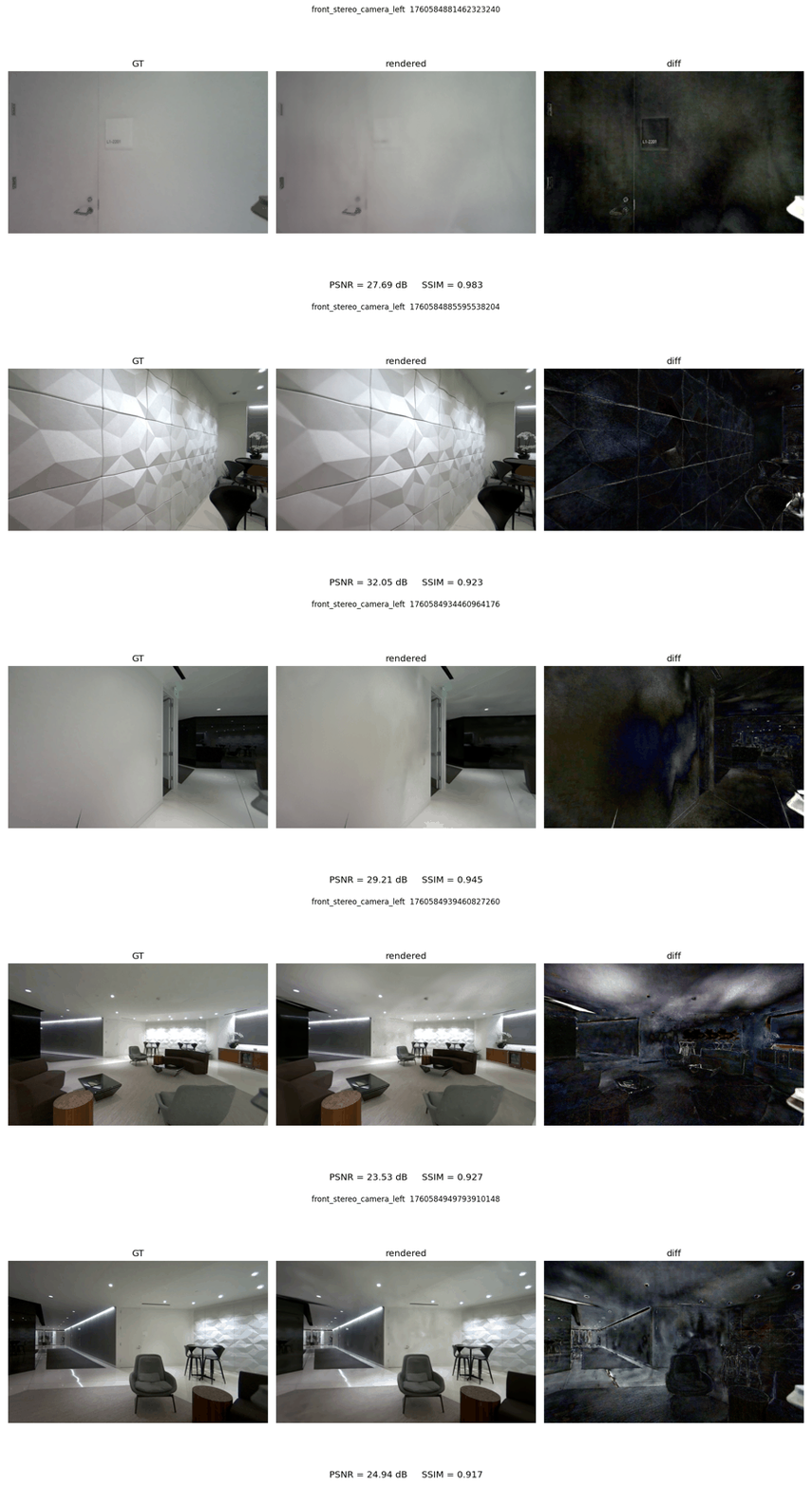
The GT tree must be organized by camera name:
gt_images/
  front_stereo_camera_left/
    1760584881462323240.png
    1760584885595538204.png
  front_stereo_camera_right/
    1760584881462323240.png
Each filename stem is a nanosecond timestamp, and each camera directory must match the camera/render-product name in the NuRec USD. Images may be .png, .jpg, or .jpeg. For each timestamp, the test finds the nearest authored sensor-rig keyframe within keyframe_tolerance_us, renders that keyframe, and compares the render to the GT image with the same camera and timestamp.
The camera poses used by this GT comparison are encoded in the NuRec USD’s sensor-rig keyframes. The stage time metadata maps USD time codes back to recording timestamps. If you need to render arbitrary external camera poses instead, use nurec_render.py poses with TUM files.
Run a one-off local GT tree without editing the config:
./python.sh source/standalone_examples/testing/nurec/test_nurec_render_vs_gt.py \
    --stage /path/to/scene.usdz \
    --gt-root /path/to/gt_images \
    --cameras front_stereo_camera_left \
    --num-samples 20 \
    --save-images --save-plots \
    --out-dir /tmp/nurec_eval
To add a reusable case, add an entry to source/standalone_examples/testing/nurec/config/nurec_eval_test.yaml:
cases:
  - name: my_scene
    stage: /abs/path/to/scene.usdz
    gt_root: /abs/path/to/gt_images
    cameras:
      - front_stereo_camera_left
    num_samples: 20
    output_parent_dir: ../_out/my_scene
    keyframe_tolerance_us: 1000
    thresholds:
      min_psnr: 25.0
      min_ssim: 0.90
Then run only that case:
./python.sh source/standalone_examples/testing/nurec/test_nurec_render_vs_gt.py \
    --config source/standalone_examples/testing/nurec/config/nurec_eval_test.yaml \
    --case my_scene --save-images --save-plots
Use an absolute local path or an omniverse:// URL for stage. gt_root may be an absolute local path, an omniverse:// URL, or a local path relative to the config file. output_parent_dir should be a local output directory, either absolute or relative to the config file. Set num_samples: null to render every GT image. Omit thresholds, or override them on the command line with --min-psnr / --min-ssim, when you want inspection without a fixed pass/fail gate.
Direct Isaac Sim Launch#
The provided nurec_render.py and test_nurec_render_vs_gt.py scripts launch with single-GPU rendering, enable the utility extension, enable omni.rtx.spg before rendering, and call the NuRec setup helper after opening the stage. When launching Isaac Sim directly, use one of the following commands. Use ./isaac-sim.sh instead of _build/linux-x86_64/release/isaac-sim.sh in a packaged Isaac Sim install.
SPG/PPISP particle or volume assets:
_build/linux-x86_64/release/isaac-sim.sh \
    --/renderer/multiGpu/enabled=false \
    --/rtx/spg/enabled=true \
    --/omni/rtx/nre/compositing/disableNuRecPostProcessings=true \
    --/rtx/rtpt/gaussian/skipTonemapping/enabled=false \
    --enable omni.rtx.spg
Plain particle-field / gaussian-splat assets:
_build/linux-x86_64/release/isaac-sim.sh \
    --/renderer/multiGpu/enabled=false \
    --/rtx/rtpt/gaussian/skipTonemapping/enabled=false
Plain NuRec volume assets:
_build/linux-x86_64/release/isaac-sim.sh \
    --/renderer/multiGpu/enabled=false \
    --/rtx/rtpt/gaussian/skipTonemapping/enabled=false